Photogala vs Google Photos Shared Albums: Which One Actually Works at Events?


Picture this: a Saturday evening, 140 guests at a wedding reception. The couple created a Google Photos shared album two weeks ago and sent the link in the group chat. By the end of the night, 23 people have added photos. The other 117? They either don't have a Google account, didn't see the message, forgot the link, or just couldn't be bothered to figure out the sharing flow mid-dance.
That's not a knock on Google Photos. It's a genuinely excellent photo storage app. But "excellent photo storage" and "excellent event photo collection" are two very different things. The gap between them is where most of your guests' photos disappear.
I tested both approaches for gathering event photos, and the differences are more fundamental than you'd expect. This isn't about which app has more features (Photogala wins that easily). It's about which approach actually gets photos from the people holding the phones.
The Core Problem: Getting People to Actually Share
Google Photos shared albums assume everyone already uses Google Photos. That's a big assumption. On Android, it's usually pre-installed. On iPhone, it's just another app most people never opened. And even among Android users, not everyone has it set up with their Google account logged in and ready to go.
According to a 2024 industry analysis, roughly 1.8 trillion photos are taken globally each year. The vast majority stay trapped on individual phones. The bottleneck isn't photography. It's sharing. And at events, that bottleneck gets worse because you're asking people to share in a specific place, during a specific window, while they're busy having fun.
Photogala takes a different approach. Guests scan a QR code (printed on table cards, projected on a screen, stuck to a sign near the bar) and land directly in a browser-based gallery. No app download. No Google account. No login. They pick a display name, tap upload, and they're done. The friction is so low that even the uncle who still uses a flip phone case can figure it out.

1.Scan, pick a name, upload. That's the entire guest experience.
What Google Photos Does Well (Honestly)
Before comparing, credit where it's due. Google Photos has real advantages:
It's free. Completely. You get 15 GB of Google storage shared across Gmail, Drive, and Photos. For a small dinner party where everyone already uses Android, that's hard to beat. If your event has 15 people who all have Google accounts, a shared album works fine.
Search is incredible. Google's photo search is arguably the best in the world. Type "beach sunset" and it finds every sunset photo you've ever taken. For personal photo management, nothing touches it.
It's already on people's phones. No new tool to learn. No new account to create (if they're already in the Google ecosystem). That familiarity matters.
But here's where event-specific needs diverge from personal photo management.
Where Shared Albums Break Down at Events
Google Photos shared albums were designed for sharing vacation photos with family after the trip. They weren't designed for 150 strangers at a wedding uploading simultaneously during a 6-hour reception. The friction points stack up:
- Account requirement. Every guest needs a Google account. No account, no upload. That eliminates a chunk of your guest list immediately, especially older relatives and iPhone users who never set up Google Photos.
- Link distribution. You need to get the album link to every guest. Group chat? Not everyone is in it. Email? Gets buried. QR code on a table card? Google Photos doesn't generate those. You're copying a URL and hoping people type it in.
- No real-time display. There's no photo wall feature. No way to project guest photos on a screen at the venue. Photos go into the album, and that's it.
- No moderation. Anyone with access can upload anything. No approval queue, no way to review before photos go public. At a corporate event, that's a liability concern.
- No engagement tools. No challenges, no leaderboard, no way to encourage participation beyond "please share your photos."
The result: at a typical event, maybe 15-20% of guests contribute to a Google Photos shared album. The rest mean to share their photos "later" and never do. A Fotify analysis of event photo platforms found that modern event-specific tools with QR code access consistently outperform generic cloud albums in guest participation rates.
Veja na prática
Todas as fotos dos convidados em um só álbum – sem app.
Feature-by-Feature Comparison
Here's the honest breakdown. Green checkmarks and red crosses, no spin.
Photogala vs Google Photos for Events
| Feature | Photogala | Google Photos |
|---|---|---|
| No app install needed | ||
| No account required for guests | ||
| QR code access | ||
| Unlimited photo uploads | within 15 GB storage | |
| Video uploads | ||
| Real-time photo wall / TV display | ||
| Photo challenges / games | ||
| Leaderboard & points | ||
| Content moderation | ||
| AI face recognition | Deluxe plan | built-in |
| NSFW content filter | AI-powered | |
| Comments & social features | basic | |
| Multiple gallery layouts | 4 layouts | |
| Custom branding | ||
| Photo search by content | ||
| Free tier | ||
| Works offline | with sync |
Two things stand out in that table. Google Photos wins on price (free) and content search (unmatched). Photogala wins on everything event-specific: access friction, engagement, display, moderation, and customization.
The Real Differentiator: What Happens During the Event
The comparison table tells part of the story. The more interesting part is what actually happens in the room.
Imagine a corporate team event for 60 people. With Google Photos, someone shares a link in Slack. A few people add photos during lunch. Most forget. Two weeks later, the album has 47 photos from 11 people. Fine, but forgettable.
Now imagine the same event with a QR code on every table. A TV screen near the buffet shows a live photo wall, cycling through uploads as they happen. There are photo challenges: "Best team selfie," "Most creative desk setup," "Catch someone mid-laugh." A leaderboard tracks who's uploaded the most. By the end of the day, you have 230 photos from 38 people, and the conversation at the after-party is about who's winning the photo challenge.
That's not a hypothetical stretch. Photo challenges and leaderboards tap into the same psychology that makes gamification effective in workplace settings. People participate more when there's a visible, low-stakes competition. Research from Gitnux found that challenge-based gamification improved participation by 89% compared to passive approaches.
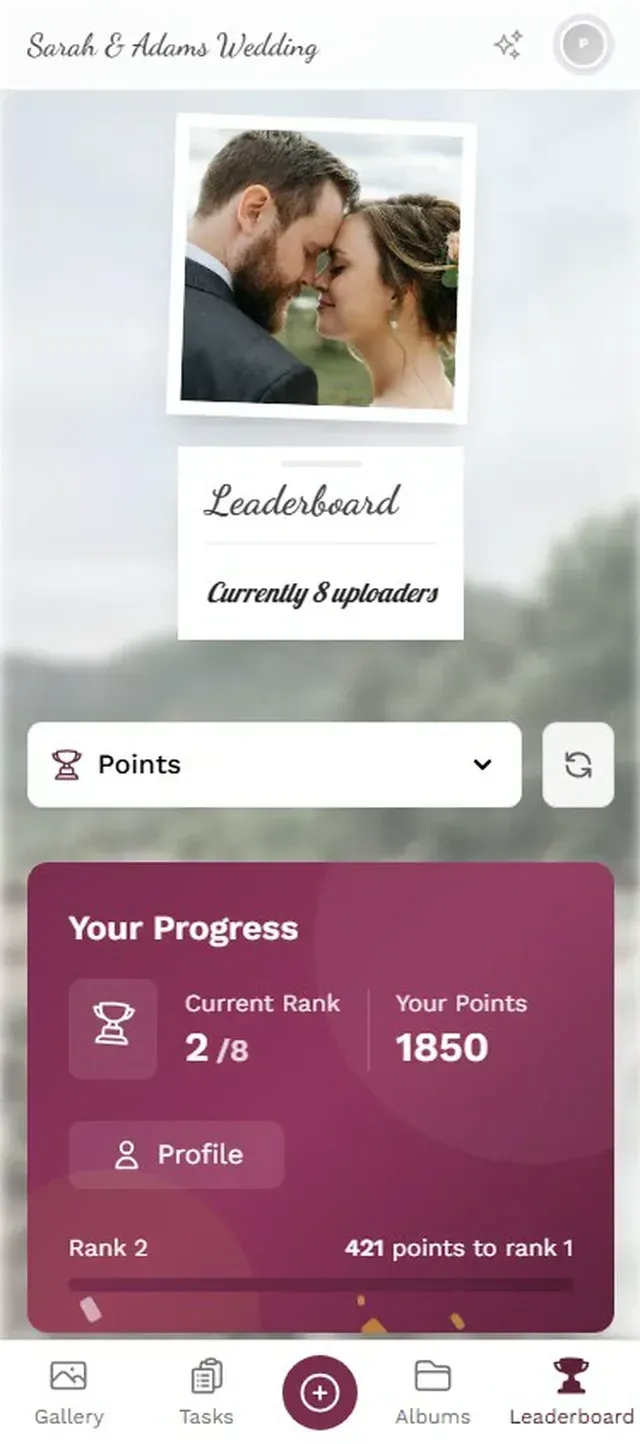
1.Guest photos cycle on screen in real time. The LIVE badge pulses.
The Honest Trade-offs
Photogala isn't perfect, and pretending otherwise would be dishonest.
It costs money. Google Photos is free. Photogala starts at €39 (one-time, not a subscription). For a casual birthday dinner with 10 close friends who all use Android, Google Photos is the better choice. Spending €39 on a tool for a 10-person dinner doesn't make sense.
It's browser-based, not a native app. That's a feature for guests (no download needed), but it means you don't get the deep OS integration Google Photos has. No automatic backup, no offline mode, no smart suggestions.
Google's AI search is better for finding specific photos. If you want to search "red dress" and find every photo of someone in a red dress, Google Photos wins. Photogala has AI face recognition (on the Deluxe plan), but not general content search.
When to stick with Google Photos: Small gatherings (under 20 people) where everyone has a Google account and you don't need a live display, moderation, or engagement features. It's genuinely the right tool for that scenario.
When Photogala Is the Clear Choice
The math changes once your event hits a certain size or complexity. Here's when a dedicated event photo platform pulls ahead:
Mixed device crowds. Any event where you can't guarantee every guest has a Google account. Weddings are the obvious one (guests spanning ages 8 to 85), but also corporate events with external attendees, community gatherings, or school reunions.
You want a photo wall. If there's a screen at the venue, a live photo wall transforms the energy. Guests see their photos appear seconds after uploading. It creates a feedback loop: people upload more because they see the results immediately. Google Photos has nothing like this.
Content control matters. Corporate events, school functions, any setting where an inappropriate upload would be a problem. Photogala's moderation queue lets you approve photos before they hit the gallery or the big screen. The AI NSFW filter catches obvious problems automatically.
You want more than a folder. If the goal is just collecting photos, Google Photos works. If the goal is creating an interactive experience where photo sharing becomes part of the entertainment, that requires challenges, a leaderboard, achievements, and real-time engagement features that Google never built (because that's not what Google Photos is for).
For more on how different sharing approaches compare beyond just Google, check out our tested comparison of 6 photo sharing methods.
Setup Comparison: How Fast Can You Get Going?
Setting Up Photogala (Under 5 Minutes)
Create your gallery
Pick your event type, add a name and cover image. Customize colors and branding if you want.
Get your QR code
Photogala generates a QR code instantly. Download it, print it on table cards, or display it on a screen.
Guests scan and upload
No app, no account. Guests open their phone camera, scan the code, and start uploading.
Google Photos setup is technically simple too (create album, share link), but the distribution problem is harder to solve. There's no QR code. You're relying on guests clicking a link from a message they may or may not see.
The Storage Question
Google gives you 15 GB free, shared across all Google services. That sounds generous until you realize your Gmail and Google Drive eat into the same quota. If your event generates 500 high-resolution photos and a few dozen videos, you could easily burn through several gigabytes.
Photogala stores everything at original quality with no compression. Storage lasts 6 months on Plus, 12 months on Premium and 24 months on Deluxe. After that, you download your ZIP archive and keep everything locally. Both approaches work, just differently.
The Verdict (Not What You'd Expect)
This isn't a "Photogala is better, period" conclusion. The right answer depends entirely on your event.
Use Google Photos if your event is small (under 20 people), everyone has Google accounts, you don't need a live display, and free matters more than features. A family barbecue? Google Photos. Sunday brunch with college friends? Google Photos.
Use Photogala the moment any of these are true: mixed device crowds, 30+ guests, you want a photo wall, you need moderation, or you want guests to actually enjoy the photo sharing process instead of treating it as homework.
The couple from that Saturday wedding? They switched to a QR code gallery for the evening reception. By midnight, they had 380 photos from 67 different guests. The Google Photos album from earlier in the day still sat at 23 contributions.
Sometimes the free option costs you the photos you'll never get back.
Tudo isso vem com o seu próprio evento.
Criar leva cinco minutos. Você pode configurar e ver tudo antes de decidir.
A partir de € 39 pagamento únicoPagamento único — sem assinatura
- Sem precisar de app
- Pronto em 5 minutos
- 30 dias de garantia de reembolso
“Uso o PhotoGala Deluxe e estou absolutamente encantada. Para documentar um evento esportivo, foi a solução perfeita. Enviar e baixar fotos pelo link é facílimo para todos os participantes. O que mais me convenceu foram o mural de fotos e a apresentação de slides: os dois são rápidos de configurar e ficam realmente profissionais. Um grande elogio também ao Peter, da equipe PhotoGala: ele é muito fácil de contatar por e-mail, responde rápido e até acolheu as minhas sugestões, integrando novos recursos que deixaram a minha apresentação ainda melhor. É raro encontrar um suporte tão dedicado. Recomendo sem hesitar, 5 estrelas!”
Escrito por

I believe event photos should be more than static galleries. They should be live, playful, and unforgettable.
Categorias
Artigos relacionados
Free vs Paid Event Photo Apps: What You Actually Give Up
Free event photo sharing sounds perfect until you see compressed images, upload limits, and zero engagement tools. Here's what the price tag really buys.
Why Event Photo Galleries Beat Group Chats for Sharing Memories
Group chats promise easy photo sharing but deliver chaos, compression, and silence after 48 hours. Dedicated photo galleries fix every one of those problems.
Photogala vs Eversnap: What Happens When Your Photo Sharing App Shuts Down
Eversnap shut down in June 2026. Here's what that means for your event photos, and how to pick a platform that won't disappear.