iCloud Shared Albums vs Event Photo Apps: What Nobody Tells You About the Limits


Picture this: your friend's wedding is in two weeks. Someone in the group chat suggests setting up an iCloud Shared Album so everyone can dump their photos in one place. Simple. Free. Already on every iPhone. Problem solved, right?
Not quite. A Boho Weddings case study documented what actually happened at a 90-guest wedding: the bride ended up with roughly 40 photos. Forty. From ninety people with smartphones. Guests took incredible shots (the dog in the processional, candid ceremony tears, getting-ready chaos) and then those photos just... stayed on their phones.
iCloud Shared Albums didn't fail because they're bad. They failed because they weren't built for events. And that distinction matters more than most people realize.
What iCloud Shared Albums Actually Are (and Aren't)
Apple currently offers two sharing options, and the naming is confusing enough that even Apple users mix them up. As AppleInsider explains, iCloud Shared Photo Library and Shared Albums are entirely separate features with different rules.
Shared Albums are the older feature. You create an album, invite people via their Apple ID or a public link, and contributors add photos. It works. But the limits are rigid:
- 5,000 photos per album. Sounds generous until a 150-guest wedding generates 800+ photos in six hours. You won't hit this cap at most events, but multi-day festivals or conferences can.
- 100 invitees maximum. Enough for a small wedding, not enough for a corporate event with 200 attendees.
- Photos are compressed. Apple downsizes shared album photos. You're not getting the original 48MP file your iPhone 15 Pro captured.
- Requires an Apple ID to contribute. No Apple ID, no uploads. Every Android user at your event is locked out entirely.
- No video over 15 minutes. Long toasts, dance floor compilations, ceremony recordings: truncated or rejected.
The newer Shared Photo Library solves some of these problems (original quality, automatic sharing based on proximity) but introduces others. It's limited to 6 people total. Six. That's a family feature, not an event feature.
The Android Problem Nobody Mentions
Here's the uncomfortable truth about iCloud sharing at events: it assumes everyone owns an iPhone.
In the US, iPhones hold roughly 57% market share. In Germany, it's closer to 35%. At any event with 100+ guests, you're looking at 35-65 people who simply cannot contribute to your iCloud album. They can view a public link, maybe. But uploading? Not without workarounds that nobody at a wedding reception is going to bother with.
One Apple Discussions thread captures this perfectly: a bride-to-be asking how to get wedding guests to upload to iCloud. The top suggestions? Create a shared folder with a link (which still requires iCloud), set up a forwarding email address (which guests won't use), or just use a dedicated app. The community essentially said: iCloud wasn't designed for this.
If even 30% of your guests use Android, an iCloud-only approach means losing a third of your event's photo coverage. That's not a minor inconvenience. That's entire tables, friend groups, and moments that disappear.
What Dedicated Event Photo Apps Get Right
The core idea behind apps built specifically for event photo sharing is simple: remove every barrier between a guest's phone and a shared gallery. No accounts, no app installs, no platform requirements.
The way this typically works: you create a gallery, get a QR code, print it on table cards or display it on a screen. A guest scans it with their phone camera (iPhone or Android, doesn't matter), a browser page opens, and they upload. Done. The EventsAlbum blog calls this the shift from "photographer's perspective" to "attendee's perspective," and it's a meaningful distinction. Guests capture angles and moments a pro photographer physically can't be in two places to get.
As GuestLense's guide puts it: the challenge isn't getting guests to take photos. They're already doing that. The challenge is collecting those photos without chasing people down for weeks afterward.

1.No app download. Guests scan, pick photos, upload.
See it in action
Every guest photo in one album – no app.
The Comparison That Actually Matters
Forget feature lists for a moment. The real question is: what happens at your event when someone pulls out their phone and wants to share a photo? How many steps, how many barriers, how many guests give up before they finish?
Here's how iCloud Shared Albums stack up against a dedicated event photo platform like Photogala:
iCloud Shared Albums vs. Photogala
| Feature | Photogala | iCloud Shared Albums |
|---|---|---|
| Works on Android + iPhone | iPhone only | |
| App install required | browser-based | but needs Apple ID |
| Original photo quality | compressed | |
| Guest limit | 75 to 500 uploaders | max 100 invitees |
| Video support | unlimited length | 15 min max |
| Live photo wall on TV | ||
| Photo challenges / games | ||
| Content moderation | ||
| Face recognition (AI) | Deluxe plan | |
| One-time cost | from €39 | free |
The free price tag on iCloud is genuinely appealing. No argument there. If your event is small (under 30 people), everyone has an iPhone, and you don't care about original quality, iCloud works fine. That's an honest assessment.
But the moment you cross into larger events, mixed device groups, or any situation where you want guests to actually engage (not just passively upload), the limitations compound fast.
Where iCloud Actually Wins
Fairness matters here. iCloud Shared Albums have genuine advantages:
It's already there. No setup, no purchase, no decision fatigue. If your guests all use iPhones and you just want a low-effort dump of casual photos, it's hard to beat "free and already installed." For a small family dinner or a trip with five close friends, it's perfect.
Apple's ecosystem integration is excellent. Photos sync across devices automatically. The editing tools are solid. If you're deep in the Apple ecosystem, shared albums feel natural because they're woven into the Photos app you already use daily.
No learning curve for iPhone users. Everyone knows how to share to an album. There's no QR code to scan, no new interface to figure out. For tech-averse family members with iPhones, this matters.
Where the Cracks Show
Say you're planning a 150-guest wedding. You set up a Shared Album and text the link to the bridal party, who forward it to their tables. Here's what typically happens:
The iPhone users who check their phones during cocktail hour add some photos. Great. The Android users tap the link, hit a wall, and move on. The older relatives never open the link at all. By the end of the night, you've collected photos from maybe 15-20 of your most tech-savvy iPhone-owning guests. Everyone else's photos live permanently in their camera rolls.
Now imagine the same wedding with a QR code on every table. A guest picks up their phone, points the camera at the code, and a browser gallery opens. They select five photos and hit upload. No account, no app, no Apple ID. The 62-year-old uncle with an Android does it. The cousin with the cracked-screen iPhone 11 does it. The barrier is so low that even people who "never share photos" end up contributing.
That's the real difference. Not features on a spec sheet, but participation rate at an actual event.
Participation is everything. A gallery with 400 photos from 60 contributors tells a richer story than one with 80 photos from 12 people. The goal isn't perfect photos. It's coverage: the moments between the moments.
The Hidden Engagement Layer
Here's something iCloud can't do at all: make photo sharing fun.
Photo challenges turn passive uploading into a game. Instead of "please share your photos," guests get prompts: "Capture someone on the dance floor who clearly thinks nobody is watching." "Find the oldest person at this event and take a selfie with them." "Photograph your dessert before it's gone."
With Photogala, these challenges can include example preview photos, so guests see exactly what kind of shot you're looking for. Think photo roulette: guests get a random reference image and try to recreate it. A meme pose. A famous movie scene. The results are usually hilarious, and suddenly you have 200 photos where you'd normally have 30.
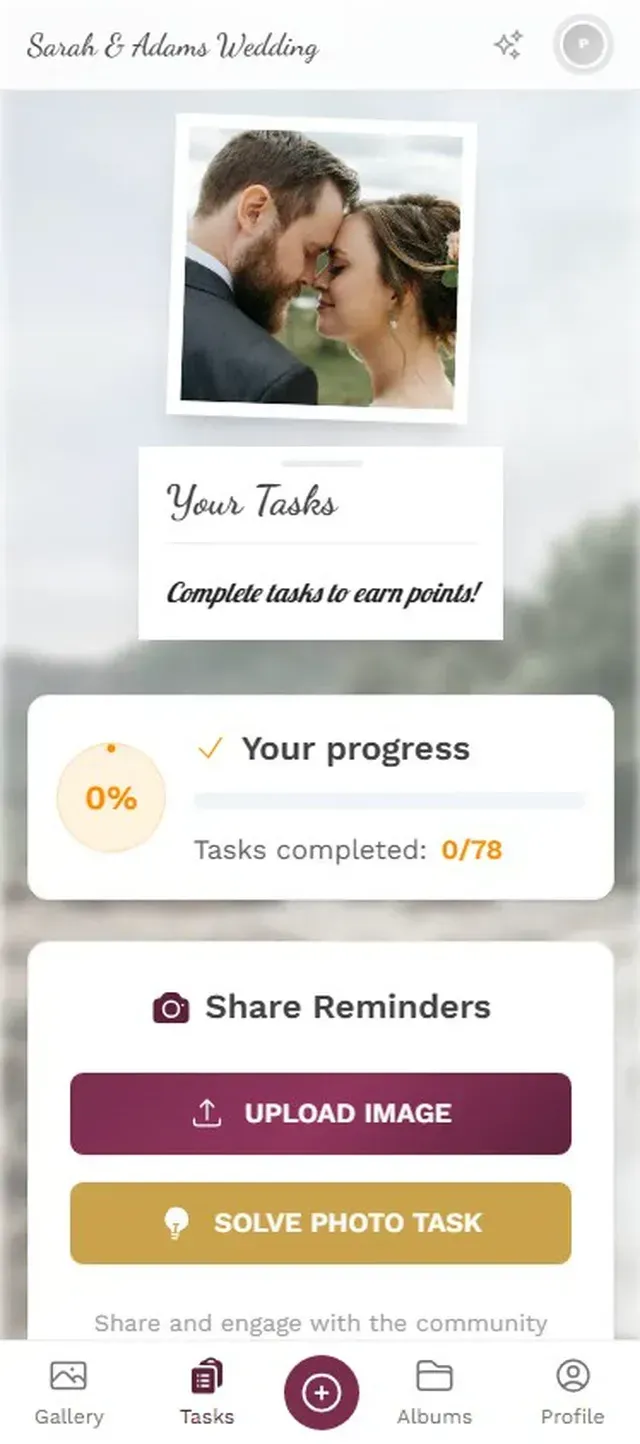
1.Guests browse themed challenges during the event.
Add a leaderboard, and something shifts. Guests start checking their ranking. The competitive ones upload more. The shy ones see everyone else participating and join in. It's not a gimmick. It's basic behavioral psychology applied to event photography.
What About Google Photos?
Google Photos shared albums solve the Android problem, and they're free. But they introduce their own friction: every contributor needs a Google account. At events, that means some guests need to sign in, others need to create an account, and the grandmother who uses a Samsung but has never set up Google services is back to square one.
We wrote a detailed comparison of Photogala vs Google Photos that goes deeper on this. The short version: Google Photos is a great personal photo tool repurposed for events. Dedicated event apps are purpose-built for the problem.
So Which Should You Use?
Honestly, it depends on three things:
- How many guests? Under 20, all iPhones? iCloud is fine. Over 50, mixed devices? You need something cross-platform.
- Do you care about original quality? If these photos will end up in a printed album or displayed on a big screen, compression matters. iCloud Shared Albums compress. Most dedicated apps don't.
- Do you want participation or just collection? If you're happy with whatever guests happen to upload, iCloud works. If you want to actively drive engagement (challenges, leaderboards, a live wall), you need a platform built for that.
For small, casual, iPhone-only groups: iCloud. For anything bigger or more intentional: a dedicated event photo app will collect more photos, from more guests, with less friction. And if you want the photos to be more than just a folder of random shots, gamification features turn the whole thing into part of the event itself.
The bride from that Boho Weddings case study got 40 photos from 90 guests. Imagine what she'd have gotten if every table had a QR code and a challenge card saying "capture the best dance move of the night."
All of this comes with your own event.
Setting it up takes five minutes. You can build and view everything before you decide.
Starting from €39 one-timeOne-time payment — No subscription
- No App Required
- Setup in 5 Minutes
- 30-Day Money Back
“I use PhotoGala Deluxe and I'm absolutely thrilled. It was the perfect solution for documenting a sports event. Uploading and downloading via the link is a breeze for every participant. What won me over most were the photo wall and the slideshow – both are quick to set up and look really professional. Big praise also to Peter from the PhotoGala team: he's very easy to reach by email, replies quickly and even took my suggestions on board and added new features that made my slideshow even better. You rarely get support this dedicated. A clear 5-star recommendation!”
Written by

I believe event photos should be more than static galleries. They should be live, playful, and unforgettable.
Categories
Related Posts

Bridal Shower Photo Sharing: Collect Every Sweet Moment in One Gallery
Bridal shower photos end up scattered across 15 phones. Here's how to get them all into one gallery before the mimosas wear off.

Maternity Photo Sharing: How to Keep Every Announcement, Bump Shot, and Memory in One Place
Pregnancy announcements land on 4 different apps. Maternity photos get lost in group chats. Here's how to keep every photo in one shared gallery your whole family can access.

Sales Kickoff Photo Sharing: How to Turn a Mandatory Meeting Into a Team Memory
Sales kickoffs are expensive. The photos from them usually disappear into 14 different camera rolls. Here's how to fix that.