Birthday Party Photos That Don't Suck: A Realistic Guide


The birthday cake photo is the easy one. Someone pulls out a phone, the candles get blown out, three people take the same shot from slightly different angles, and that's that. The cake is documented.
But what about the other five hours of the party? The moment your friend's face lit up opening that ridiculous gift. The kids covered in frosting. Your dad doing whatever your dad does at parties (probably standing near the grill, beer in hand, talking to exactly one person). Those photos exist on 15 different phones, and roughly zero of them will ever be shared.
This guide is about two things: taking birthday party photos that are actually worth keeping, and making sure they don't vanish into individual camera rolls. Because the best birthday photo you'll ever see might be on your cousin's phone right now, and you'll never know it exists.
Forget the Shot List Mentality
Most photography advice for birthday parties reads like a wedding checklist. "Capture the decorations. Get a group shot. Photograph the cake." Sure, fine. But birthdays aren't weddings. Nobody hired a coordinator. There's no schedule pinned to the wall. Things just... happen.
The best birthday photos come from embracing that chaos. Light Stalking's guide to party photography makes a great point: birthday parties are hard to photograph precisely because they're unpredictable. People move, lighting changes, kids sprint through frame. That's not a bug. That's where the good stuff lives.
So instead of a shot list, think about moments worth watching for. Three categories cover almost everything:
- Reactions. The face when someone opens a gift, sees the cake, or hears everyone sing. You can't pose these. You have to be ready.
- Between-moments. The quiet ones. Two people laughing in a corner. A kid sneaking a cupcake. Someone asleep on the couch at 11 PM. These are the photos people actually share years later.
- The scene itself. Not the decorations in isolation (boring), but the room with people in it. The table after everyone's eaten. The aftermath. Context makes photos interesting.
7 Birthday Photo Ideas That Go Beyond "Say Cheese"
A posed group photo has its place. One per party is fine. Seven is a hostage situation. Here are ideas that produce better photos with less effort.
1. The Arrival Shot
Stand near the door. When someone walks in and sees the birthday person, that first hug or expression is pure gold. You get maybe two seconds. Use burst mode.
2. The Gift Reaction Series
Don't photograph the gift. Photograph the person opening it. Shoot three quick frames: the rip, the reveal, the reaction. Expert Photography recommends thinking in sequences, not single shots. A three-photo series of someone unwrapping a present tells a story that one image can't.
3. The Over-the-Shoulder
Stand behind someone looking at their phone screen showing photos from the party. It's a photo-within-a-photo and it adds a layer of depth that feels surprisingly intimate. Works especially well later in the evening when people are already scrolling through what they've taken.
4. Detail Shots With People
A photo of a balloon arch? Skip it. A photo of a kid reaching for a balloon with frosting-covered fingers? That's a keeper. Classpop's roundup of birthday photo ideas lists 27 concepts, but the ones that work best all share a trait: they include human interaction, not just objects.
5. The Dance Floor (Even If It's a Living Room)
Every party has a moment where someone starts dancing. It doesn't matter if it's a dedicated dance floor or just the kitchen after the third drink. Low angle, fast shutter speed, let the motion blur happen naturally.
6. Candlelight Portraits
The 30 seconds when the candles are lit but not yet blown out create the best natural lighting you'll get all night. Warm, directional, dramatic. Point your phone at the birthday person's face (not the cake) during this window. The cake is secondary. Their expression in candlelight is the shot.
7. The Aftermath
Empty plates, confetti on the floor, someone's jacket draped over a chair. The party is over and the room tells the whole story. These photos feel nostalgic the moment you take them.
Lighting shortcut: Edinburgh Studios' photography guide breaks down ISO, aperture, and shutter speed for party settings. The quick version: if you're shooting on a phone, stay near windows during the day and near lamps at night. Avoid flash. It kills the mood in the photo and at the actual party.
The Real Problem: 15 Phones, Zero Shared Photos
Here's the thing about birthday party photos. The ideas above work. Your guests will take great shots throughout the night. Some of them will be genuinely wonderful.
And then Monday comes. Nobody sends anything. That cousin who got the perfect candlelight portrait? Already buried under 200 newer photos in her camera roll. The funny video of your friend's toast? Still on his phone, unshared, slowly scrolling further from the top.
You could create a WhatsApp group. "Share your photos here!" You'll get 8 photos from 3 people. Then the group goes silent forever. You could try a shared iCloud album, but half the guests are on Android. Google Photos shared albums work better, but require a Google account and most people will forget the link exists by Tuesday.
The fundamental problem isn't motivation. People want to share. They just won't go through multiple steps to do it after the party ends. The sharing has to happen during the event, when the energy is there.
Collecting Photos While the Party's Still Going
This is where QR code galleries change the equation. Instead of sending links after the event, you put a QR code on the table (or tape it to a wall, or prop it on the bar). Guests scan it, open a gallery in their browser, and upload directly. No app install. No account creation. No "I'll send it later."
Picture a 30th birthday party. 25 guests. A printed QR code sitting next to the napkins. By the time the cake comes out, 14 people have already uploaded something. Not because you asked them to, but because someone scanned it out of curiosity and the rest followed. That's how it works in practice: one person breaks the ice, and social proof does the rest.

1.One scan, straight to the gallery. No app needed.
With Photogala, you set up a gallery in about two minutes, get a QR code, and that's your entire setup. Guests upload from their phone browser. Photos show up instantly in the shared gallery. If you connect a TV or monitor, you get a live photo wall that updates in real time, which honestly becomes its own form of entertainment at a party.
See it in action
Every birthday photo in one album – no app.
Photo Challenges: Turning Guests Into Photographers
Here's an idea that works surprisingly well at birthday parties: photo challenges.
Instead of hoping guests take interesting photos on their own, give them specific prompts. "Take a photo with the birthday person." "Capture someone dancing." "Find the weirdest decoration and photograph it." These aren't complicated. But they work because they give people a reason to look for moments they'd otherwise walk past.
What makes this genuinely fun (and not just a gimmick) is when challenges include example preview photos. Imagine a challenge card that says "Recreate this pose" with a reference photo of a ridiculous movie scene. Or a "Photo Roulette" where each guest gets a random example photo and has to mimic it. The results are reliably hilarious, especially after the second round of drinks.
Photogala lets you create unlimited photo challenges with example photos, and guests can complete them directly from their phones. You can even print individual challenge QR codes on table cards, so each table gets a different prompt. Add a points system and leaderboard (available on Premium), and suddenly your uncle is uploading his 12th photo because he refuses to let your college roommate beat him.
For more inspiration on challenge-based photo activities, we put together a detailed list of photo scavenger hunt ideas that work at any event.
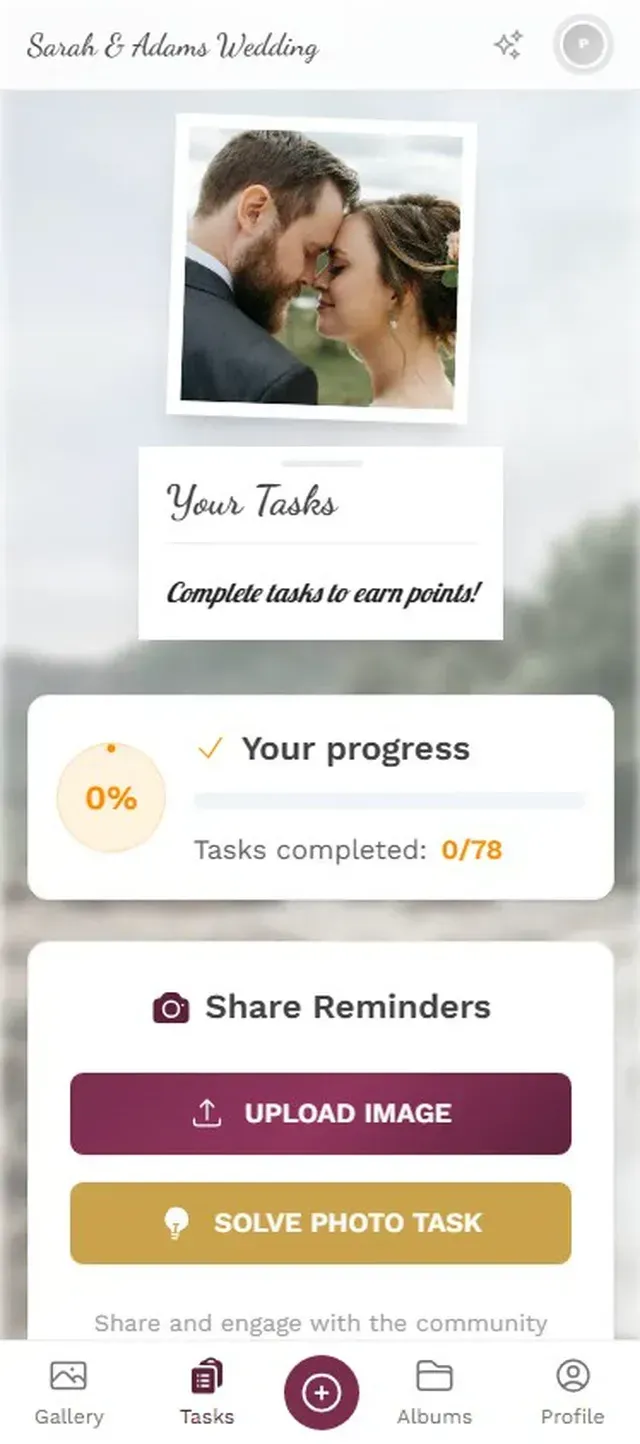
1.Guests pick challenges and complete them from their phone.
What About Hiring a Photographer?
For milestone birthdays (30th, 50th, surprise parties), a professional photographer can be worth it. FilmFolk charges around £99/hour for birthday coverage in the UK, and rates are similar across most markets.
But here's what a photographer can't do: be everywhere at once. They'll get beautiful posed shots and some candid moments, but they'll miss the selfie your friends took in the bathroom mirror, the blurry video of the toast, the sneaky photo someone took of the cake before it was ready. Those moments belong to the guests.
The best approach for a bigger birthday isn't photographer or guest photos. It's both. Let the professional handle the formal shots and key moments. Let the guests handle everything else via a shared gallery. You'll end up with 40 polished photos from the photographer and 80-120 chaotic, wonderful photos from everyone else. That combination tells the real story of the night.
One honest limitation: Photogala is browser-based, not a native app. For 95% of guests, that's actually an advantage since there's nothing to download. But the upload interface won't feel quite as polished as a dedicated camera app. It's a trade-off: universal access vs. native app experience.
Making It All Come Together
A birthday party gallery doesn't need to be complicated. The simpler you make it, the more people will actually use it. Here's the setup that works:
Setup in 3 Steps
Create your gallery beforehand
Set the event name, pick a cover image, and customize the QR code design. Takes about 2 minutes.
Print and place QR codes
Print a few copies and put them where people will see them: next to the food, on the bar, by the entrance. Table cards work great too.
Let it run
Photos stream into the gallery as guests upload. Connect a TV for a live photo wall if you want the full effect.
After the party, you can bulk-download everything as a ZIP file. Some people turn their favorites into a photo book (both Tom's Guide and Wirecutter have solid comparisons of photo book services if you want to go that route).
The photos that matter most at a birthday party aren't the ones you planned. They're the ones that happened while nobody was posing. Give your guests an easy way to share those moments, and you'll look back on the party the way it actually felt: messy, loud, and full of people you love.
All of this comes with your own event.
Setting it up takes five minutes. You can build and view everything before you decide.
Starting from €39 one-timeOne-time payment — No subscription
- No App Required
- Setup in 5 Minutes
- 30-Day Money Back
“Excellent service and great pictures! Photogala fully met our expectations at the event. The value for money is unbeatable. Absolutely recommended! The seating plan saved us a lot of hassle!”
Written by

I believe event photos should be more than static galleries. They should be live, playful, and unforgettable.
Categories
Related Posts

Bridal Shower Photo Sharing: Collect Every Sweet Moment in One Gallery
Bridal shower photos end up scattered across 15 phones. Here's how to get them all into one gallery before the mimosas wear off.

Maternity Photo Sharing: How to Keep Every Announcement, Bump Shot, and Memory in One Place
Pregnancy announcements land on 4 different apps. Maternity photos get lost in group chats. Here's how to keep every photo in one shared gallery your whole family can access.

Sales Kickoff Photo Sharing: How to Turn a Mandatory Meeting Into a Team Memory
Sales kickoffs are expensive. The photos from them usually disappear into 14 different camera rolls. Here's how to fix that.