Photo Gallery Website Templates Are Solving the Wrong Problem


Here's a scene you might recognize. You've got 400 photos from a wedding, a company retreat, or a family reunion. You want them online, in a beautiful gallery, shareable with everyone who was there. So you Google "photo gallery website template" and find yourself staring at 50+ options, each one shinier than the last.
Three hours later, you're knee-deep in a Squarespace trial, wondering why the grid layout crops your vertical shots and whether the free plan watermarks downloads.
The template rabbit hole is real. And most of the time, it's the wrong rabbit hole entirely.
The Two Completely Different Problems
When someone searches for a photo gallery template, they usually want one of two things. The first: a permanent portfolio or photography website. A place to showcase work, attract clients, maybe sell prints. The second: a way to share event photos with a specific group of people who were actually there.
These are fundamentally different problems. A portfolio template needs to look polished, load fast, and rank on Google. An event gallery needs people to upload photos, not just look at them. It needs to work on grandma's Android phone. It needs to be set up in minutes, not days.
Most template roundups lump both use cases together. That's why you end up with a gorgeous Webflow portfolio when what you actually needed was a shared album with a QR code.
When a Template Actually Makes Sense
Templates are the right call for photographers and creatives building a lasting online presence. If you're showcasing a portfolio, selling prints, or running a photography business, a well-built template on WordPress, Squarespace, or Webflow gives you exactly what you need: clean layouts, SEO control, and customization.
Colorlib's roundup of 52 gallery templates gives a good overview of what's available for free. Most use drag-and-drop editors, so you don't need to write code. SiteBuilderReport covers 30+ options across Squarespace, Wix, Webflow, and WordPress, updated as of January 2026.
For portfolio use, the Beaumont template on Squarespace is genuinely well-designed: two-column layout, large thumbnails, minimal chrome. If you're a photographer building a client-facing site, that's your world. Spend the weekend, get it right, and it'll serve you for years.
If you're building a photography portfolio, look for templates with lazy loading, responsive image sizing, and built-in SEO fields. Page speed matters more than fancy animations for Google rankings.
But here's where the template path breaks down.
The Event Photo Problem Templates Can't Solve
Say you just hosted a 150-person wedding. The photographer delivered 300 polished shots. Beautiful. But the guests? They took another 600 photos on their phones. Candid moments the photographer missed. The dance floor at midnight. The flower girl asleep under a table.
Those 600 photos are scattered across 80 different camera rolls right now. A Wedibox guide on collecting wedding photos lists six methods people try, from shared iCloud albums to disposable cameras. The common thread: every method requires guests to actively do something after the event, and most of them won't.
A static gallery template doesn't help here. You can't ask 150 guests to email you photos so you can manually upload them to your Squarespace site. You need something where guests upload directly, from their phones, ideally while they're still at the event and excited about it.
This is where the "template" search query leads people astray. The solution isn't a template. It's a tool.
What an Event Photo Gallery Actually Needs
After looking at what works for event photo collection (not just display), the requirements are surprisingly specific:
- Zero friction upload. No app download. No account creation. Scan a QR code, open the browser, tap upload. If it takes more than 30 seconds, half your guests won't bother.
- Real-time display. Photos should appear in the gallery immediately, not after someone manually approves a batch upload at 2 AM.
- Works on every phone. Your 62-year-old uncle's four-year-old Samsung needs to work just as well as a new iPhone.
- Some form of moderation. At any event with alcohol, someone will upload something questionable. You need a way to catch it before it hits the big screen.
- Bulk download afterward. Guests want their photos. You want all the photos. Everyone needs an easy way to grab the full set.
Notice what's missing from that list? Custom CSS. SEO optimization. Domain mapping. E-commerce. All the things templates are built for.

1.No app install. Guests scan, tap, and upload in seconds.
Template vs. Dedicated Tool: An Honest Comparison
This isn't a contest where one option is always better. It depends entirely on what you're doing.
Photo Gallery Template vs. Event Photo Tool
| Capability | Website Template | Event Photo Tool |
|---|---|---|
| Setup time | 2-8 hours (customization) | 5-10 minutes |
| Guest uploads | ||
| QR code access | ||
| Real-time display | ||
| Content moderation | ||
| Works without app install | ||
| SEO & Google ranking | ||
| Custom domain | ||
| E-commerce / print sales | ||
| Portfolio showcase | ||
| Cost | $0-16/month (ongoing) | One-time fee |
| Best for | Photographers, portfolios | Events, group sharing |
If you're a wedding photographer showcasing your work, the template column wins. If you're the couple trying to collect every guest's photos from the reception, the right column wins. Different problems, different tools.
See it in action
Every guest photo in one album – no app.
What Photogala Does Differently
Most event photo sharing tools handle the basics: QR code, upload, shared album. GuestCam, for instance, works in 100+ countries and lets guests upload to a private album via QR code. It's straightforward and does the job.
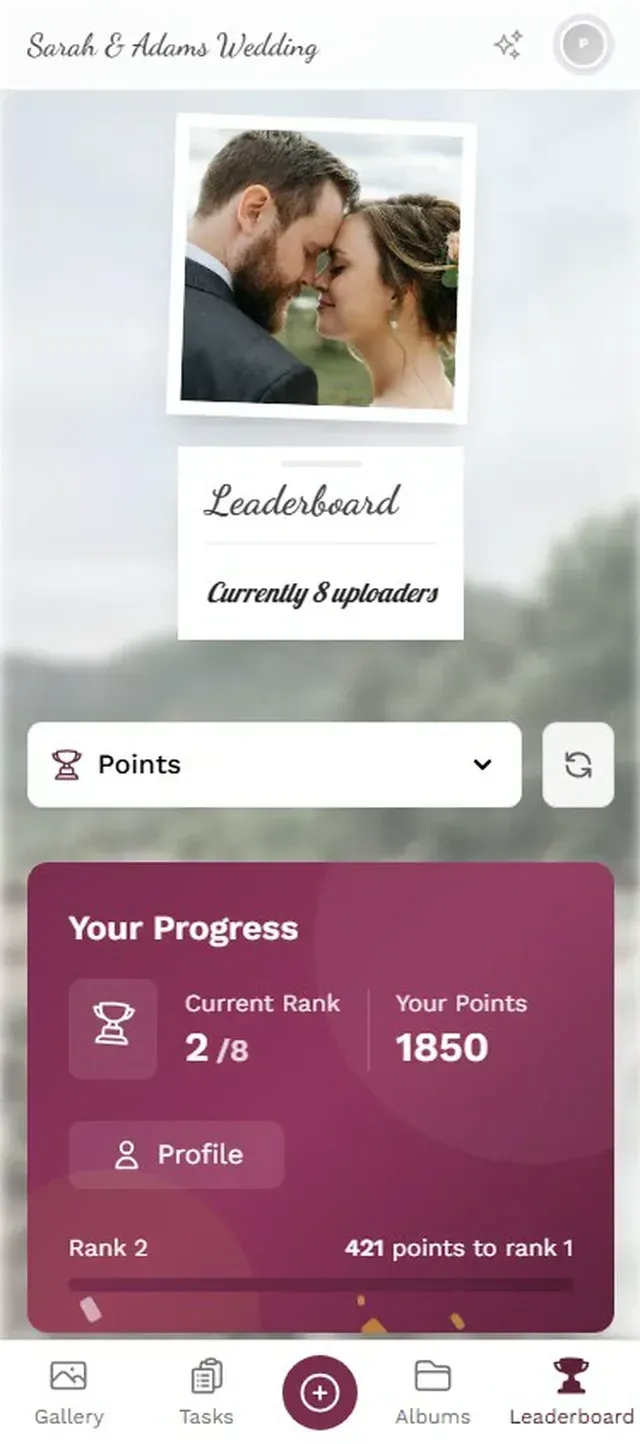
Where Photogala goes further is in what happens after the photo lands in the gallery. There's a gamification layer that most platforms skip entirely: photo challenges (with example preview photos guests try to recreate), a leaderboard tracking who's uploaded the most, achievements guests can unlock, and even real-world rewards you can set up for the event.
Picture a wedding where the challenge card on each table says "Recreate this movie poster pose." The example photo shows the reference. Guests compete, laugh, and the gallery fills up with photos that are actually interesting, not just 50 slightly different angles of the cake.
There's also a moderation dashboard with AI-powered NSFW filtering (important for any event where the bar is open), face recognition that auto-groups photos by person, and four distinct gallery layouts. The browser-based approach means no app install for guests.
The honest trade-off: Photogala isn't free. The Plus plan costs €39 as a one-time fee, which is more than a free Squarespace trial. But it's also not a monthly subscription you forget to cancel, and it includes unlimited photo uploads on every plan.
1.Photo challenges give guests creative prompts to fill the gallery.
The "I'll Just Use Google Photos" Trap
Someone always suggests a shared Google Photos album. It's free, it works, and everyone already has it. Except half the guests don't have Google accounts. Or they have one but can't remember the password. Or they're on iPhone and have never opened Google Photos in their lives.
Shared albums also have a contributor limit (up to 20,000 items, but only 200 contributors on a shared album). For a big wedding or corporate event, that's a real constraint. And there's no moderation: once someone has the link, anything they upload is visible to everyone immediately.
iCloud Shared Albums have similar friction. They require Apple devices or iCloud accounts. Great if your entire guest list uses iPhones. Unrealistic for most events.
The QR-code-to-browser approach sidesteps all of this. No account, no app, no ecosystem lock-in. The person with a five-year-old Android phone and the person with the latest iPhone both scan the same code and upload the same way.
A Practical Decision Framework
Before you spend another hour browsing templates, answer one question: who is putting photos into this gallery?
If the answer is "just me" or "my team of photographers," a template is the right tool. Pick one from the roundups linked above, customize it, and move on.
If the answer is "50 to 500 people who were at an event," you need something built for group collection. A template will give you a beautiful empty gallery. An event photo tool will fill it.
For photographers who also shoot events: you might need both. A portfolio template for your website, and an event photo tool for each wedding or corporate gig. They solve different halves of the same business. If you're looking for tips on sharing event photos with clients specifically, this guide on uploading photos for clients covers the options in detail.
What About Free Templates?
Free gallery templates exist in abundance. Colorlib lists 52 of them. They're genuinely useful for getting a basic portfolio online without spending money.
The catch is always the same: limited customization, occasional branding from the template provider, and no support when something breaks. For a personal project or a simple portfolio, that's fine. For a professional photography business, the $12-16/month for Squarespace or WordPress hosting pays for itself in credibility.
For event photo sharing, "free" usually means iCloud or Google Photos shared albums, with all the friction described above. ReplayMyDay offers a digital guestbook approach with setup under 30 seconds, though it's more focused on the guestbook side than full gallery features.
The real question isn't whether the template is free. It's whether you're spending 6 hours customizing something that still won't do what you need.
Setting Up an Event Gallery in Under 10 Minutes
If you've decided a template isn't the right fit and you need guests to actively contribute photos, here's what the setup actually looks like:
From zero to live gallery
Create your event gallery
Pick your event type, add a name and cover image. Customize colors and branding if you want, or skip it. Takes about 2 minutes.
Set up photo challenges (optional)
Add prompts like "Best dance move" or "Find the bride's shoes." Import from templates or create your own. Each challenge gets its own QR code you can print on table cards.
Share the QR code
Print it on table cards, project it on screen, or send the link via message. Guests scan and start uploading immediately. No app, no account.
Watch the gallery fill up
Photos appear in real time. Enable the photo wall for a big screen at the venue. Use moderation to review uploads before they go public.
The whole setup takes less time than browsing the first page of template results on Google. And the gallery is already collecting photos while you'd still be adjusting column widths in a template editor.
The next time someone sends you a template roundup with 50 options, ask yourself: do I need a gallery people look at, or a gallery people contribute to? The answer saves you a weekend.
All of this comes with your own event.
Setting it up takes five minutes. You can build and view everything before you decide.
Starting from €39 one-timeOne-time payment — No subscription
- No App Required
- Setup in 5 Minutes
- 30-Day Money Back
“We were really thrilled, and everything went so much more smoothly, from the seating plan all the way to the photo games! Simply great! Highly recommended!”
Written by

I believe event photos should be more than static galleries. They should be live, playful, and unforgettable.
Categories
Related Posts

Company Retreat Photo Sharing: How to Actually Keep the Memories
Most offsite photos die on individual phones. Here's how to collect, share, and actually use every photo from your next company retreat.

Neighborhood Block Party Photo Sharing: How to Turn 40 Strangers Into One Shared Album
Block parties create great photos — and zero way to share them. Here's how a QR code gallery turns your street into a connected community.

75, 250, or 500 Uploaders: How to Size Your Event Photo Gallery
Not every event needs 500 uploader slots. Here's how to figure out which tier actually matches your guest count, event type, and budget.