Conference Photography No One Sees: How to Actually Get Event Photos to Attendees

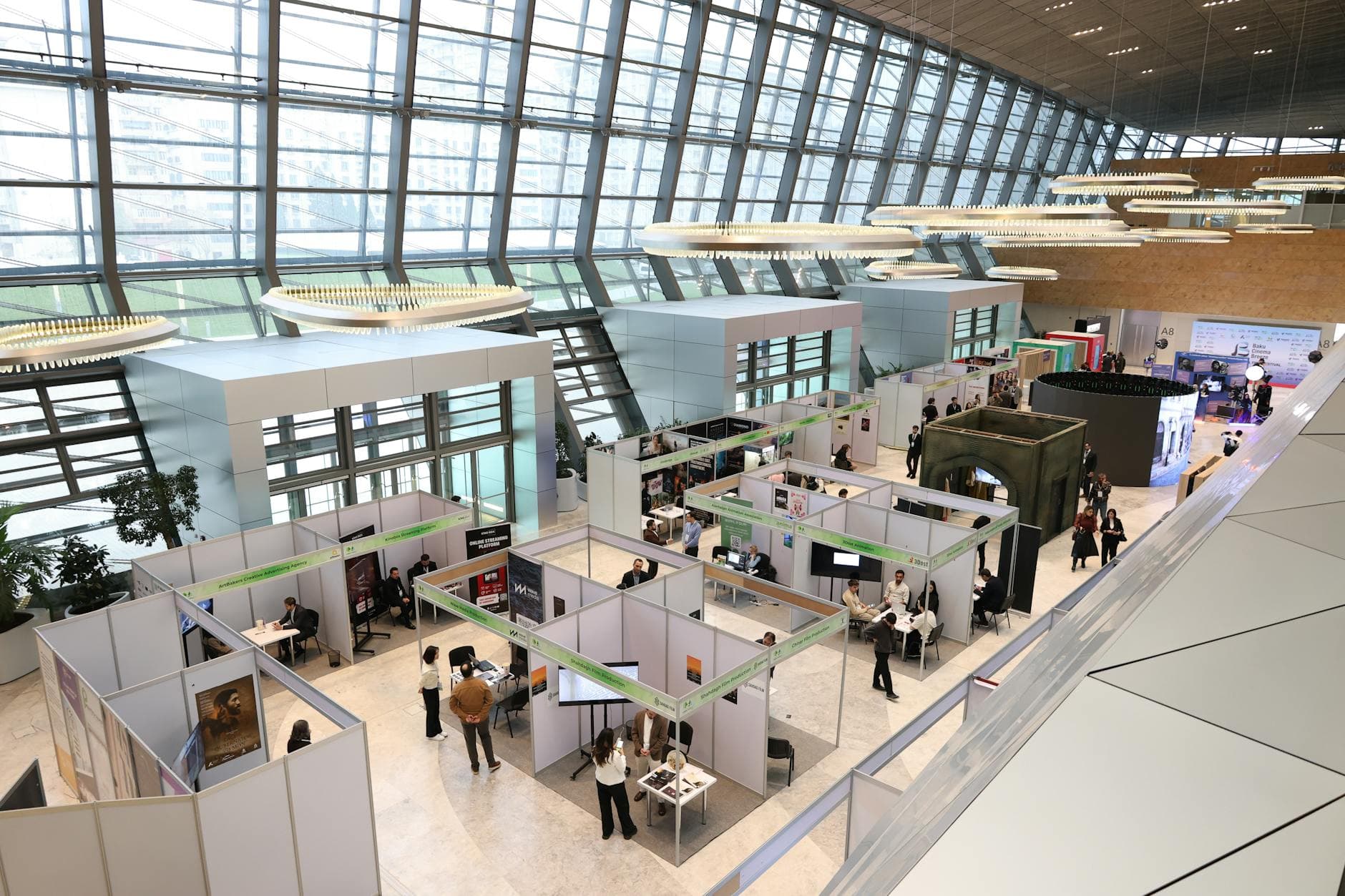
Your company spent €8,000 on a conference photographer. Two weeks later, 1,200 perfectly edited photos sit in a shared drive folder titled "Q1 Summit 2026 - FINAL." Fourteen people have opened it. Three downloaded anything.
This is the norm, not the exception. Corporate event photography has a distribution problem that nobody talks about. The photos are often excellent. The pipeline for getting them to the people in those photos is broken.
According to Christie's Photographic, event photography in 2026 has moved beyond documentation. It's now a strategic asset for brand storytelling and attendee experience. But an asset locked in a shared drive isn't an asset at all.
The Real Cost of Photos Nobody Sees
Think about what conference photos actually do when they reach people. An attendee posts a great candid shot from your keynote on LinkedIn. Their network sees your brand, your stage design, your energy. A department head uses a team photo in their next all-hands deck. A recruiter pulls a shot of the networking area for a careers page.
None of that happens when photos are buried. BKN Productions puts it well: event photography has evolved from documentation into a strategic pillar of internal communication. Visual content from events creates touchpoints that resonate across the whole organization. But only if people actually see it.
The distribution gap is where most event teams lose their return on photography investment. You're not paying the photographer for files. You're paying for reach, engagement, and the moments that make your company look alive.
Why Traditional Sharing Methods Fall Short
Most event teams default to one of three approaches. All of them leak value.
The shared drive email. A link goes out 5-10 days after the event. By then, the emotional peak is gone. People have moved on. Open rates for post-event emails hover around 15-20% for internal comms, and the click-through to actually browse photos is a fraction of that. You end up with a handful of enthusiastic downloaders and 400 people who meant to look but never did.
The social media dump. Marketing uploads 30 curated shots to LinkedIn or the company intranet. Better than nothing, but attendees can't easily find themselves, the selection is small, and people who weren't at the event scroll right past.
The photographer's online gallery. Some photographers offer hosted galleries with download links. The problem: it's another login, another URL to remember, and there's no connection to the event experience itself. It feels transactional, not communal.
The pattern: every traditional method introduces delay, friction, or both. Photos shared 48 hours after an event get roughly 3x less engagement than photos shared during the event. Timing matters more than photo quality for engagement.
Real-Time Sharing Changes the Math
Picture a 300-person industry conference. Registration badges have a small QR code printed at the bottom. During the coffee break after the morning keynote, a few attendees scan it out of curiosity. They land on a browser-based gallery, no app to install, no account to create. The photographer's shots from the opening session are already there. So are 40 candid photos other attendees uploaded from the networking area.
By lunch, 87 people have checked the gallery. By the end of the day, the number is over 200. Not because someone sent a reminder email, but because attendees kept showing each other photos on their phones during breaks. "Did you see the one from the panel? Someone caught the exact moment the CEO spilled his water."
That's the difference between distribution and discovery. Traditional sharing distributes photos to people. Real-time galleries let people discover photos on their own terms, at the moment they're most interested.

1.No app, no sign-up. Scan and upload in seconds.
Setting Up Photo Sharing That Actually Works at Conferences
The mechanics aren't complicated. The strategy behind them is what separates a forgettable shared folder from a gallery that attendees genuinely use.
Start Before the First Session
Upload the photographer's early shots (venue setup, registration area, stage) before attendees even arrive. When someone scans the QR code for the first time, an empty gallery feels dead. A gallery with 15-20 professional shots signals that this is active and worth checking back.
Place QR Codes Where People Wait
Conference attendees spend a surprising amount of time standing around: registration lines, coffee breaks, lunch queues, session transitions. These are your best touchpoints. Print QR codes on table tents in the lunch area, on signage near the coffee station, and on the back of name badges. Anywhere someone might pull out their phone and have 30 seconds to kill.
Skip the main stage. Nobody scans a QR code during a keynote.
Moderation Is Non-Negotiable
This is where corporate events differ fundamentally from weddings or birthday parties. At a conference, attendees might photograph whiteboards with confidential roadmaps, snap slides marked "internal only," or upload something that violates your company's social media policy. HIVO's research emphasizes that confidentiality and privacy are paramount in professional event photography.
You need a moderation layer. Assign one or two team members as moderators who review uploads before they appear in the public gallery. With Photogala, this works through a dedicated moderation dashboard: every photo sits in a queue until someone taps approve or reject. One person with a phone can handle this during breaks without missing any sessions.
Honest caveat: moderation adds a delay of a few minutes between upload and visibility. For most conferences, that's fine. For live product demos where you want instant reactions, you might choose to disable pre-approval and rely on the AI NSFW filter as a safety net instead.
See it in action
Every guest photo in one album – no app.
The Photo Wall Effect
If your venue has screens in common areas (most conference centers do), a live photo wall turns passive display space into something people actually look at.
Imagine a 55-inch screen near the registration desk cycling through the latest uploads. Every few minutes, a new photo appears: someone shaking hands with a speaker, a group selfie from the workshop room, the catering team's surprisingly photogenic lunch spread. People stop, point, laugh. Some walk over to the QR code nearby and upload their own.
The photo wall creates a feedback loop. People see photos on the screen, want to contribute their own, upload them, and then watch for their photo to appear. At a 200-person trade show, this loop alone can generate 150-250 uploads over a full day, most of them from attendees who wouldn't have shared a single photo otherwise.
Eventkraft's research describes corporate events as powerful tools for building culture and reinforcing values. A photo wall makes that visible in real time, not weeks later in a recap email.
What About Trade Shows?
Trade shows add a layer of complexity. You're not just sharing photos with your team. You're sharing them with prospects, partners, and sometimes competitors walking the same floor.
The approach shifts. Instead of one event-wide gallery, consider booth-specific or session-specific galleries. A QR code at your booth leads to a branded gallery showing your demos, your team, your setup. Visitors scan, browse, and take away visual memories of your product. It's subtler than a brochure and stickier than a business card.
For booth staff, a shared gallery solves the "who has the photos from yesterday's demo?" problem. Everyone uploads to the same place. Marketing pulls what they need for social posts that evening. No WhatsApp groups, no "can you AirDrop me that one?"
Fotify's analysis of conference photo sharing points out that the right platform transforms passive attendance into active engagement. At a trade show, that translates directly into longer booth visits, more conversations, and better lead recall.
The 48-Hour Window You Can't Afford to Miss
Here's something most event teams underestimate: the useful life of a conference photo is about 48 hours. After that, the emotional connection fades. The attendee who was excited about the group photo on day one has moved on to three new projects by Friday.
This is why real-time sharing matters so much. If your photographer delivers edited photos in two weeks, you've already lost the window for organic sharing, LinkedIn posts, internal newsletters, and water-cooler conversations.
The workaround: give attendees unedited photos immediately (via the QR gallery), then add the photographer's polished edits to the same gallery once they're ready. Attendees who bookmarked the gallery link get a second reason to come back. The casual shots drive immediate engagement. The professional shots extend the gallery's value for marketing and internal comms.
Quick setup checklist for your next conference: - Upload 15-20 professional shots before doors open - Print QR codes on badges, table tents, and signage near coffee areas - Assign 1-2 moderators with phone access to the approval queue - Set up a photo wall on at least one screen in a high-traffic area - Send a gallery link in your post-event email (not a shared drive link)
Beyond Photos: What the Gallery Becomes Afterward
A conference gallery has a second life that most teams ignore. After the event, it becomes a recruiting asset ("look at our company culture"), a sales tool ("here's what our last user conference looked like"), and an internal comms resource for months.
The key is making the gallery permanently accessible, not hiding it behind a temporary link that expires. With Photogala, galleries stay live for 6-12 months depending on your plan. Long enough for the marketing team to pull shots for the next quarter's content calendar, and for attendees to revisit whenever they need a photo for a presentation or a LinkedIn post.
If you're curious about how other teams handle photo sharing at corporate events specifically, there's a deeper tactical breakdown in our corporate conference photo sharing guide.
All of this comes with your own event.
Setting it up takes five minutes. You can build and view everything before you decide.
Starting from €39 one-timeOne-time payment — No subscription
- No App Required
- Setup in 5 Minutes
- 30-Day Money Back
“I use PhotoGala Deluxe and I'm absolutely thrilled. It was the perfect solution for documenting a sports event. Uploading and downloading via the link is a breeze for every participant. What won me over most were the photo wall and the slideshow – both are quick to set up and look really professional. Big praise also to Peter from the PhotoGala team: he's very easy to reach by email, replies quickly and even took my suggestions on board and added new features that made my slideshow even better. You rarely get support this dedicated. A clear 5-star recommendation!”
Written by

I believe event photos should be more than static galleries. They should be live, playful, and unforgettable.
Categories
Related Posts

Sales Kickoff Photo Sharing: How to Turn a Mandatory Meeting Into a Team Memory
Sales kickoffs are expensive. The photos from them usually disappear into 14 different camera rolls. Here's how to fix that.
Customer Appreciation Event Photos: The Album Nobody Plans (But Everyone Wants)
Your best clients showed up, mingled, laughed. Then what? Here's how to turn a customer appreciation event into a shared photo gallery that keeps the relationship warm.
Store Grand Opening Photos: How One QR Code Captures the Ribbon Cutting and Everything After
The ribbon cutting lasts 3 seconds. The photos from your grand opening should last forever. Here's how to collect every guest photo with a single QR code.