Photogala vs WeTransfer for Event Photos: One Was Built for This, One Wasn't


Picture this: it's Monday morning after your best friend's wedding. You took 47 photos on your phone. Your partner took 30. The cousin at your table? She got the best candid of the bride's dad on the dance floor. Now someone creates a WeTransfer link, uploads their batch, and sends it around. Three days later, two people have uploaded. The cousin forgot. The link expires next week.
WeTransfer is a fantastic tool. Genuinely. For sending a batch of design files to a client, or a video edit to a collaborator, it's hard to beat. But using it to collect photos from dozens of event guests is like using a hammer to turn a screw. It works, technically, if you hit it hard enough. But there's a better tool for the job.
This isn't really a fair comparison, and I want to be upfront about that. WeTransfer is a file transfer service. Photogala is an event photo sharing platform. They overlap in exactly one place: moving photos from point A to point B. Everything beyond that diverges sharply.
The Core Problem With File Transfer at Events
WeTransfer solves a simple problem well: you have files, someone else needs them, you send a link. The recipient downloads. Done. For a one-to-one or one-to-few transfer, it's clean and reliable.
Event photo sharing is a fundamentally different challenge. You're not moving files from one person to another. You're collecting photos from many people (guests) into one place, ideally in real time, and you want everyone to be able to browse, enjoy, and contribute. The flow is many-to-one-to-many, not one-to-one.
That distinction changes everything about what the tool needs to do.
With WeTransfer's free tier, you get 2 GB per transfer and files expire after 7 days. Even the Pro plan ($16/month) caps individual transfers at 200 GB with 28-day expiry. For a wedding with 150 guests, you'd need someone to coordinate: "Send your photos to this email" or "Upload them to this link." Except WeTransfer links are designed for the sender to upload, not for 150 different people to contribute to the same pool. You'd end up with 15 separate transfer links from 15 people who bothered, and 135 guests who never got around to it.
What Happens When You Use a Purpose-Built Tool
Photogala approaches this from the opposite direction. Instead of "send me your files," it creates a shared gallery that guests join by scanning a QR code. No app download, no account creation, no email required. They scan, they upload, they see everyone else's photos. The whole thing runs in the browser.
Everyone sees the same gallery in real time

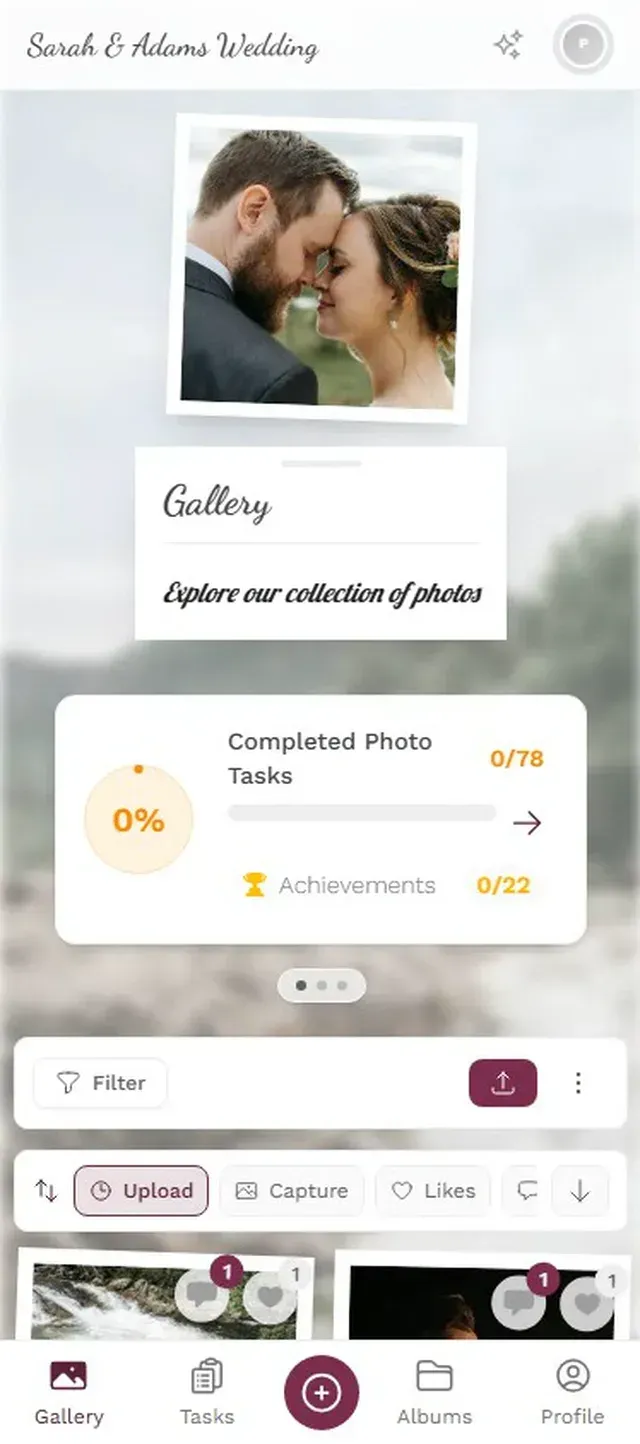

Say you're hosting a company summer party for 80 people. You print QR codes on the table tents. By the time appetizers are cleared, 25 people have uploaded photos. By dessert, it's 50. There's a TV by the bar running the live photo wall, and every few minutes a new photo pops up and someone laughs. Nobody had to download anything, nobody had to email anyone, and the photos aren't going to expire next Tuesday.
That's the difference between a tool built for file transfer and one built for events.
Ready to create your gallery?
Speed: Real-Time vs After-the-Fact
This is where the comparison gets almost unfair. WeTransfer is inherently asynchronous. Someone takes photos at the event, goes home, remembers to upload them (maybe), creates a transfer link, and sends it. The fastest realistic timeline is next-day. More often, it's next-week or never.
A 2023 Mixbook survey found that 50% of Americans do nothing with the photos sitting on their phone. They just... stay there. The gap between "I'll send those to you" and actually doing it is where most event photos go to die.
Photogala makes sharing happen during the event, not after it. Guests upload while the moment is still fresh, while they're still at the venue, while the energy is high. Photos show up in the gallery instantly. If you're running a photo wall on a screen, they appear within seconds.
This isn't just a convenience difference. It changes the social dynamic. When people see their photo appear on the big screen, they upload more. When they see their friend's funny candid in the gallery, they want to match it. The upload rate compounds throughout the event.
Privacy: It's Complicated for Both
WeTransfer has a decent privacy setup for file transfers. End-to-end encryption on Pro and Premium plans, data stored in the EU (they're a Dutch company), and transfers auto-delete after the expiry window. For sending files to a known recipient, that's solid.
But for event photo sharing, the privacy questions are different. Who can see the photos? Can guests delete their own uploads? What happens to the images after the event? Who controls access?
With WeTransfer, once you download a batch of someone's wedding photos, those files live on your device forever. There's no central control. No way for the couple to remove a photo that shouldn't have been shared. No moderation.
Photogala gives the event host control over the gallery. Content moderation lets you approve or reject photos before they appear (useful if there's a live photo wall and you don't want surprises). The Deluxe plan includes an AI NSFW filter that catches inappropriate content automatically. Guests can only see what's in the gallery, and the host can remove anything at any time. As Photomea's privacy guide notes, event organizers using AI-powered photo tools have regulatory obligations under GDPR, and having built-in moderation helps meet those requirements.
If privacy matters for your event (corporate, school, children's party), a dedicated platform with moderation and access controls is worth it. A shared folder or transfer link gives you no control over what gets shared or who sees it.
One honest caveat: Photogala is browser-based and stores photos in the cloud, so you're trusting the platform with your data. WeTransfer's auto-expiring links mean the photos don't live on their servers permanently. If you want photos to disappear after a set window, that's a point for WeTransfer. Photogala keeps galleries available for 6-12 months depending on the plan, which is a feature for most people but a consideration for the privacy-conscious. For a deeper look at event photo privacy, we wrote a separate guide on keeping your event photos secure.
Ease of Use: Who Are You Optimizing For?
WeTransfer's interface is famously simple. Drag files, add recipient email, hit send. For the person sending, it's about as easy as it gets. But "easy for the sender" and "easy for 150 wedding guests" are very different standards.
Here's the friction with WeTransfer at events:
- Someone has to organize it ("Send your photos to [email protected]")
- Each guest has to remember to do it after the event
- Each guest creates their own transfer link
- The organizer receives 10-20 separate download links
- Someone has to download, merge, and re-share all the photos
- Photos from guests who forgot? Gone forever.
With Photogala, the guest experience is: scan QR code, type a name, start uploading. Three taps. No email, no app, no account. The 62-year-old uncle and the 16-year-old nephew use the same flow.
For the host, setup takes about two minutes. Create a gallery, customize the branding if you want, print QR codes. That's it. All photos land in one place automatically.
The Feature Gap
This is where comparing the two starts to feel like comparing a bicycle to a minivan. Both have wheels. The similarity ends there.
Feature Comparison
| Feature | Photogala | WeTransfer |
|---|---|---|
| Purpose | Event photo sharing | File transfer |
| QR Code Guest Access | ||
| Real-Time Gallery | ||
| Live Photo Wall / TV Display | ||
| No App Download | ||
| Photo Challenges / Games | ||
| Leaderboard & Points | ||
| AI Face Recognition | ||
| Content Moderation | ||
| Comments & Likes | ||
| Multiple Gallery Layouts | 4 layouts | |
| Custom Branding | logo on Pro | |
| Unlimited Photos | 2GB free, 200GB Pro | |
| File Expiry | 6-12 months storage | 7 days free, 28 days Pro |
Look at that table and you'll notice something: most rows aren't even a contest because they're not categories WeTransfer is trying to compete in. WeTransfer doesn't have a photo wall because it's not an event tool. It doesn't have challenges because it's not trying to get people to upload more. It doesn't have moderation because the sender controls what they send.
This is exactly the point. The tool you choose should match the job. WeTransfer is overqualified for sending a ZIP of vacation photos to your mom. It's underqualified for running photo sharing at a 200-person wedding.
When WeTransfer Actually Makes More Sense
Credit where it's due. There are scenarios where WeTransfer is the better pick:
- Photographer delivering final edits. A wedding photographer sending 300 edited photos to the couple? WeTransfer (or its Pro plan) is perfect. Big files, one recipient, clean handoff.
- Small group, after the event. Five friends went on a trip and want to swap photos next week. A WeTransfer link is quick and easy. No setup needed.
- You need to send non-photo files too. WeTransfer handles any file type. If you're sharing a mix of photos, videos, PDFs, and documents, it's more flexible.
- Files need to auto-delete. If you specifically want photos to disappear after a week, WeTransfer's expiry is a feature, not a limitation.
For anything under 10 people where you don't need real-time sharing, WeTransfer works fine. The overhead of setting up a dedicated gallery isn't worth it for a dinner party with six friends.
When Photogala Pulls Ahead
The gap widens as event size grows. Once you pass about 20-30 guests, the coordination cost of "everyone send me your photos" becomes the bottleneck, not the transfer tool.
Challenges give guests a reason to upload more
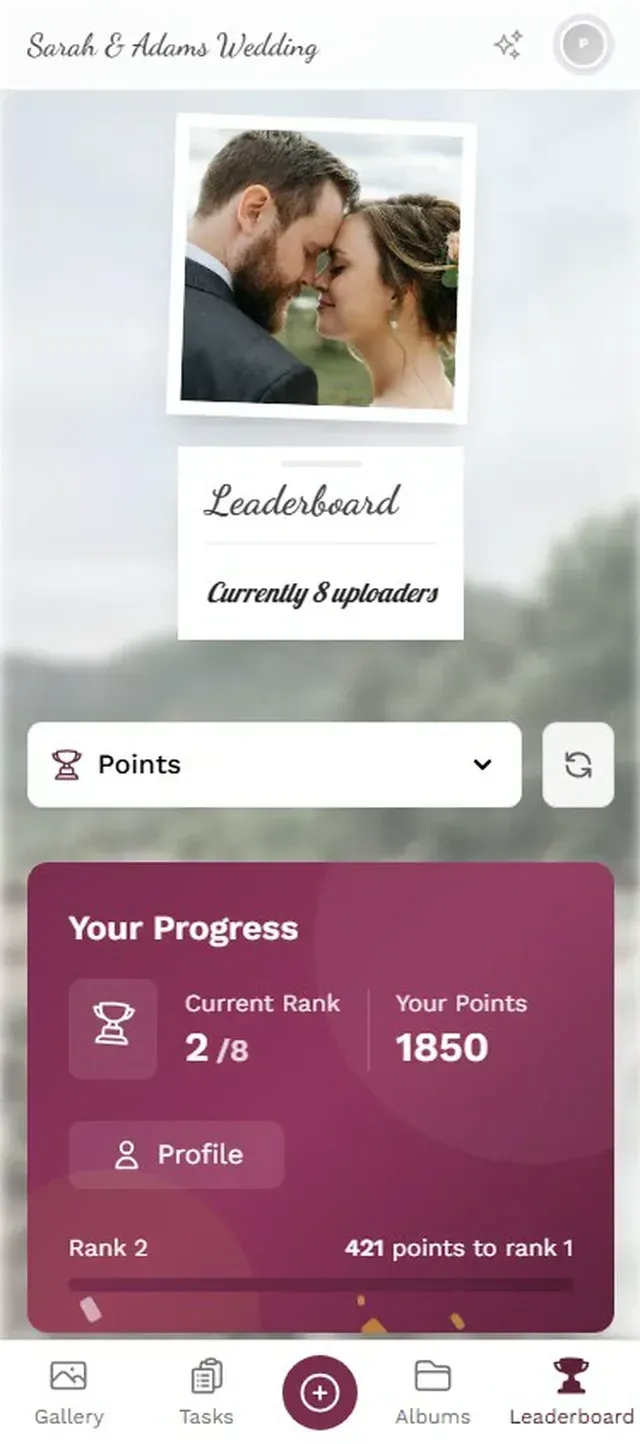
Photo challenges are the sleeper feature here. Instead of passively hoping guests upload, you give them prompts: "Best dance floor photo," "Find the bride's shoes," "Group selfie with the DJ." Challenges can even include example preview photos, so guests know what to aim for. Think photo roulette: guests get a random reference image and try to recreate it. The results are always hilarious. Research from AmplifAI shows gamification increases engagement by 48% in workplace settings. At events, where people are already in a good mood, the effect is even more natural.
WeTransfer can't do any of this. Not because it's a bad product, but because it was never trying to.
The Price Question
WeTransfer's free tier costs nothing but limits you to 2 GB and 7-day expiry. The Pro plan runs $16/month (billed annually). If you only need it for one event, you're paying for a month you'll mostly not use.
Photogala is a one-time payment: €39 for Starter, €69 for Premium, €119 for Deluxe. No subscription. For a single event, the math is straightforward. For the price of a few months of WeTransfer Pro, you get a purpose-built event gallery with features WeTransfer doesn't have.
As Fotify's 2026 comparison of event photo platforms notes, the best tools in this space combine real-time display, guest-friendly uploads, and moderation. File transfer tools weren't part of their evaluation, because they solve a different problem.
The Bottom Line
If someone asks you to "just use WeTransfer" for wedding photos, they probably haven't tried coordinating photo collection from more than 10 people. It works, in the same way that emailing photos one by one works. It's technically possible. It's just not the right tool.
WeTransfer moves files. Photogala turns event guests into active contributors to a shared photo gallery. The difference sounds subtle until you've stood at a wedding watching 80 people upload photos through a QR code while a photo wall cycles their shots on a big screen behind the dance floor. That's not a file transfer. That's something else entirely.
Ready to create your gallery?
Start sharing your event photos with guests in minutes.
Create GalleryWritten by

I believe event photos should be more than static galleries. They should be live, playful, and unforgettable.
Categories
Related Posts

Wedding Hashtag vs QR Code Gallery: What Actually Works in 2026
Hashtags made sense in 2018. In 2026, most guest photos hide behind private profiles. Here's what replaced them.

How Much Does Event Photo Sharing Cost? Complete 2026 Guide
From free shared albums to premium platforms: what event photo sharing actually costs in 2026, what you get at each price point, and where the hidden fees lurk.

Photogala vs Snapchat for Event Photo Sharing: One Keeps Your Photos, One Deletes Them
Snapchat is fun for selfies, but event photo sharing needs permanence, organization, and zero friction. Here's how a purpose-built gallery compares.