Your Event Photos Are Less Private Than You Think


Picture this: 150 wedding guests, all snapping photos on their phones. By midnight, those images are scattered across a dozen WhatsApp groups, three iCloud shared albums, someone's Google Drive, and a USB stick the photographer handed to the bride's dad. Every single one of those photos carries invisible data: GPS coordinates, timestamps, device serial numbers, sometimes even the direction the camera was pointing.
Nobody thinks about this at a wedding. And honestly, for most casual snapshots, it doesn't matter. But when 150 people upload hundreds of photos to platforms they barely understand, the cumulative privacy exposure adds up fast.
This isn't a scare piece. Most event photo sharing is perfectly fine. But there are a few things worth understanding, especially if you're the one setting up the gallery or organizing the event. The good news: protecting your guests' privacy doesn't require a law degree. It requires about ten minutes of thought beforehand.
What Your Photos Actually Reveal
Every photo your phone takes embeds metadata called EXIF data. It includes the GPS location where the shot was taken, the exact time, your phone model, lens settings, and sometimes a unique device identifier. Most people never see this data because photo apps hide it. But anyone who downloads the original file can extract it in seconds.
For a vacation snapshot on Instagram, this is mostly irrelevant because social platforms strip metadata on upload. But event photo sharing is different. When guests upload original-quality photos to a shared album or gallery, that metadata often travels with them. According to photography security researchers, stripping EXIF and GPS metadata is a best practice for any shared gallery, though you'll want to preserve embedded copyright information if the photographer needs it.
The practical risk? Someone downloads a batch of wedding photos, and every image contains the exact address of the venue, the names of devices that took them, and timestamps accurate to the second. For a public event, that's usually fine. For a private celebration at someone's home, it's worth thinking about.
Quick check: Open any photo on your phone, tap the info or details button, and look for location data. If you see a map pin, that photo carries GPS coordinates. Most event photo platforms strip this automatically, but not all of them do.
The Real Risks (and the Overblown Ones)
Let's be honest about what actually matters and what's internet paranoia.
Overblown: Someone hacking into your wedding photo gallery to steal pictures of your aunt dancing. The realistic threat level here is approximately zero. Your event photos are not interesting to hackers.
Underappreciated: Photos ending up in places you didn't intend. A guest screenshots a funny photo from the gallery and posts it on TikTok. Someone downloads the entire album and shares it with people who weren't invited. A corporate event gallery stays public for months because nobody remembered to close it. These aren't dramatic breaches. They're mundane lapses that happen constantly.
PowerDMARC's 2025 analysis identifies identity theft and privacy invasion as real risks when sharing photos online, particularly when images contain sensitive background information: whiteboards with company data, name badges, addresses visible on mail in the background. The stuff you don't notice when you're taking the photo.
And then there's the AI angle. Photolog's research on AI threats to photography highlights that uploaded photos can be scraped for AI training without consent. For professional event photographers, this is a growing concern. For casual guest photos at a birthday party, it's lower priority, but it's worth knowing the landscape.
Five Things That Actually Help
Forget the 47-point security checklists. Here's what makes a real difference for event photo sharing.
1. Use a platform with access controls, not a public link
The single biggest privacy decision is how guests access the gallery. A public link that anyone can open is convenient but offers zero control. A QR code that opens a browser-based gallery with upload permissions is better. You control who can view, who can upload, and when the gallery closes.
This is where tools built specifically for events outperform general-purpose solutions like Google Photos or iCloud. SmugMug, for example, lets professional photographers set per-gallery privacy controls. For events, you want something even simpler: guests scan, upload, done, but with the host maintaining control over visibility and downloads.
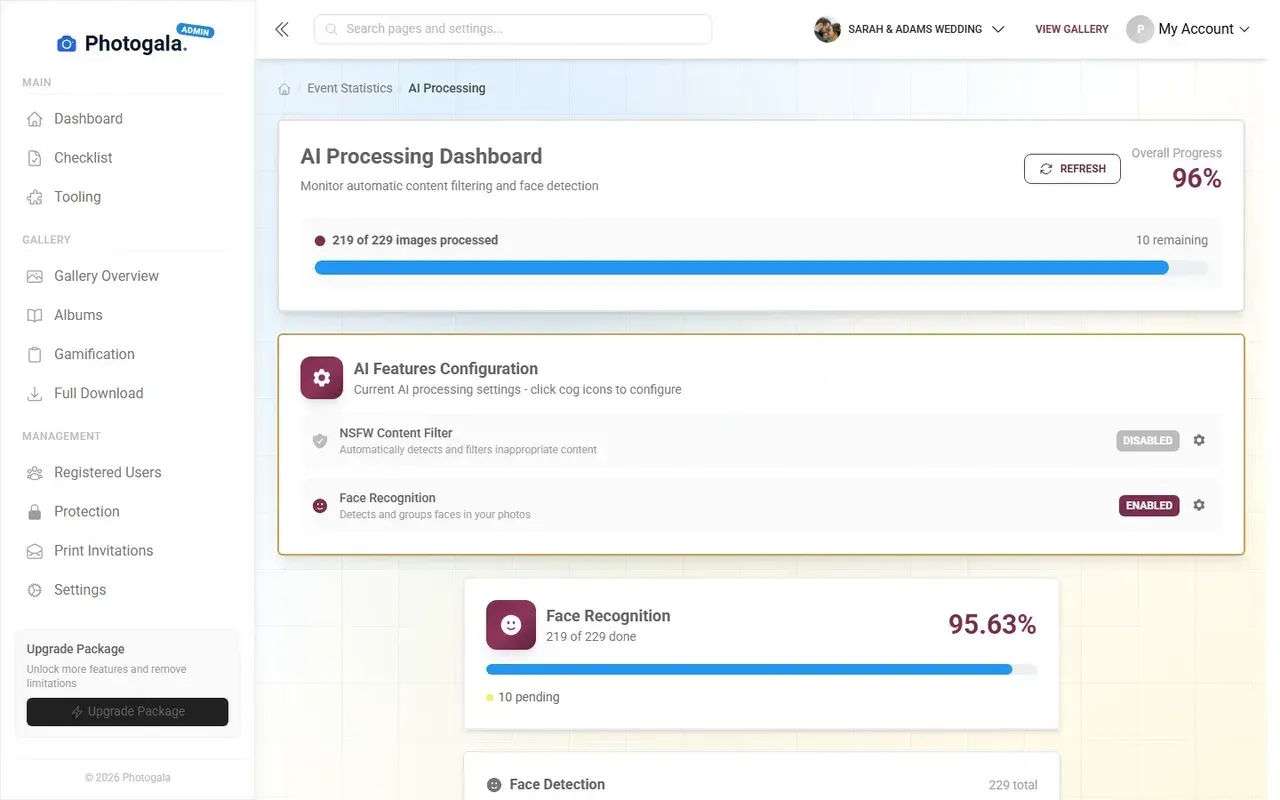
1.Guests scan and upload without downloading an app
2. Turn on moderation
Content moderation sounds corporate and heavy-handed. It's not. It means someone (you, a bridesmaid, the event coordinator) gets to approve photos before they appear in the shared gallery or on the photo wall.
Imagine a corporate holiday party where someone uploads a photo of a colleague in an embarrassing moment. Without moderation, it's instantly visible to everyone on the big screen. With moderation, someone taps "reject" and it never appears. One tap. Takes two seconds.
On Photogala, you can assign moderator roles to multiple people. They get notifications when new uploads arrive, review them on their phone, and approve or reject with a reason. The AI NSFW filter catches the obvious problems automatically, so human moderators only deal with edge cases.
See it in action
Every guest photo in one album – no app.
3. Set an expiration date
Event galleries that stay online forever are a liability nobody thinks about. Six months after the wedding, the gallery is still public. A year after the company retreat, photos of former employees are still accessible.
Set a storage window that matches the event. Photogala's Plus plan includes 6 months of storage, Premium and Deluxe include 12 months. After that, the gallery closes automatically. You can download everything as a ZIP before it expires, so nothing is lost. But the online exposure has a defined end date.
4. Brief your guests (it takes 30 seconds)
This is the most overlooked step. A quick note on the invitation or a small sign near the QR code: "Photos shared here are visible to all guests. Please be considerate of what you upload."
That's it. No privacy policy. No legal jargon. Just a reminder that the gallery is shared and people should think for a moment before uploading. At corporate events, this matters even more. A simple heads-up sets the expectation that the gallery is a curated space, not a free-for-all.
For corporate events: If you're in the EU, GDPR applies to event photos where individuals are identifiable. Getting consent doesn't have to be complicated, but ignoring it can be expensive. A sign at the entrance explaining that photos will be shared in a closed gallery is a reasonable starting point.
5. Don't use WhatsApp groups as your gallery
This is the one that surprises people. WhatsApp compresses photos to about 15% of original quality, strips some metadata (good), but also gives every group member the ability to save and forward every photo to anyone (not good). There's no moderation, no access control, no expiration, and no way to remove a photo once someone else has saved it.
WhatsApp is great for chatting. It's terrible for event photo sharing. The convenience isn't worth the trade-offs, especially when a QR-code-based gallery takes the same 30 seconds to set up and gives you actual control over the content.
What About AI Face Recognition?
Face recognition in event photos is genuinely useful and genuinely sensitive. It lets guests find every photo they appear in without scrolling through hundreds of images. It also means the platform is processing biometric data.
Photogala's face recognition (available on the Deluxe plan) works locally within your event gallery. It clusters photos by face, lets you label people by name, and guests can filter the gallery to see only photos of themselves. The data stays within the gallery and expires with it.
The honest trade-off: this is a feature that improves the guest experience significantly, but it processes facial data. If that makes you uncomfortable, don't enable it. It's optional, off by default, and only the event host can activate it. For weddings, most couples love it because guests can instantly find their own photos. For corporate events with stricter privacy policies, it's a conversation to have with your legal team first.
1.Guests filter the gallery to find their own photos instantly
A Privacy Setup That Takes 10 Minutes
Quick Privacy Setup for Any Event
Enable moderation
Turn on the approval queue so uploads are reviewed before going live. Assign 1-2 trusted people as moderators.
Configure the AI filter
If on the Deluxe plan, enable the NSFW filter. Set sensitivity based on your event type.
Set gallery visibility
Use QR code access instead of public links. Guests scan to join, but the gallery isn't findable by search.
Add a brief note for guests
A small sign or a line on the invitation: 'Photos are shared with all guests. Upload responsibly.'
That's genuinely it. Four settings, ten minutes. You're not building Fort Knox. You're making thoughtful default choices so that the 300 photos your guests upload end up in a controlled, time-limited space instead of scattered across the internet.
The best event photo galleries are the ones guests actually use. Overcomplicating privacy kills participation. A grandmother who has to create an account, verify her email, and accept a cookie banner is a grandmother who puts her phone away. QR code, scan, upload. That flow works because the privacy controls happen on the host side, invisible to the guest.
Your guests want to share photos. Your job is to give them a place to do it where the photos stay where they belong.
All of this comes with your own event.
Setting it up takes five minutes. You can build and view everything before you decide.
Starting from €39 one-timeOne-time payment — No subscription
- No App Required
- Setup in 5 Minutes
- 30-Day Money Back
“We were really thrilled, and everything went so much more smoothly, from the seating plan all the way to the photo games! Simply great! Highly recommended!”
Written by

I believe event photos should be more than static galleries. They should be live, playful, and unforgettable.
Categories
Related Posts
How to Run a Best-Photo Contest at Your Event
Photo contests turn passive guests into active participants. Here's how to set one up that people actually care about.
How to Embed Your Event Photo Gallery on a Wedding or Event Website
Your event website deserves more than a static page. Here's how to embed a live photo gallery that guests actually use.

How to Make a Photo Book From Your Event Photo Gallery
Your event gallery has hundreds of photos. Here's how to turn them into a photo book people actually flip through.