Facebook Shared Albums vs Dedicated Photo Sharing Apps: Why Event Organizers Are Switching


The bride's cousin posts in the Facebook group at 11:47 PM: "Can everyone add their photos to the shared album?" Three weeks later, 11 out of 140 guests have contributed. The cousin posts again. Two more photos trickle in. By month two, the album has 43 photos, half of them duplicates, and the bride has quietly accepted that the other 800+ photos from her wedding day are gone forever.
This isn't a worst case. It's the typical case. Facebook shared albums were never built for events, and the gap between what organizers expect and what actually happens is enormous.
The Facebook Shared Album Problem
On paper, Facebook shared albums make sense. Most people have accounts. It's free. You can invite people to contribute. Done.
In practice, three things break down immediately.
Not everyone is on Facebook. This is the big one. Pew Research has tracked a steady plateau in Facebook adoption among younger adults. Your 23-year-old cousin might not have an account. Neither might the groom's German business partner. Or the grandmother who uses an iPad but only for FaceTime. A photo collection method that excludes 20-40% of your guests isn't a solution.
Privacy friction kills participation. Even guests who have Facebook accounts often hesitate. Contributing to a shared album means their profile is visible to strangers. Some guests have locked-down privacy settings that prevent them from being added to groups at all. Others simply don't want their wedding selfies surfacing in their coworkers' newsfeeds. As one event planning blog puts it, the phone-number-visible, everyone-sees-everything model creates real friction.
Compression destroys quality. Facebook compresses uploaded images. That golden-hour portrait your friend captured on their iPhone 16 Pro? It arrives in the album looking like it was taken through a window screen. For casual scrolling, nobody notices. For printing, framing, or making a photo book later, it matters.
The Deeper Issue: Passive vs. Active Collection
Here's what most organizers miss. Facebook shared albums are a passive collection method. You create the album, post a link, and hope people remember to upload their photos days or weeks later. By then, the moment has passed. Guests are back at work, the excitement has faded, and those 47 photos from the dance floor are buried under 200 new screenshots and memes.
A 2023 survey reported by Deseret News found that 80% of people have photos on their phone they haven't looked at since taking them. The intention to share was there. The follow-through wasn't.
Dedicated photo sharing apps flip this model. They collect photos during the event, when energy and enthusiasm are highest. A QR code on the table. A 10-second scan-and-upload flow. No account creation, no app download. The window of willingness is minutes, not weeks.
The best time to collect event photos is during the event itself. Every hour of delay after the event cuts participation roughly in half.
What Dedicated Apps Actually Do Differently
The phrase "dedicated photo sharing app" covers a lot of ground. Some are barely more than a Dropbox folder with a pretty link. Others (as shared.click notes) offer full gallery experiences with no app download and no account required, just a QR code or link.
The good ones solve the three Facebook problems directly:
- No account needed. Guests scan a QR code, enter a display name, and start uploading. Works on any phone, any browser. Your grandmother with the iPad can do it.
- Original quality. Photos and videos upload at full resolution. No compression, no quality loss.
- Real-time collection. Photos appear in the gallery as they're taken, not three weeks later when someone finally remembers to open Facebook.
But the real difference goes beyond fixing Facebook's gaps. The best apps add features that Facebook never attempted: live photo walls on a screen at the venue, content moderation so nothing inappropriate shows up on that screen, and even gamification to get guests actively participating instead of passively spectating.

1.No app, no account. Scan, name, upload.
See it in action
Every guest photo in one album – no app.
The Comparison Nobody Wants to Make
Facebook is free. That's the argument. And it's a fair one. If your event has 20 guests who all have Facebook accounts and you don't care about photo quality, a shared album works fine.
For anything larger or more structured, the math changes. Here's how Facebook shared albums stack up against a purpose-built platform like Photogala:
Facebook Shared Albums vs. Photogala
| Feature | Photogala | Facebook Albums |
|---|---|---|
| Account required | browser only | Facebook account |
| App download needed | but needs Facebook app or browser | |
| Photo quality | original quality | compressed |
| Video support | ||
| Guest limit | unlimited viewers | Limited by group/friends |
| Real-time uploads during event | possible but rarely used that way | |
| Live photo wall on TV | ||
| QR code access | ||
| Content moderation | approve/reject queue | manual deletion only |
| Photo challenges / gamification | ||
| Face recognition | AI clustering | Facebook's own tagging |
| Privacy from social graph | isolated event gallery | tied to profiles |
| Cost | Starts at €39 one-time | Free |
Facebook wins on exactly one line: cost. For everything else, it's either equal or behind. And that single advantage disappears when you factor in what "free" actually costs you: lost photos from guests who don't have accounts, compressed image quality, and zero engagement tools.
The Participation Gap
This is the part that surprised me most when researching this piece. The difference in participation rates between passive sharing (post a link, hope for the best) and active collection (QR codes at the event, instant upload) is dramatic.
Picture a 200-guest wedding. With a Facebook shared album, you might get 15-25 contributors if you're lucky. Most guests intend to upload, then forget. With a QR code gallery available during the event, that number jumps to 60-80+ contributors. The photos exist either way. The difference is whether they leave the phone.
As chivent.com's research describes it, the problem with traditional collection methods like group chats and shared drives is fundamentally about friction: guests need existing accounts, many don't know how to upload, and the whole process gets abandoned.
QR codes eliminate that friction almost entirely. 47% of event professionals already use QR codes for attendee engagement, and the number keeps climbing.
What About Google Photos and iCloud?
Fair question. Google Photos shared albums and iCloud Shared Photo Libraries are better than Facebook in some ways. They preserve higher image quality. They have decent interfaces.
They share Facebook's core problem: everyone needs the same ecosystem. Google Photos needs a Google account. iCloud needs Apple devices. At any mixed event (which is every event), you're immediately excluding a chunk of your guests. We've covered this comparison with Google Photos in detail if you want the deep dive.
The browser-based approach sidesteps the entire ecosystem question. Any phone, any browser, any operating system. One QR code.
When Facebook Still Makes Sense
Honesty check. There are situations where Facebook shared albums are the right call:
- Small, close-knit groups where everyone has Facebook (a 15-person dinner party, a college friend reunion)
- Budget is truly zero and you'd rather get some photos in low quality than none at all
- Post-event nostalgia, not real-time collection, is the goal. Facebook albums work fine for "hey, add your vacation pics when you get a chance"
For weddings, corporate events, large celebrations, or any situation where you want high participation and original-quality photos: a dedicated app is worth the €39-139 one-time investment. That's less than the cost of a single flower arrangement at most weddings.
The Features Facebook Can't Match
Beyond basic photo collection, dedicated platforms offer tools that simply don't exist in Facebook's world.
Photo challenges turn passive guests into active contributors. Instead of hoping someone photographs the cake cutting, you create a challenge: "Capture the first dance from the guest's perspective." Guests see the challenge, compete to get the best shot, and suddenly you have 30 angles of a moment you might have gotten 3 of otherwise. Photogala takes this further with example preview photos for challenges, enabling creative formats like photo roulette where guests recreate a reference image.
Content moderation matters more than people think. Imagine a 55-inch screen cycling through guest photos at a corporate event. Without a moderation queue, you're one inappropriate upload away from an HR incident. Facebook offers no pre-screening. Dedicated apps let you assign a moderator who approves photos before they hit the big screen.
A live photo wall is something you have to see to appreciate. Photos appearing on a screen in real time, at the venue, while the event is happening. Guests love seeing their shots displayed. It creates a feedback loop: someone sees a photo on screen, takes their own, uploads it, and three minutes later it's on the wall too.
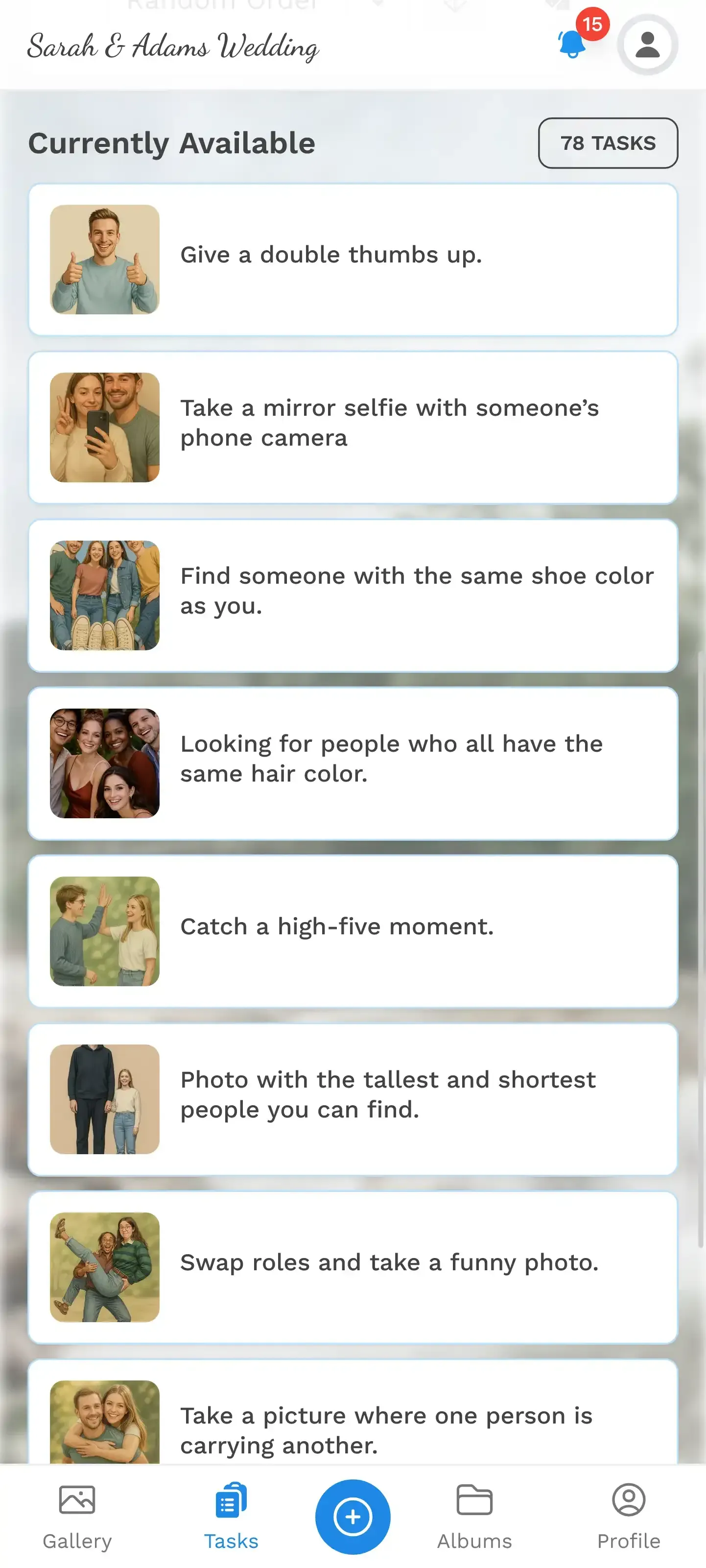
1.Challenges give guests a reason to pick up their phone
Making the Switch
If you've been defaulting to Facebook shared albums for events and feeling disappointed by the results, the switch is straightforward. Most dedicated platforms take under five minutes to set up. You create a gallery, customize the branding, generate a QR code, and print it on table cards or share the link.
From Facebook Album to QR Gallery in 3 Steps
Create your event gallery
Pick a name, upload a cover image, choose your gallery style. Takes about 2 minutes.
Generate and share QR codes
Print QR codes on table cards, napkins, or a poster. Or share a direct link via text message.
Collect photos in real time
Guests scan, upload, done. Photos appear in the gallery and optionally on a live photo wall.
One honest trade-off: it's not free. Photogala starts at €39 for a one-time payment (no subscription), which covers unlimited photos, unlimited guests, and 6 months of storage. For a comparison of free alternatives, we've rounded up what Reddit actually recommends.
Facebook shared albums had a good run. They were the best option when the alternative was emailing photos or passing around a USB stick. But events deserve better than "good enough." The photos your guests take are irreplaceable. Whether they actually make it out of 150 individual camera rolls is the only question that matters.
All of this comes with your own event.
Setting it up takes five minutes. You can build and view everything before you decide.
Starting from €39 one-timeOne-time payment — No subscription
- No App Required
- Setup in 5 Minutes
- 30-Day Money Back
“Excellent service and great pictures! Photogala fully met our expectations at the event. The value for money is unbeatable. Absolutely recommended! The seating plan saved us a lot of hassle!”
Written by

I believe event photos should be more than static galleries. They should be live, playful, and unforgettable.
Categories
Related Posts

How to Make a Photo Book From Your Event Photo Gallery
Your event gallery has hundreds of photos. Here's how to turn them into a photo book people actually flip through.
Game-Day Watch Party Photo Sharing: How to Capture 4 Hours of Chaos in One Gallery
Game-day watch parties generate wild, unforgettable moments. Here's how to make sure every photo actually ends up in one place instead of 14 different camera rolls.
Military Homecoming Photo Sharing: How to Collect Every Reunion Moment From Every Phone
Military homecomings and farewell parties produce hundreds of irreplaceable photos scattered across dozens of phones. Here's how to collect them all in one place before everyone disperses.