How to Share Lots of Photos (Without Losing Your Mind or Your Storage)

Somewhere on your phone right now, there are photos from an event you attended weeks ago. Maybe months. They're still sitting in your camera roll, unsent, because the moment you tried to share them, you hit a wall.
Maybe it was the iCloud link that expired. Maybe the WhatsApp group compressed everything into pixel soup. Maybe you started uploading to Google Photos and gave up after the third "storage full" notification.
You're not alone. According to PetaPixel, an estimated 1.6 trillion photos will be taken in 2026. The global total of stored photos has already crossed 8.3 trillion. Taking photos has never been easier. Sharing them, especially in large batches, is still surprisingly broken.
This isn't an article about sharing a selfie on Instagram. This is about the real problem: how do you get 200, 500, or 1,000+ photos from point A to point B when "point B" is a group of people who all use different phones, different apps, and have different levels of patience?
Why Sharing Lots of Photos Is Still This Hard
The core issue is that most sharing tools were designed for small batches. Send a few vacation snaps to your partner. Drop a screenshot in a group chat. That works fine. But the moment you try to share a large collection with a group, every method reveals its limits.
File size is the first bottleneck. A single iPhone photo in HEIC format runs about 2-4 MB. A burst of 300 photos from a wedding? That's close to a gigabyte. Most messaging apps compress images aggressively, email has attachment limits, and even cloud services start throttling uploads at a certain point.
The second problem is access. You can create a shared Google Photos album, but half the group doesn't have a Google account. You can AirDrop, but that only works with Apple devices within arm's reach. You can create a Dropbox link, but someone's grandmother isn't going to navigate a file download interface.
And then there's the coordination problem. Say 40 people at a birthday party each took 15 photos. That's 600 photos scattered across 40 different camera rolls. Getting everyone to upload to the same place, within the same week, before the enthusiasm fades? Good luck.
The 6 Most Common Methods (and Where They Break)
I want to be fair about this. Every method has a use case where it works well. The question is whether it works well for your specific situation: lots of photos, multiple contributors, varying tech comfort levels.
1. WhatsApp / iMessage Group Chats
The go-to for most people. Create a group, tell everyone to dump their photos. It works for 10-20 photos. Beyond that, it becomes a scrolling nightmare. WhatsApp compresses images significantly, so you're not getting originals. iMessage handles quality better but only within the Apple ecosystem. And scrolling through 400 photos in a chat thread, mixed with messages like "great party!" and "who left a jacket?", isn't anyone's idea of a good time.
Works for: Small groups, casual sharing, when quality doesn't matter.
Breaks when: You have more than ~50 photos, need originals, or have mixed device types.
2. Shared Albums (iCloud / Google Photos)
Better than group chats. iCloud Shared Albums and Google Photos both let you create a shared space where multiple people can contribute. The interface is cleaner, you can organize by date, and quality is decent.
The catch: iCloud requires Apple IDs from everyone. Google Photos requires Google accounts. In a mixed group, you'll always leave someone out. Storage limits are another issue: Google's free tier gives you 15 GB total (shared with Gmail and Drive), and iCloud's free tier is a tiny 5 GB. That fills up fast when you're dealing with hundreds of high-res photos. Comparitech also raises a valid point about privacy: shared albums on these platforms aren't exactly built with event privacy in mind.
Works for: Groups where everyone uses the same ecosystem.
Breaks when: The group is mixed (Android + iPhone), storage runs out, or you need a simple link anyone can use.
3. Email
Nobody wants to receive 47 emails with 5 photos each. Attachment limits (typically 25 MB per email) make this impractical for anything beyond a handful of images. Some services like WeTransfer solve the size problem but create a different one: download links that expire, no preview, no organization.
Works for: Sending a curated selection of 5-10 photos to one person.
Breaks when: You have more than a dozen photos or more than a few recipients.
4. Cloud Storage Links (Dropbox, OneDrive, Google Drive)
Create a folder, set it to "anyone with the link can upload," share the link. This actually works reasonably well for tech-savvy groups. Dropbox and Google Drive both support multi-file uploads and maintain original quality.
The problem is friction. The upload interface isn't intuitive for everyone. Folder structures confuse people. And you end up with files named IMG_4872.jpg through IMG_5341.jpg with no way to know who uploaded what. For a family reunion where half the attendees are over 60, this is a non-starter.
Works for: Tech-comfortable groups, work teams, organized friend groups.
Breaks when: Contributors vary in tech comfort, or you want any kind of organization beyond a file dump.
The real issue with all four methods above: they require everyone to use the same app, have the same account type, or navigate an unfamiliar interface. The more people involved, the more someone gets left out.
5. USB Drives / AirDrop at the Event
Old school, but some people swear by it. Pass around a USB stick or AirDrop in person. You get original quality and no compression. But it only works while people are physically together, it's slow (AirDropping 200 photos takes a while), and USB drives in 2026 feel like asking guests to fax their photos.
Works for: Small in-person gatherings where you want originals immediately.
Breaks when: People leave before sharing, the group is larger than 10, or you want contributions after the event.
6. QR Code Photo Sharing Platforms
This is the newer approach. A QR code links to a browser-based gallery. Guests scan it with their phone camera (no app download), and they can upload directly. Photos appear in a shared gallery in real time. Some platforms, like Photogala, add features on top: organization by album, moderation tools, even a live photo wall for display at the venue.
The key advantage is zero friction. No accounts, no app installs, no ecosystem lock-in. A QR code works on any smartphone. The person who struggles with technology and the person who builds apps for a living both do the same thing: point the camera, tap the link, upload.
Works for: Events of any size, mixed tech comfort levels, when you want everything in one place.
Breaks when: There's no internet at the venue (rare but possible), or the platform you choose has upload limits.
See it in action
Every guest photo in one album – no app.
What Actually Matters When Sharing Hundreds of Photos
After going through all these options, a pattern emerges. The method that works best for large photo collections isn't necessarily the one with the most features. It's the one that solves three specific problems:
Problem 1: Getting Everyone to Contribute
This is the hardest part. People mean to share their photos. They just don't. A Photomea trend report describes how photo sharing has evolved from a weeks-long workflow to something that should be instant. Yet most people still procrastinate because the process feels like work.
The solution is reducing steps. Every additional step (download an app, create an account, find the right folder) cuts your participation rate. The simplest path wins. That's why QR codes have taken off for event photo sharing: scan, upload, done.
Photogala takes this a step further with photo challenges: prompted tasks like "take a photo of the birthday cake" or "capture the funniest dance move." It sounds gimmicky until you picture a 30th birthday where the host set up 8 challenges and guests are actually competing to complete them. Suddenly, people who would normally take 3 photos are uploading 15.

1.No app, no account. Scan the QR code and upload directly from the browser.
Problem 2: Keeping Photos Organized
A shared folder with 800 files named IMG_7392.jpg is technically a solution. It's also useless if you want to find the group photo from dinner or all the shots of the bride's entrance.
This is where dedicated photo sharing platforms pull ahead of generic cloud storage. Albums, chronological sorting, and (on some platforms) AI-powered face recognition let you find specific photos without scrolling through everything. Photogala's Deluxe plan includes face clustering, which automatically groups photos by who's in them. For a large event, that's the difference between "here are 700 photos, good luck" and "here are all the photos with your family."
One honest caveat: the AI face recognition is a Deluxe-only feature (€119). If you're sharing photos from a casual birthday, you probably don't need it. A basic album structure handles 80% of the organization problem.
Problem 3: Preserving Quality
This one is straightforward but often overlooked. WhatsApp strips resolution. Email forces compression. Some cloud services resize on upload.
If the photos matter (and if you're reading an article about how to share lots of them, they probably do), original quality preservation is non-negotiable. Look for platforms that explicitly guarantee no compression. Photogala keeps originals on every plan. Google Photos only preserves originals if you have enough storage quota.
A Practical Setup for Your Next Event
Here's what actually works, based on solving all three problems above. This approach works for a 30-person birthday, a 200-guest wedding, or a corporate event with 100 attendees.
Share event photos in 3 steps
Create a shared gallery before the event
Set up a QR-code-based gallery (Photogala or similar). Customize it with the event name, a cover photo, and optional photo challenges. Takes about 5 minutes.
Make the QR code impossible to miss
Print the QR code on table cards, tape it to the entrance, add it to the event invitation. The more visible it is, the more people will use it. Some hosts put it on napkins or coasters.
Let it run and download later
Photos flow in during the event. Afterwards, bulk-download the entire gallery as a ZIP. Share the gallery link with anyone who missed the code.
The key detail most people miss: placement matters more than the tool. A QR code on a single poster by the door will get 30% participation. The same QR code on every table, in the invitation, and on a visible screen? 70%+. The tool is only as good as its visibility.
If you're running a live photo wall on a TV at the venue, place it where people gather naturally: near the bar, the buffet, or the dance floor. A screen in a side room gets ignored. I've seen similar advice from multiple event planners, and it holds up every time.
When You Need More Than Just Sharing
For some events, uploading photos to a shared space is enough. For others, you want the photos to be part of the experience itself.
Picture a company team-building day. 80 employees, most of whom barely know each other outside their department. A shared Google Drive folder isn't going to get anyone excited. But a photo challenge where teams compete to capture specific moments, with a leaderboard tracking who's most active, a live photo wall cycling through the latest uploads on a big screen? That changes the dynamic.
Photogala's challenge system lets you set example preview photos for each task. So instead of a vague prompt like "take a funny photo," you can show guests exactly what you're looking for: recreate this meme, mimic this movie scene, strike this ridiculous pose. At a recent-concept corporate event, organizers might set up a "recreate the company logo with your team" challenge. The results are always better (and funnier) than what you'd get from a blank prompt.
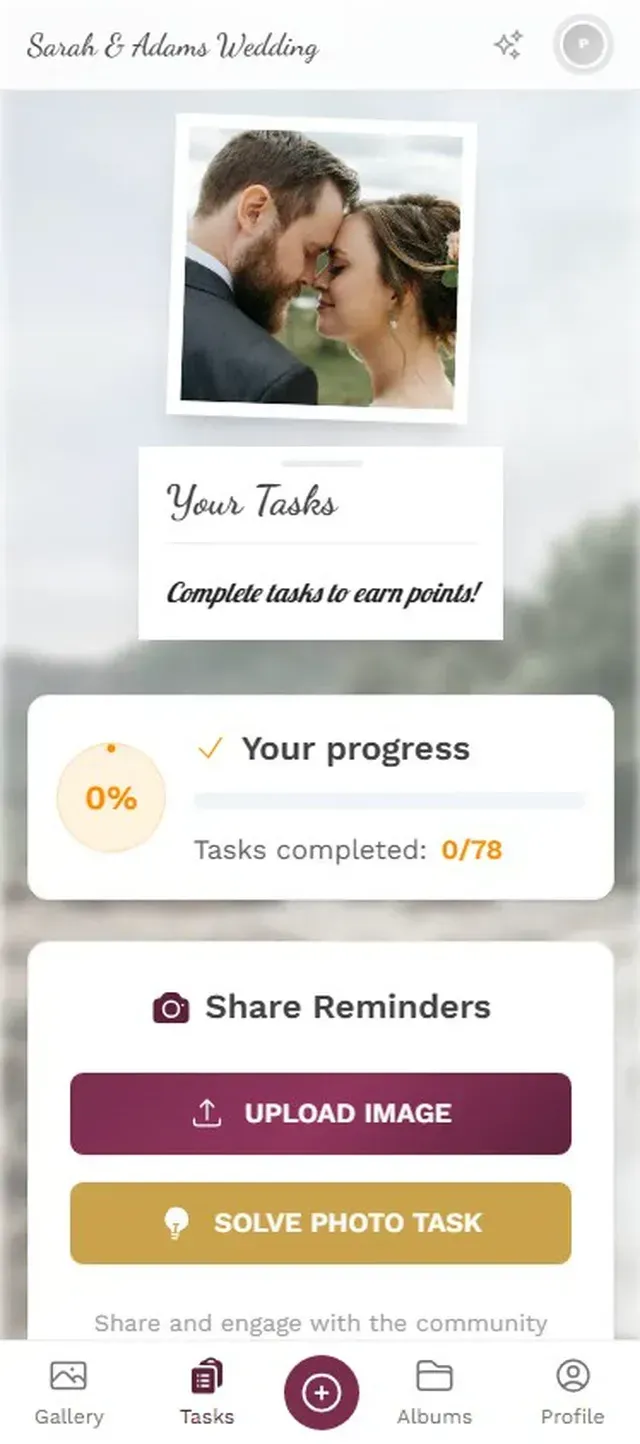
1.Example photos show guests exactly what to recreate.
Research from Ticketroot shows that AI-powered photo distribution at events transforms attendee engagement. The same principle applies on a smaller scale: when people can immediately see their photos on a shared screen or gallery, they take more.
The Real Bottleneck Isn't Technology
Here's what surprised me while researching this piece. The technology for sharing large photo collections has existed for years. Cloud storage is cheap. QR codes work on every phone. Upload speeds are fast enough.
The actual bottleneck is human behavior. People take photos, mean to share them, and then don't. Reunacy describes the problem well: photos end up scattered across devices, stored in printed boxes, saved on old laptops. The value of a centralized platform isn't just the upload mechanism. It's giving people a reason to upload now, while the energy is still there, instead of "later" (which usually means never).
That's why the QR-code-at-the-event approach works better than the share-a-link-after-the-event approach. You capture photos while people are still in the moment. By the next morning, motivation drops by half. By the next week, it's gone.
If you're planning an event and want to actually end up with everyone's photos in one place, the single best thing you can do is make sharing effortless during the event. Not after. During. Everything else is optimization.
The best photos from any event aren't the posed ones. They're the candid moments 40 different people captured from 40 different angles. The only challenge is getting all of them into one place before the moment passes.
All of this comes with your own event.
Setting it up takes five minutes. You can build and view everything before you decide.
Starting from €39 one-timeOne-time payment — No subscription
- No App Required
- Setup in 5 Minutes
- 30-Day Money Back
“I use PhotoGala Deluxe and I'm absolutely thrilled. It was the perfect solution for documenting a sports event. Uploading and downloading via the link is a breeze for every participant. What won me over most were the photo wall and the slideshow – both are quick to set up and look really professional. Big praise also to Peter from the PhotoGala team: he's very easy to reach by email, replies quickly and even took my suggestions on board and added new features that made my slideshow even better. You rarely get support this dedicated. A clear 5-star recommendation!”
Written by

I believe event photos should be more than static galleries. They should be live, playful, and unforgettable.
Categories
Related Posts

Bridal Shower Photo Sharing: Collect Every Sweet Moment in One Gallery
Bridal shower photos end up scattered across 15 phones. Here's how to get them all into one gallery before the mimosas wear off.

Maternity Photo Sharing: How to Keep Every Announcement, Bump Shot, and Memory in One Place
Pregnancy announcements land on 4 different apps. Maternity photos get lost in group chats. Here's how to keep every photo in one shared gallery your whole family can access.

Sales Kickoff Photo Sharing: How to Turn a Mandatory Meeting Into a Team Memory
Sales kickoffs are expensive. The photos from them usually disappear into 14 different camera rolls. Here's how to fix that.