

Picture a 150-guest wedding. The couple creates a Google Photos shared album, prints the link on table cards, and asks everyone to upload their shots. Sounds reasonable. By the end of the night, 23 people have contributed. The other 127? Some don't have Google accounts. Some couldn't figure out the link. A few uploaded to the wrong album. And the bride's aunt sent hers via WhatsApp instead, because that's what she knows.
Google Photos is one of the best consumer photo products ever built. Seriously. For organizing your personal library, searching by face or location, and backing up your camera roll, nothing comes close. But using it to collect photos from a group of people at a live event is like using a Swiss Army knife to cut a wedding cake. Technically possible. Not ideal.
This comparison isn't about which product is "better." Google Photos and Photogala solve fundamentally different problems. But if you're deciding how to handle photo sharing at your next event, the differences matter.
The Google Account Problem
Here's the thing most people don't think about until it's too late: Google Photos shared albums require every contributor to have a Google account. And they need to be signed into it. On their phone. At your event.
For a tech-savvy friend group, that's fine. For a wedding with guests aged 14 to 82, it's a wall. According to PhotoAid's mobile photography research, weddings are one of the most-photographed event types (44% of guests actively take photos). But "actively taking photos" and "successfully uploading to a shared Google album" are two very different actions.
Photogala sidesteps this entirely. Guests scan a QR code, the gallery opens in their browser, and they upload. No account. No app. No sign-in screen. The friction difference is enormous, especially for older guests or anyone on an iPhone who doesn't use Google services daily.
Google Photos shared albums also cap at 20,000 items and 100 contributors per album. For most events that's plenty, but large multi-day festivals or conferences can hit those limits.
What Happens After the Upload
Say everyone does manage to upload their photos. Now what? In Google Photos, you have a chronological feed of images. You can scroll. You can download. That's about it.
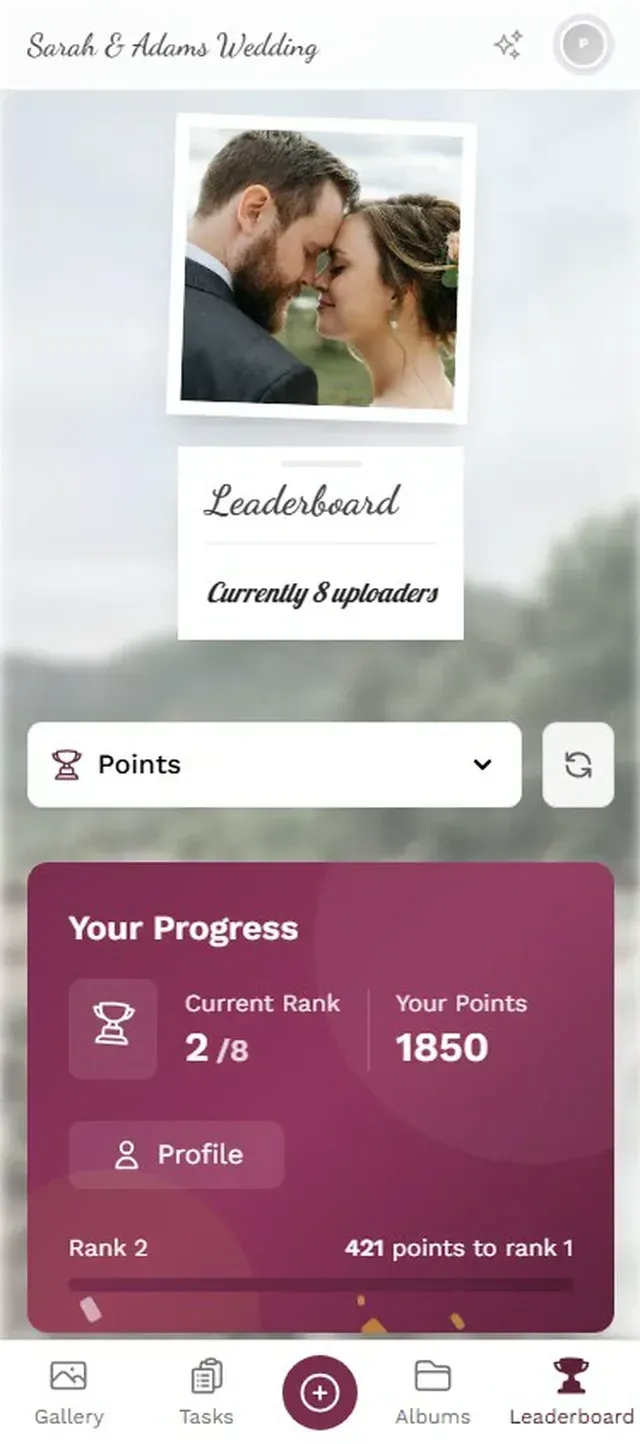
There's no live photo wall cycling through new uploads on a screen at the venue. No leaderboard tracking who's contributed the most. No photo challenges nudging guests to capture specific moments ("Best dance floor shot," "Find the flower girl"). No moderation queue to catch the inevitable blurry shot of someone's shoe, or worse.
This is where the "different problems" distinction becomes concrete. Google Photos is a storage and organization tool. Photogala is an event engagement platform that happens to collect photos. The photo collection is the starting point, not the end.
Photo challenges give guests specific moments to capture

The Feature Gap, Visualized
Numbers tell the story faster than paragraphs. Here's a side-by-side of what each platform offers for event photo sharing specifically:
Photogala vs Google Photos for Events
| Feature | Photogala | Google Photos |
|---|---|---|
| No account needed to upload | ||
| QR code access | ||
| Works in any browser (no app) | app recommended | |
| Photo wall / live display | ||
| Photo challenges | ||
| Leaderboard & points | ||
| Content moderation | ||
| AI face recognition | Deluxe plan | built in |
| Gallery customization | 4 layouts, full branding | |
| Comments & social features | ||
| NSFW auto-filter | Deluxe plan | |
| Video uploads | ||
| Unlimited uploads | all plans | with Google storage |
| Cost | €39-139 one-time | Free (with storage limits) |
Google Photos wins on exactly two things: it's free (if you have storage space), and its built-in face recognition is excellent. Those are real advantages. If your event is a small dinner party with 10 tech-comfortable friends who all use Android, Google Photos might genuinely be enough.
But for anything larger, the gaps start showing fast.
Discover what Photogala can do
The Engagement Question
Here's a question worth sitting with: do you just want to collect photos, or do you want guests to enjoy the process of sharing them?
Research from AmplifAI shows that gamification increases engagement by 48% in structured environments. Events aren't workplaces, but the psychology is the same. Give people a challenge ("Capture the best sunset shot from the terrace"), a visible ranking, and maybe a small reward, and watch what happens. Imagine three guests checking the leaderboard between courses, trying to outdo each other.
Google Photos has no mechanism for this. It's a passive container. Upload and forget. Photogala's challenges, achievements, and leaderboard turn photo sharing into an activity, something guests actively participate in rather than something they remember to do at 2 AM while waiting for a taxi.
One thing that surprised me while researching this: even basic photo challenges ("Selfie with the DJ," "Best table decoration") can change the dynamic of an event more than you'd expect. It gives shy guests permission to walk around with their phone out. It gives groups an ice-breaker. It gives the couple or host a curated collection of specific moments they actually wanted captured.
The Moderation Blind Spot
Google Photos shared albums have no moderation. Every photo uploaded is instantly visible to everyone in the album. For a vacation album with your college roommates, that's fine. For a corporate team event with the CEO in attendance? For a wedding where photos are projected live onto a screen behind the dance floor?
That's a different risk profile.
Photogala's moderation dashboard lets you (or a designated moderator, say a bridesmaid or event coordinator) review uploads before they go live. One tap to approve, one tap to reject. The Deluxe plan adds an AI-powered NSFW filter that automatically flags questionable content before a human even sees it.
Review every upload before it goes public
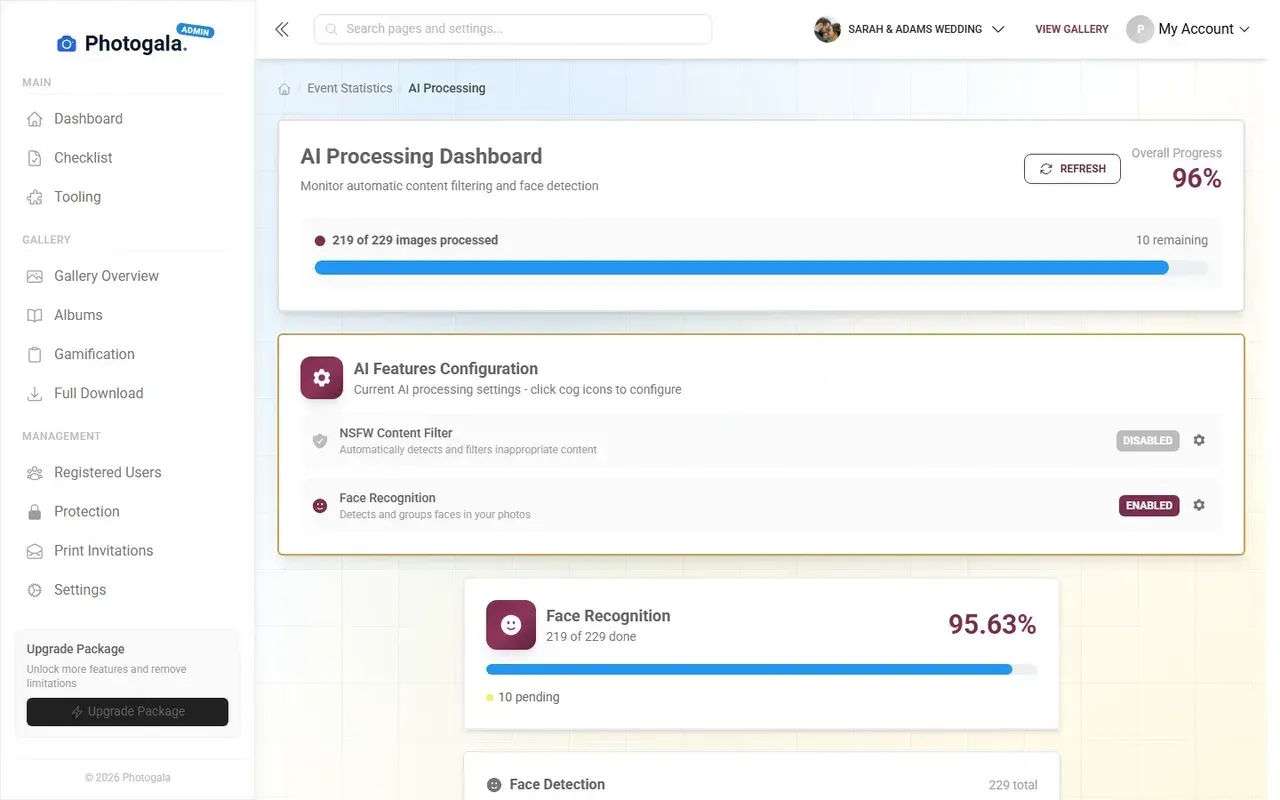
Is moderation necessary for every event? No. A backyard birthday probably doesn't need it. But having the option matters when the stakes are higher. As noted in ImageShout's guide to guest photo management, organizing and filtering guest photos is one of the biggest challenges event hosts face.
Where Google Photos Actually Wins
Fairness matters. Google Photos does some things Photogala doesn't, and pretending otherwise would be dishonest.
It's free. If you're already paying for Google One storage, adding a shared album costs nothing extra. Photogala starts at €39. For a casual get-together where everyone already has Google accounts, the price argument is real.
Face search is built in and mature. Google's face recognition has years of machine learning refinement behind it. Photogala offers face recognition too (on the Deluxe plan), but Google's is more polished for personal library search. The key difference: Photogala's face recognition is designed for event context, grouping and filtering photos by person within a single event gallery, not across your entire life.
It's already on your phone. No setup, no QR code, no new interface to learn. For the host, there's zero configuration. That simplicity has genuine value.
If you're choosing between the two, ask this: "Will every guest at my event have a Google account and know how to find a shared album?" If yes, Google Photos works. If the answer is "probably not" or "I'm not sure," that's your answer.
The Real Cost Comparison
Google Photos is free, with caveats. You get 15 GB of shared storage across Gmail, Drive, and Photos. For a Mixbook survey that found 50% of Americans do nothing with their event photos, maybe that's enough storage for the photos that actually get uploaded.
But "free" has hidden costs. No moderation means someone has to manually scroll through and remove bad photos. No engagement features mean fewer photos get shared in the first place. No photo wall means you need a separate solution (or skip it entirely). No branding means the event gallery looks like... Google.
Photogala's €39 Plus plan covers unlimited photos, unlimited guests, up to 25 video uploads, and unlimited photo challenges. The €69 Premium plan adds moderation and the gamification suite. Custom branding and the photo wall are included on every plan. One-time payment, no subscription. For context, the average US wedding costs about $36,000, and the average German wedding about €15,453 according to Bridal Times. €69 for a photo sharing solution with engagement features is a rounding error in that budget.
The honest trade-off: Photogala isn't free, and it's browser-based (no native app). For some users, that matters. For most event scenarios, the browser approach is actually an advantage because guests don't need to install anything.
Which One Should You Use?
Use Google Photos if your event is small (under 20 people), everyone has a Google account, you don't need a photo wall or moderation, and you just want a simple shared album.
Use Photogala if you want guests to actually participate (not just the five people who remember to upload), you need moderation, you want a live photo wall, or your guest list includes anyone who might not have a Google account. Which, at most events, is a lot of people.
The irony is that Google Photos is a superior photo management tool. But event photo sharing isn't a photo management problem. It's an engagement problem, a logistics problem, and sometimes a moderation problem. Photogala is built for all three.
Remember that 150-guest wedding from the opening? With a QR code on every table, no sign-in required, and a leaderboard running on the screen next to the dance floor, the photo count at the end of the night looks very different from 23.
If you want to see how the other dedicated event photo apps stack up, check out our Photogala vs GuestPix comparison or the Photogala vs FridaySnap breakdown.
Ready to create your gallery?
Start sharing your event photos with guests in minutes.
Create GalleryWritten by

I believe event photos should be more than static galleries. They should be live, playful, and unforgettable.
Categories
Related Posts

Wedding Hashtag vs QR Code Gallery: What Actually Works in 2026
Hashtags made sense in 2018. In 2026, most guest photos hide behind private profiles. Here's what replaced them.

How Much Does Event Photo Sharing Cost? Complete 2026 Guide
From free shared albums to premium platforms: what event photo sharing actually costs in 2026, what you get at each price point, and where the hidden fees lurk.

Photogala vs Snapchat for Event Photo Sharing: One Keeps Your Photos, One Deletes Them
Snapchat is fun for selfies, but event photo sharing needs permanence, organization, and zero friction. Here's how a purpose-built gallery compares.