The Wedding Photo Problem Nobody Talks About (and How to Fix It)

Your photographer will deliver 300 polished images in two or three weeks. Beautiful work. But the photo your maid of honor took of your face when you saw the venue for the first time? The one your college roommate snapped of your dad wiping his eyes during the toast? Those live on someone else's phone. And statistically, they'll stay there.
A survey by Easyweddingalbum put it bluntly: guest photos capture authentic emotions that professional photographers miss. The laughter during toasts, quiet conversations in the corner, the dance floor chaos at midnight. These candid moments hold equal value to the staged portraits.
The challenge isn't getting guests to take photos. They already do that. The challenge is collecting those photos afterward, when they're scattered across 80 or 120 phones and nobody remembers to send them.
Why the Usual Methods Fall Apart
Everyone tries something. The problem is that the "something" usually fails within 48 hours of the wedding.
The WhatsApp Group
This is the default for most couples. Create a group, add everyone, ask people to share. Sounds simple. In practice, it turns into a mess. Half the guests never join the group. The ones who do share photos in compressed quality (WhatsApp strips resolution). Scrolling through 400 messages of mixed photos, videos, voice notes, and "congratulations!!!" texts to find the good shots is nobody's idea of fun. And after a week, the group goes quiet. The photos you haven't seen yet? Gone.
AirDrop at the Reception
Works beautifully between two iPhones sitting next to each other. Falls apart when you have Android users (roughly half of European wedding guests), people who've never used AirDrop, or anyone who left the table. It's a great tool for sharing three photos with one person. It's a terrible tool for collecting 400 photos from 100 people.
Shared Google Photos or iCloud Albums
Better than WhatsApp, worse than you'd hope. Google Photos requires a Google account. iCloud requires Apple. Mixed groups (which is every wedding) means someone's always locked out. And the couple has to manually invite every single guest, which means having everyone's email address. For a 150-person wedding, that's a spreadsheet project.
As Weddingstyle.de notes, the simplest approach for collecting guest photos is QR codes. No accounts, no app installs, no invitations to manage.
What Actually Works: One QR Code, One Gallery
The concept is almost stupidly simple. You create a shared photo gallery. You get a QR code. Guests scan it with their phone camera, tap a button, and upload. No app download. No login. No account creation. The photos appear in a shared gallery that everyone can see.
That's it. The entire workflow takes about 15 seconds per guest.


1.Guests scan the code and they're in. No app needed.
The reason this works better than everything else comes down to one thing: friction. WhatsApp requires joining a group. Google Photos requires an account. AirDrop requires proximity and the right phone. A QR code requires nothing except a phone camera, which every single guest already has in their hand.
Print QR codes on table cards, place them at the bar, or even put one on a welcome sign at the entrance. The more visible the code, the more guests will scan it. This guide on QR code placement covers the best spots.
The 72-Hour Window You Can't Miss
Here's something most couples don't think about until it's too late. Guest engagement with wedding photo sharing drops off a cliff after about three days. On the wedding day itself, people are excited, emotional, and taking tons of photos. The morning after, some will still upload a few more. By Monday, most have moved on. By the following weekend, it's over.
This is why setup timing matters more than you'd expect. If you send out a sharing link two weeks after the wedding with a polite "please upload your photos," you'll get maybe 10-15 responses out of 150 guests. If the QR code is on the dinner table during the reception, you'll collect photos in real time while the energy is high.
Picture a 180-guest wedding. The QR code is on every table card. By the time the first dance starts, 40 guests have already uploaded. By midnight, you're looking at 350+ photos from 70 different perspectives. The couple's uncle, who never posts on social media, uploaded 12 photos of the ceremony because scanning a QR code felt effortless.
See it in action
Every guest photo in one album – no app.
Setting It Up (15 Minutes, Tops)
The actual setup is the easy part. Most platforms, including Photogala, follow roughly the same flow.
Three Steps to a Wedding Photo Gallery
Create your gallery
Pick a name, upload a cover photo, customize the colors to match your wedding theme. Takes about 5 minutes.
Print the QR code
Download the QR code and add it to table cards, welcome signs, or the wedding program. Most couples print 15-20 copies.
Guests scan and upload
No app, no login. Guests open their phone camera, scan the code, and start uploading photos directly from their camera roll.
One thing I'd recommend: do a test run before the wedding. Have two friends scan the code and upload a few photos. Make sure the gallery looks right, the QR code works, and you're happy with the layout. Five minutes of testing saves you from discovering a problem at the reception.
Going Beyond "Just Collecting Photos"
Collecting photos is the baseline. It solves the distribution problem. But there's a second problem most couples don't even realize they have: getting guests to actually participate actively, not just passively take a few snapshots.
FridaySnap, which has handled over 10,000 weddings, shows that the demand for this is massive. But basic upload-only galleries miss an opportunity. When guests just dump photos into a folder, you get a lot of the same shots from slightly different angles. Fifty photos of the cake. Three photos of the dance floor.
Photo challenges change this dynamic completely. Instead of "upload whatever you want," you give guests specific creative prompts: "Catch someone crying happy tears," "Find the oldest person on the dance floor," "Snap a photo that tells the story of this couple." Suddenly guests are looking for moments, not just pointing their camera at whatever's in front of them.
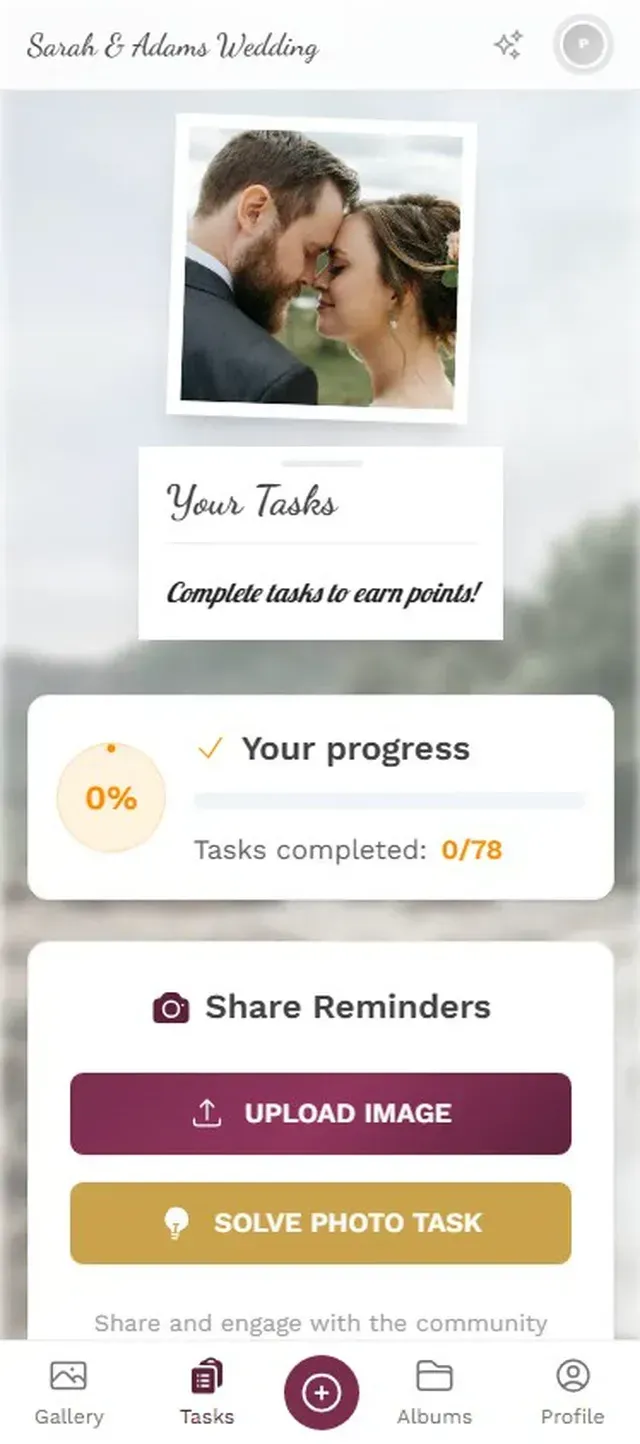
1.Guests see a list of creative challenges to complete.
Photogala takes this further with example preview photos for challenges. You can set a reference image, and guests try to recreate or mimic it. Think "recreate this funny pose" or "take a photo that looks like this movie scene." The results are consistently hilarious, and guests get competitive about it.
A leaderboard adds fuel. When guests can see who's uploaded the most or completed the most challenges, participation spikes. It's the same psychology that makes people check their step count, just applied to wedding photos.
One honest trade-off: Photogala is browser-based, not a native app. For 95% of guests this doesn't matter (it works great in any mobile browser), but guests with very old phones or poor connectivity might have a slower experience than a dedicated app would provide.
What to Look For in a Photo Sharing Tool
Not all solutions are equal. Some platforms limit your photo count per tier. Others compress images. A few require guests to create accounts, which kills participation. Here's what actually matters.
No app install required. This is non-negotiable. The moment guests have to download something from the App Store, you lose half of them. Browser-based solutions that work via QR code have the highest participation rates by far.
Original quality uploads. Your cousin's DSLR photo of the first dance shouldn't get compressed to a WhatsApp-quality thumbnail. Look for platforms that preserve the original file.
Unlimited uploads. Some platforms cap photos at 50 or 200 per tier. At a wedding with 150 guests, you'll blow past that before dinner is over. WedUploader and Photogala both offer unlimited uploads, though WedUploader stores everything in your own Google Drive (which has its own storage limits).
A live photo wall option. Connecting the gallery to a screen at the venue (behind the DJ booth, near the bar) creates a live slideshow of guest uploads. It's a crowd pleaser. People see their photo pop up on the big screen and immediately want to upload more.
A live photo wall keeps the energy going all night.
Content moderation. Open galleries are wonderful until someone uploads something inappropriate. Pre-approval mode lets you (or a trusted bridesmaid) review photos before they hit the gallery or the big screen. One tap to approve, one tap to reject. Assign it to someone at the head table and forget about it.
The Part Nobody Plans For
Here's something that catches couples off guard: what happens with the photos after the wedding. You collected 500 guest photos. They're sitting in a gallery. Now what?
Download them. All of them. Most platforms offer a bulk ZIP download. Do it within the first month, while you still have access and before any storage expiration kicks in. Photogala's Plus plan keeps photos for 6 months, Premium and Deluxe for 12. Other platforms vary.
Then back them up somewhere permanent. An external hard drive, a cloud storage service you already pay for, whatever works for your setup. The wedding gallery is a collection tool, not a forever archive. Treat it accordingly.
And one more thing: send guests a link to the shared gallery in your thank-you cards. They contributed to it. They want to see the full collection too. It's a small gesture that people genuinely appreciate. For more ideas on sharing the final collection, this article on sending wedding photos to guests covers the full process.
The photos your guests take won't be perfect. They'll be blurry, poorly lit, weirdly cropped. Some will have a thumb over the lens. But mixed in with those imperfect shots will be the moments your photographer couldn't catch: the inside jokes, the surprised reactions, the 11 PM dance floor chaos. Those are the photos you'll actually look at ten years from now.
Getting them off 150 phones and into one place doesn't have to be complicated. A QR code on the table, a shared gallery, and 15 seconds of each guest's time. That's the whole solution.
All of this comes with your own event.
Setting it up takes five minutes. You can build and view everything before you decide.
Starting from €39 one-timeOne-time payment — No subscription
- No App Required
- Setup in 5 Minutes
- 30-Day Money Back
“I use PhotoGala Deluxe and I'm absolutely thrilled. It was the perfect solution for documenting a sports event. Uploading and downloading via the link is a breeze for every participant. What won me over most were the photo wall and the slideshow – both are quick to set up and look really professional. Big praise also to Peter from the PhotoGala team: he's very easy to reach by email, replies quickly and even took my suggestions on board and added new features that made my slideshow even better. You rarely get support this dedicated. A clear 5-star recommendation!”
Written by

I believe event photos should be more than static galleries. They should be live, playful, and unforgettable.
Categories
Related Posts

Bridal Shower Photo Sharing: Collect Every Sweet Moment in One Gallery
Bridal shower photos end up scattered across 15 phones. Here's how to get them all into one gallery before the mimosas wear off.

Maternity Photo Sharing: How to Keep Every Announcement, Bump Shot, and Memory in One Place
Pregnancy announcements land on 4 different apps. Maternity photos get lost in group chats. Here's how to keep every photo in one shared gallery your whole family can access.

Sales Kickoff Photo Sharing: How to Turn a Mandatory Meeting Into a Team Memory
Sales kickoffs are expensive. The photos from them usually disappear into 14 different camera rolls. Here's how to fix that.