7 Ways to Collect Wedding Guest Photos (Ranked by What Actually Works)


Your photographer delivers 350 polished, color-graded images three weeks after the wedding. They're gorgeous. And they're missing the moment your college roommate ugly-cried during the vows, the impromptu limbo contest at midnight, and the photo your grandmother secretly took of you and your partner sneaking a quiet moment behind the barn.
Guest photos fill those gaps. The problem is collecting them. A Mixbook survey found that 50% of Americans do nothing with the photos on their phone. They sit there, unsent, unsorted, slowly buried under screenshots and grocery lists.
So how do you actually get those photos off your guests' phones and into one place? I tested every common method. Some work. Most don't. Here's an honest ranking.
The Methods That Sound Good (But Underdeliver)
1. WhatsApp or iMessage Group Chats
The most common approach: create a group chat, ask everyone to drop their photos in. It's free, everyone already has the app, and it requires zero setup.
Here's the reality. WhatsApp compresses every image to roughly 1,600 pixels on the long edge. That beautiful sunset shot your cousin took? Downgraded to blurry mush the moment it hits the chat. Worse, as Snapeen's guide puts it, what you typically end up with is "20 photos from tech-savvy relatives, blurry screenshots, and forgotten promises."
There's also the social friction problem. Not everyone wants to be in a 150-person group chat with strangers. Your partner's work colleagues and your great-aunt Margret don't need to be in the same thread.
2. Shared Google Photos or iCloud Albums
A step up from group chats. You create a shared album, send the link, and guests add their photos. Image quality stays intact. Free. Sounds perfect.
Except half your guest list doesn't have Google accounts. And the half that does can't figure out the sharing permissions. iCloud is even worse: it only works well if everyone has an Apple device. At a 150-person wedding, you can safely assume 30-40% of guests will hit a technical wall before uploading a single photo.
The adoption problem: Pix.wedding nails it: "The biggest factor in any wedding photo sharing solution is guest adoption. It does not matter how good the platform is if your guests do not use it." Every method should be judged on this metric first.
3. Social Media Hashtags
Create a custom hashtag (#SmithJonesWedding2026), announce it at the reception, hope guests use it.
Two problems. First, only guests who are active on Instagram will participate, which skews heavily toward ages 22-35 and excludes a large chunk of your guest list. Second, the photos live on Instagram's servers, not yours. They're cropped, filtered, compressed, and mixed in with posts from strangers who happened to use the same hashtag. You don't own them.
Hashtags can complement other methods, but they shouldn't be your primary collection strategy.
4. Email Collection
"Send your photos to [email protected]!" Simple concept. Terrible execution. Gmail caps attachments at 25 MB. Most phones shoot photos at 5-8 MB each, so guests can send maybe 3-4 photos per email before hitting the limit. And nobody, absolutely nobody, wants to email photos in 2026.
The Methods That Actually Work
5. AirDrop or USB Stations
Set up a laptop at the venue and have guests AirDrop their photos or plug in a USB cable. Full quality, no compression, no accounts needed.
The upside: lossless transfers. The downsides: you need someone staffing the station all night, AirDrop only works Apple-to-Apple, and it creates a bottleneck. Picture a line of eight guests waiting to AirDrop their photos while the band plays their favorite song. Most will wander off. This works best as a secondary option at smaller events (under 50 guests).
6. Photo Booths with Digital Sharing
Photo booths are genuinely fun. 61% of couples include one as guest entertainment. The modern ones offer digital delivery via text or email alongside the printed strip.
The catch: they're expensive (€400-800 for a rental), they capture only posed booth shots (not the candid moments throughout the evening), and they create a single collection point rather than capturing the full event. Great for entertainment. Incomplete as a photo collection strategy.
Discover what Photogala can do
7. QR Code Photo Sharing Apps
This is where things get interesting. A QR code on every table, linked to a browser-based gallery. Guests scan, upload, done. No app download, no account creation, no technical skills required.
QR code usage has surged 323% since 2021, and 49% of couples already include QR codes on save-the-dates or invitations. Your guests are familiar with the mechanic. The barrier to entry is essentially zero.
The key advantage is passive collection. You're not asking guests to remember an email address, join a group chat, or download an app. The QR code sits on the table. Curiosity does the rest. At a well-set-up wedding, photos start rolling in before the main course is served.
Not all QR code apps are equal, though. Some limit photo counts per tier. Some compress images. Some offer nothing beyond a basic upload form. The best ones add features that actively encourage more uploads: photo challenges that give guests fun assignments, leaderboards that tap into friendly competition, and real-time photo walls that make people want to see their shots on screen.
All 7 Methods, Side by Side
Wedding Guest Photo Collection Methods Compared
| Method | Adoption Rate | Photo Quality | Cost | Effort |
|---|---|---|---|---|
| WhatsApp Group | Medium | Compressed | Free | Low |
| Google/iCloud Album | Low-Medium | Original | Free | Medium |
| Hashtag | Low | Compressed | Free | Low |
| Very Low | Original | Free | High | |
| AirDrop/USB | Low | Original | Free | High |
| Photo Booth | Medium | Booth only | €400-800 | Medium |
| QR Code App | High | Original | €39-139 | Low |
What QR Code Sharing Looks Like in Practice
Imagine a 180-guest wedding. QR codes printed on small table cards, maybe also on the bar menu and near the photo wall screen. A guest picks up the card, scans it with their phone camera, and lands on a browser-based gallery. They tap upload, select their photos, and they're done. The whole process takes about 20 seconds.

Quick name entry, no account required

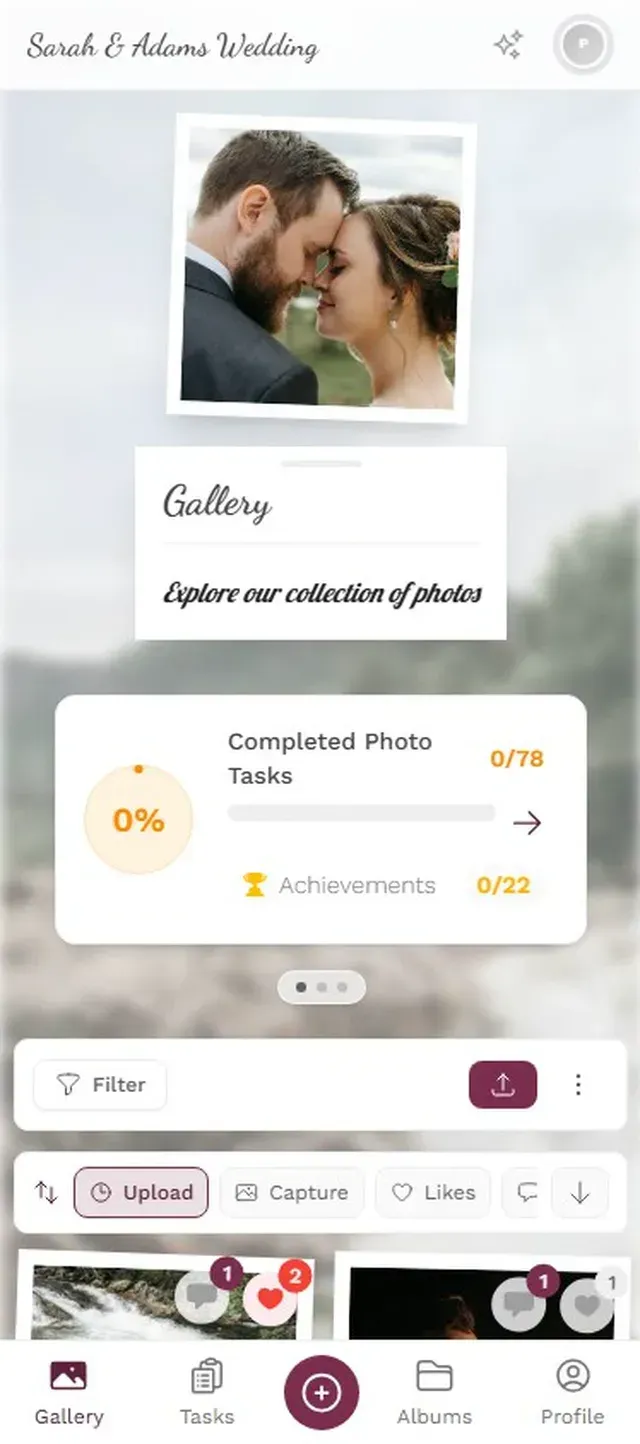

The photo wall is what really drives engagement. When guests see their photos appearing on a screen near the dance floor or behind the bar, it creates a feedback loop. They upload more. Their table neighbors notice and start uploading too. By the end of the night, you could have 400-600 photos from a wedding this size, all in original quality, all in one gallery.
Photogala takes this further with photo challenges ("Capture the flower girl's best moment" or "Find the oldest family member on the dance floor") and a leaderboard that ranks guests by uploads. It sounds gimmicky until you picture a table of groomsmen competing to outscore each other. That kind of friendly rivalry fills gaps in your gallery that passive uploading alone would miss. You can read more about how photo challenges drive engagement.
One honest trade-off: Photogala is browser-based, not a native app. That's actually a feature for guests (no download needed), but it means you need a decent WiFi or mobile signal at your venue. Check coverage before the big day. Offline uploads are not supported.
5 Tips to Maximize Guest Photo Uploads
The method matters less than the execution. Even the best QR code app collects nothing if nobody scans the code.
- Place QR codes everywhere. Table cards, bathroom mirrors, the bar, near the entrance. One placement point isn't enough. Guests need to encounter the code 2-3 times before curiosity wins.
- Announce it once, early. Have your MC mention the photo gallery right after the welcome toast. One clear explanation: "Scan the QR code on your table to share your photos tonight." Don't over-explain.
- Put the photo wall in a high-traffic spot. Near the bar or behind the DJ, not tucked in a side room. The screen sells itself.
- Start with a challenge. Something easy like "Take a selfie with the bride and groom" gets the first uploads rolling. Once people see photos appearing, the momentum builds on its own.
- Don't wait until after the event. Open the gallery before cocktail hour. The getting-ready moments and ceremony shots from guest phones are some of the best.
Set Up Your Gallery in 3 Steps
Create Your Event
Pick a plan, name your event, customize the branding. Takes about 2 minutes.
Print & Place QR Codes
Download the QR code, print it on table cards or add it to your invitations.
Watch Photos Roll In
Guests scan, upload, and photos appear in the gallery and on the photo wall instantly.
The Photos You'll Be Glad You Collected
Here's what surprised me most about researching this topic. The 2026 wedding photography trends point toward raw, emotional, unposed moments as the defining aesthetic of the year. The nostalgia-driven, imperfect snapshots that guests capture on their phones are exactly what couples are paying professional photographers thousands of dollars to replicate.
Your photographer captures the posed portrait on the grand staircase. Your guests capture the flower girl asleep under the dessert table at 11 PM. Both matter. One you planned for. The other you almost lost forever because it was trapped on your cousin's phone.
Whatever method you choose, choose something. The default approach, which is hoping people will "send you the photos" afterward, has a near-zero success rate. The good news: a QR code on a table card costs almost nothing and takes five minutes to set up. The photos it collects are priceless.
Ready to create your gallery?
Start sharing your event photos with guests in minutes.
Create GalleryWritten by

I believe event photos should be more than static galleries. They should be live, playful, and unforgettable.
Categories
Related Posts

Multicultural Wedding Photo Sharing: Honoring Every Tradition in One Gallery
When your wedding blends two (or more) cultures, collecting guest photos gets complicated fast. Here's how to make it work without losing a single moment.

How to Collect Photos From Event Guests Automatically
Stop chasing guests for photos after the event. A QR code, a shared gallery, and a few smart settings can do the collecting for you.
Housewarming Party Photo Sharing: How to Capture Your New Place Through Everyone's Eyes
Your housewarming is the only time your home will look this good and feel this new. Here's how to collect every guest's photos without lifting a finger.