5 Ways to Make Corporate Event Photos Look Professional (Without a Photographer)


Picture this: your company just wrapped up an offsite team event. Forty people, great venue, the CEO actually cracked a joke that landed. Two weeks later, someone in marketing asks for photos for the internal newsletter. What they get: three blurry shots from the CEO's assistant, a selfie someone posted on LinkedIn, and a perfectly lit photo of the catering table. Empty.
Sound familiar? Most companies don't hire photographers for anything below a major conference. The budget isn't there, or the event feels too casual. But here's the thing: professional-looking event photos don't require a professional photographer. They require a little bit of structure.
As Paperblog's coverage of event photography puts it plainly: the moments are already being captured. Guests photograph real interactions all day long, the jokes at the back table, quiet conversations, the reactions happening while everyone else is looking at the stage. The hard part isn't taking photos. It's making sure the good ones don't stay buried in 40 different camera rolls.
Here are five ways to fix that.
1. Lighting Is 80% of the Job
The gap between a "professional" event photo and an amateur one almost always comes down to light. Not composition, not the camera, not editing. Light.
Most corporate event spaces have the same problem: overhead fluorescent panels or dim mood lighting. Neither works for photos. Fluorescents cast a flat, slightly green tint. Dim lighting forces phone cameras into high ISO, which means grain and blur.
You don't need a lighting rig. But you can do a few things that make a real difference:
- Open the blinds. If your venue has windows, use them. Natural daylight is free and flattering. Schedule key moments (group photos, award handoffs) near windows.
- Add two portable LED panels. A pair of small LED lights (€30-50 each) placed at 45-degree angles to the stage or speaking area will transform every photo taken in that zone. Battery-powered, no wiring needed.
- Avoid backlighting. If the podium is in front of a bright window, every speaker photo will be a silhouette. Flip the room layout if you can.
One detail that often gets overlooked: phone cameras auto-adjust exposure based on the brightest area in frame. If there's a projector screen behind the speaker, the camera will expose for the screen and turn the speaker into a shadow. Move the speaker to the side of the screen, not in front of it.
Quick test: Before the event starts, stand where guests will be sitting and take a photo of the stage area with your phone. If the speaker's face is dark or grainy, you have a lighting problem. Fix it now, not after 40 people have already taken bad photos.
2. Make a Shot List (and Share It)
Professional photographers always show up with a shot list. It's the simplest tool in event photography, and almost nobody uses it for corporate events.
A shot list is just a checklist of moments and scenes you want captured. PlanIt Events recommends planning shots ahead by listing must-have moments: speeches, special announcements, group photos, and key interactions. The idea isn't to script every photo. It's to make sure someone is paying attention when the important stuff happens.
For a typical corporate offsite or team event, your shot list might look like this:
- Wide shot of the full room during the keynote
- Close-up of the speaker (from the side, not from behind heads)
- Candid table conversations during lunch
- Team activity in progress (not posed, mid-action)
- Award or recognition moment
- Group photo (everyone, end of day)
- One detail shot: the branded backdrop, name badges, table setup
Now here's the trick that makes this actually work: don't keep the list to yourself. Share it with 3-4 people. "Hey, you're sitting near the stage, can you grab a close-up of the keynote?" "You're on the activities team, can you take a few action shots?" Distributing responsibility means coverage, not just one person's perspective.
3. Use Photo Challenges to Direct the Content
This is where things get interesting. Shot lists work for a small planning team. But what about getting 40, 60, or 100 attendees to take better photos without micromanaging them?
Photo challenges solve this by turning the shot list into a game. Instead of "please take good photos," you create specific prompts: "Best candid laugh," "Your team in action," "The keynote in one frame." Attendees compete, the leaderboard adds a bit of friendly pressure, and suddenly you have dozens of intentional, on-theme photos instead of random snapshots.
The psychology backs this up. Edinburg Studios' 2026 trends report highlights that authentic, story-driven coverage is replacing random shot collections. Photo challenges are essentially crowd-directed storytelling. You define what stories you want told, and your attendees tell them.
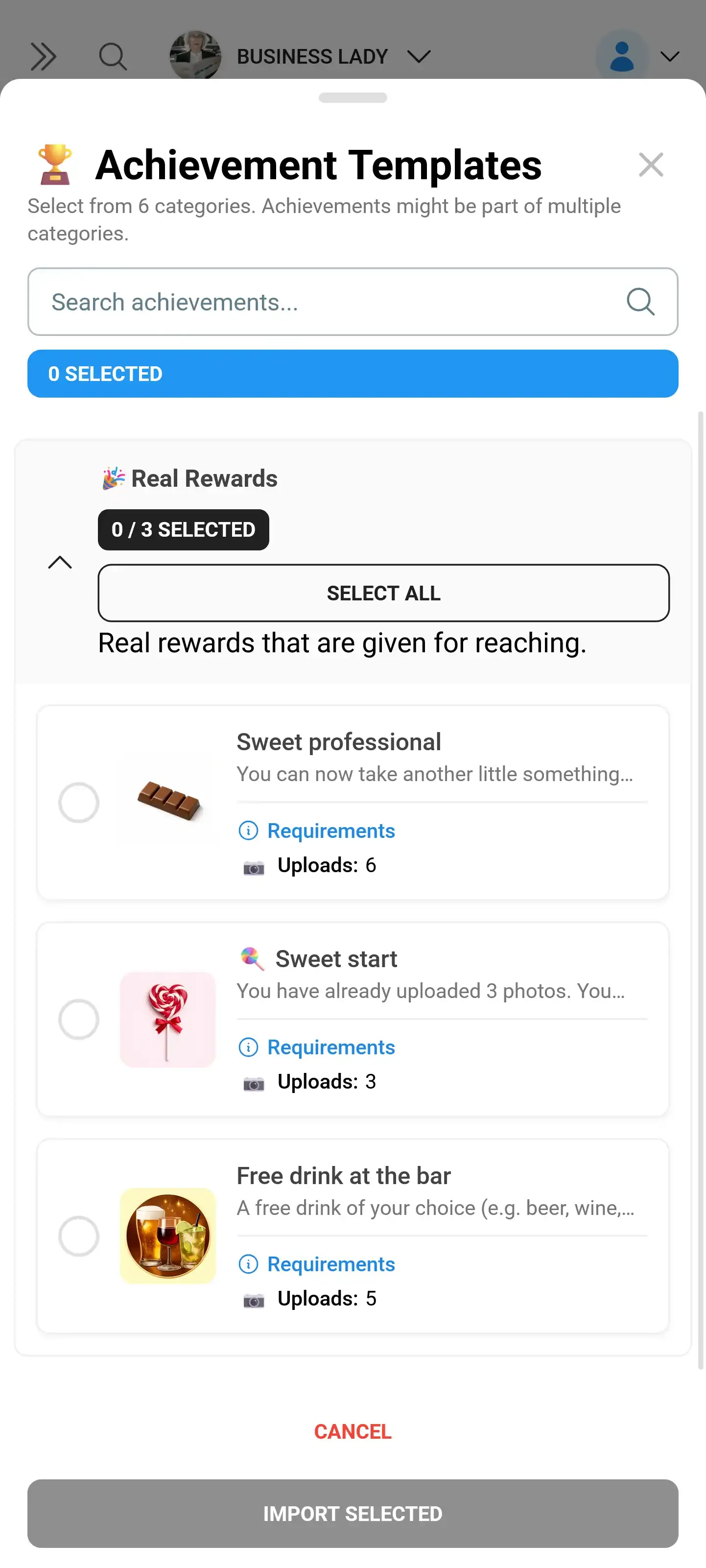
1.Attendees see challenge prompts and submit photos directly from their phone
With Photogala, challenges can include example preview photos showing attendees exactly what you're looking for. Imagine setting a challenge called "The Speaker" with a sample photo showing the ideal angle and framing. Instead of 30 photos of the back of someone's head, you get 30 well-framed shots from the side. Some will be great.
One thing to keep in mind: don't overdo the challenges. Five to eight is the sweet spot for a half-day event. More than that and people start ignoring them. Less than three and there's not enough variety to keep it engaging.
See it in action
Every guest photo in one album – no app.
4. Set Up a Central Collection Point
Here's where most corporate events fail completely. The photos exist. They're scattered across 40 phones, three WhatsApp groups, a Slack channel, and someone's Google Drive link that expires in 30 days.
The solution is embarrassingly simple: give everyone one place to upload, and make it frictionless. No app install, no account creation, no "I'll send them later." A QR code on every table that opens a browser gallery. Scan, upload, done.
This is Photogala's core function. You create a gallery, print QR codes (or display one on screen), and guests upload from their phone's browser. Everything lands in one shared gallery in real time. No chasing people after the event, no "can you AirDrop me those?"

1.No app needed. Guests scan, pick photos, and upload in seconds.
There's one honest trade-off here: Photogala is browser-based, not a native app. That's actually an advantage for events (no install barrier), but it means the upload experience depends on the venue's WiFi. If your venue has spotty connectivity, have someone set up a mobile hotspot as a backup. Learned that one the hard way.
5. Curate Ruthlessly After the Event
This is the step everyone skips. And it's the one that makes the biggest difference between "we have 200 event photos" and "we have 20 great event photos."
Professional photographers deliver 50-100 edited shots from a full-day event. They might take 2,000 raw photos to get there. The ratio matters. Dumping 200 unfiltered photos into a shared folder is not professional. Selecting the 20-30 best ones is.
Emmages Photography's analysis of 2026 corporate event trends makes an important point: event imagery functions as strategic assets that influence perception and credibility long-term. That means the photos you share internally and externally need to be chosen carefully, not just dumped.
A few curation rules that help:
- Delete duplicates first. If twelve people photographed the same keynote moment, keep the best two.
- Prioritize candid over posed. A genuine laugh at a table beats a stiff group photo every time. (The exception: you need at least one clean group photo for the record.)
- Check the backgrounds. A great candid shot with a garbage bin in the background isn't a great shot.
- Crop generously. Most phone photos have too much dead space around the subject. Cropping in by 20-30% often transforms a mediocre shot into a good one.
If you're using Photogala's moderation feature, you can actually do this curation in real time during the event. Set up pre-approval so every photo gets reviewed before it appears on the live photo wall or shared gallery. Assign one person on your team as moderator. One tap to approve, one tap to reject. The public gallery stays clean from the start.
The Real Secret: Lower the Bar for Capturing, Raise It for Sharing
Here's the underlying principle behind all five of these tips: you want as many raw photos as possible (quantity), but you only share the best ones (quality). Professional photographers do the same thing. They just do both parts themselves.
At a corporate event, the "capturing" part is handled by your attendees. They're already doing it. Your job is to make their photos a little better (lighting, challenges, shot list) and then filter the results (curation, moderation).
Say you run a team offsite with 50 people. With a QR code gallery and three or four photo challenges, you might collect 150-250 photos over the course of the day. After curation, you end up with 25-40 polished shots that look intentional, well-lit, and on-brand. That's a better result than most corporate photographers deliver for events this size.
For more ideas on how to make event photos work harder for your brand, check out our guide on corporate photo booth alternatives or our practical event photography tips.
All of this comes with your own event.
Setting it up takes five minutes. You can build and view everything before you decide.
Starting from €39 one-timeOne-time payment — No subscription
- No App Required
- Setup in 5 Minutes
- 30-Day Money Back
“I use PhotoGala Deluxe and I'm absolutely thrilled. It was the perfect solution for documenting a sports event. Uploading and downloading via the link is a breeze for every participant. What won me over most were the photo wall and the slideshow – both are quick to set up and look really professional. Big praise also to Peter from the PhotoGala team: he's very easy to reach by email, replies quickly and even took my suggestions on board and added new features that made my slideshow even better. You rarely get support this dedicated. A clear 5-star recommendation!”
Written by

I believe event photos should be more than static galleries. They should be live, playful, and unforgettable.
Categories
Related Posts

Bridal Shower Photo Sharing: Collect Every Sweet Moment in One Gallery
Bridal shower photos end up scattered across 15 phones. Here's how to get them all into one gallery before the mimosas wear off.

Maternity Photo Sharing: How to Keep Every Announcement, Bump Shot, and Memory in One Place
Pregnancy announcements land on 4 different apps. Maternity photos get lost in group chats. Here's how to keep every photo in one shared gallery your whole family can access.

Sales Kickoff Photo Sharing: How to Turn a Mandatory Meeting Into a Team Memory
Sales kickoffs are expensive. The photos from them usually disappear into 14 different camera rolls. Here's how to fix that.