Three Hundred Phones, One Gallery: The Graduation Ball Photo Setup That Actually Works

The ball is over. Five hundred people are heading home, the decoration crew is peeling tape off the walls, and somewhere on a couple hundred phones, the best video of the midnight show is sitting on a device that's currently face-down on someone's nightstand. Nobody knows whose phone. Nobody will ever ask.
Every Maturaball in Austria, every Abiball in Germany, every prom and formal elsewhere ends the same way. The ball is often the biggest event of the school year, and the photos from that night are supposed to last. Instead, they're scattered across hundreds of camera rolls, slowly sinking into the "I'll send them later" void. A WhatsApp group might collect a fraction. A shared Google Drive another. The rest? Gone.
It doesn't have to play out like this. One gallery, one QR code, every phone uploading to the same place. The next morning, the whole year group has access to everything. For a ball with hundreds of uploaders, pick a plan with enough uploader slots (250 on Premium, 500 on Deluxe). Here's how to set that up.
One QR Code on Every Ticket
The idea is simple. You create one shared photo gallery for the ball and get a QR code. That QR code goes everywhere: printed on the back of every ticket, on table tents at each seat, projected on a screen near the entrance. Guests scan it with their phone camera, a browser opens, and they start uploading photos and videos. No app to install. No account to create.
For a Maturaball or Abiball committee, this kills the biggest coordination headache. Nobody needs to collect photos from fifteen different class reps afterward. Parents don't need to beg for pictures in the WhatsApp group. Everyone uploads to the same gallery, everyone can browse it. The same principle works for school events with younger students: switch on moderation (Premium and up), protect the gallery with a password and check your school's photo consent rules first.
The QR code upload works on any smartphone. Android, iPhone, older models, newer ones. Scan, tap, pick photos, done. The technical barrier is basically zero, which matters when your audience ranges from 17-year-old students to their 65-year-old grandparents sitting at the VIP table.
A Photo Wall Next to the Dance Floor
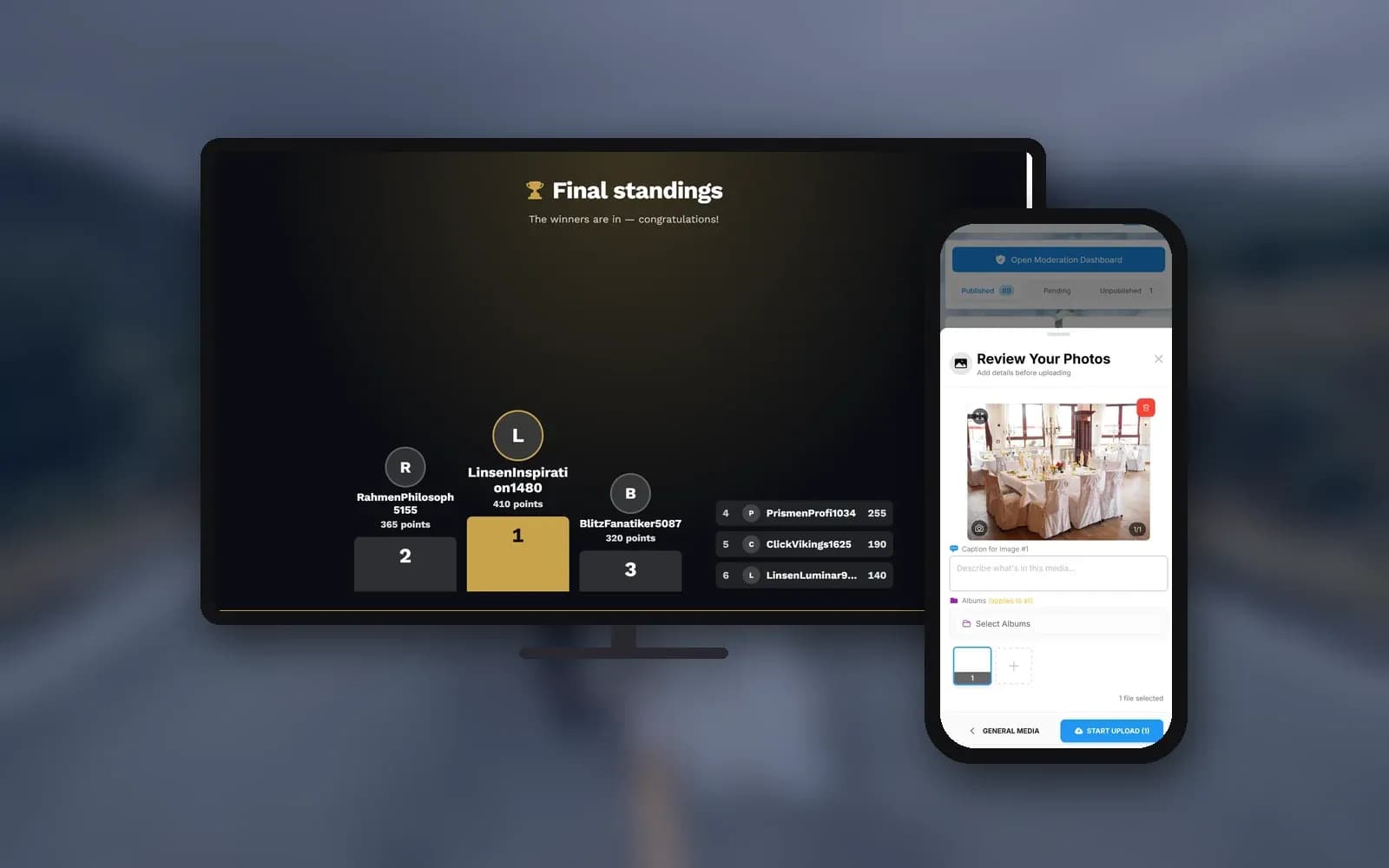
This is the part that gets people talking during the ball itself. Connect a TV or projector to the gallery, place it somewhere visible (near the bar or the dance floor works well), and every approved photo cycles on the big screen in real time. Guests see their uploads appear, point, laugh, take more photos. It feeds itself. The live photo wall supports different display modes, from a classic slideshow to a collage layout with polaroid-style frames. You'll need at least the Plus plan for the wall.
One thing the ball committee will appreciate: content moderation. With moderation switched on, every upload lands in an approval queue first. A committee member (or two, for a long night) reviews incoming photos on their phone before anything goes on screen. One tap to approve, one to reject. Only photos a committee member approved reach the big screen. Moderation is available on the Premium plan and above.
You can get creative with the wall, too. Photo wall slides let you mix sponsor logos, the ball programme, or a thank-you message between the guest photos (that feature is on the Deluxe plan). And if your year group runs on competition, a live leaderboard on the wall can show who's uploaded the most (Premium plan, since it needs both the photo wall and the leaderboard). Works surprisingly well for getting a hall full of teenagers to actually participate.


1.The photo wall shows approved uploads in real time
Set Up Your Ball Gallery in Four Steps
Create the gallery
Sign up (free, no credit card), name your event, pick a design. Takes about five minutes.
Print the QR code
Download the QR code and add it to tickets, table tents, posters, or the ball programme. QR code upload works on every plan, including the free one.
Set up the photo wall
Connect a TV or projector, open the photo wall URL in a browser, and go full-screen. Requires the Plus plan or above.
Switch on moderation
Assign a committee member as moderator. They approve or reject uploads before anything hits the big screen. Requires the Premium plan or above.
See it in action
Every guest photo in one album – no app.
When the Music Starts
Picture the first hour. The band plays, the entrance ceremony wraps up, and phones come out. Someone scans the QR code on their ticket, picks three photos from the red carpet, uploads. Moments later (or right after approval, if moderation is on), those photos rotate on the big screen. The person at the next table notices, scans the same code, uploads their own shots. By the end of the first dance, the uploads keep coming. Nobody from the committee lifted a finger.
Then the midnight show hits. Whether it's a choreographed dance, a comedy sketch, or the classic teacher roast, every second person in the audience films it. Those clips go straight into the gallery (video uploads need a paid plan, more on that below). When guests upload video from their phones, the committee ends up with fifteen different angles of the same performance. The best one will come from someone nobody expected.
Video uploads require at least the Plus plan, and the entry tier caps you at 25 videos. For a ball with a midnight show and plenty of dance floor clips, the Premium plan (unlimited videos) is the safer choice. The free plan supports photos only, and does not include the photo wall.
The DJ and the band are part of the atmosphere, not something the gallery replaces. Some committees set up guest song requests alongside the photo gallery, so everyone can submit wishes from the same phone. And if anyone captures a great motion photo on an Android phone, it keeps its movement in the gallery. (iPhone Live Photos arrive as stills, though, worth mentioning in the event info.)
The Photographer and the Photo Booth
Most graduation balls hire a professional photographer, some rent a photo booth. Good. These aren't competitors to a guest gallery. They're complements. The photographer captures the polished, well-lit shots: the entrance, the awards, the formal group photo. The guest gallery captures everything else. Candid dance floor moments. Silly backstage selfies. The midnight show from row five.
Talk to the photographer beforehand. If they're open to it, their edited shots can be added to the gallery afterward through live upload via FTP or WebDAV. The committee ends up with one gallery containing both the professional photos and the guest snapshots. The photo booth can send its shots straight in, too. Just note: the live upload feature requires the Premium plan or above.
The Morning After
Here's where the setup pays for itself. The next day, the ball committee shares one link. Students forward it to their group chats. Parents get it from the class rep. Set a gallery password and agree with the school who may receive the link, since many guests are under 18. Teachers find it in their inbox. One link, one gallery, every photo and video from the night. No chasing. No "can you send me that one from the stage?" messages.
Downloads are available from the Plus plan, including bulk ZIP downloads of the entire gallery in original quality. The gallery stays online for the full storage period (6 months on the entry plan, longer on higher tiers), and that period starts after the first 10 photos, not from the purchase date. You can prepare everything weeks before the ball without burning storage time. If your school runs an annual ball, you can even reuse the setup for next year's committee.
The ball committee stays in charge the whole time. Remove photos, manage access, customize the gallery header with the ball's name and a cover photo from the night. Custom gallery colors to match the school branding are available on the Premium plan. This isn't a free-for-all dump folder. It's a curated event gallery for the whole year group.
A note on minors and consent. If students at the ball are under 18, consent for photos matters. Make it clear in advance that photos will be shared in a group gallery. Switch on moderation so nothing appears without approval. The gallery is password-protected, limiting access to people with the link and code. For more on safe gallery setups for school events, see our guide for schools and PTAs.
The ball ends. Five hundred people head home. But this time, the best video of the midnight show isn't trapped on a mystery phone. It's in the gallery, along with everything else. By the time the headaches fade, the whole year group is already scrolling through it.
All of this comes with your own event.
Setting it up takes five minutes. You can build and view everything before you decide.
Starting from €39 one-timeOne-time payment — No subscription
- No App Required
- Setup in 5 Minutes
- 30-Day Money Back
“We used the software at my mum's birthday party. It went down really well 😊”
Written by

I believe event photos should be more than static galleries. They should be live, playful, and unforgettable.
Categories
Related Posts

Photo Sharing for Churches and Congregations: One Gallery for Every Service
Churches produce hundreds of photos every week across dozens of phones. Most vanish into personal camera rolls. Here's how one shared gallery with a QR code fixes that.
Photo Sharing for Wedding Planners: Delight Clients and Win Referrals
Wedding planners who help guests share photos don't just create better events. They build a referral engine that runs on emotion, timing, and shared memories.

Photo Sharing for Schools and PTAs: Safe Galleries for Every Event
School events generate hundreds of parent photos that end up scattered across WhatsApp groups and email threads. Here's how QR code galleries keep them organized and FERPA-friendly.