How to Share High-Resolution Photos with Clients (Without the Headache)


The photos are edited. Color-corrected, cropped, exported at full resolution. Two weeks of work, and they look fantastic. Now you need to get 847 files into your client's hands. This is where things get ugly.
You zip the folder. The archive is 14 GB. Gmail won't touch it. You upload it to Google Drive and send a link. Three days later, the client emails back: "I can't figure out how to download them all at once." You try WeTransfer. The link expires in seven days. The bride's mother tries to access it on day eight. You re-send. She downloads a single preview thumbnail and thinks that's the final file.
Sound familiar? You're not alone. According to Zenfolio's delivery guide, the post-session delivery process is one of the biggest pain points for working photographers. And the frustrating part is that the delivery experience shapes how clients remember you, sometimes more than the photos themselves.
The Delivery Problem Nobody Talks About
Photography blogs obsess over gear, lighting, and editing. But the moment between "export" and "client has photos" is a black hole. Most photographers cobble together a workflow from whatever free tools are available, and most of those tools weren't built for this.
Here's what typically goes wrong:
- File size limits. Full-resolution JPEGs from a 45MP camera run 15-25 MB each. A 500-photo wedding set is 8-12 GB. Most email services cap attachments at 25 MB. Cloud storage links work but feel impersonal.
- Expired links. WeTransfer's free tier gives you 7 days. Dropbox links can be revoked accidentally. Clients don't always download immediately, and suddenly you're resending files months later.
- No presentation layer. A folder of numbered files (DSC_4872.jpg, DSC_4873.jpg) doesn't exactly scream "professional." The client sees raw files, not a curated gallery experience.
- Download confusion. Non-technical clients struggle with bulk downloads, ZIP extraction, and cloud storage interfaces. You end up on a support call walking someone through Google Drive.
As Digital Photography School puts it, choosing the right delivery method means balancing speed, ease of use, security, and the overall client experience. Most free tools only get you one or two of those.
What Clients Actually Want
After years of watching photographers struggle with this, the pattern is clear. Clients don't care about your file management system. They care about three things:
- Instant access. They want to see their photos now, not after figuring out how ZIP files work on an iPhone.
- Easy sharing. They want to forward the gallery to family members with one tap. Not instructions. Not a password they'll forget.
- Full quality when they need it. They want to browse casually on their phone, but download the full-resolution file when they want to print one.
That's it. Everything else (your folder structure, your naming convention, your preferred cloud provider) is invisible to them. And it should be.
SendPhoto's workflow guide makes this point well: professional delivery should reflect the quality of your work. A beautiful gallery with password protection and easy downloads builds client confidence. A Google Drive folder with 847 files does not.
The Common Approaches (and Where They Break)
Let's be honest about the options most photographers use today.
Google Drive / Dropbox
Free, familiar, and functional for small batches. But there's no presentation. Clients see a file list, not a gallery. Bulk downloading hundreds of files is clunky on mobile. And shared links don't give you any insight into whether the client actually downloaded anything.
WeTransfer
Great for one-off transfers. The 7-day expiry on free links is a real problem, though. If you're delivering to a wedding couple and their parents, someone will miss the window. The Pro plan fixes this but adds a monthly cost to something you use sporadically.
Dedicated Gallery Platforms
Services like Pixieset, ShootProof, or Pic-Time were built for this. They offer branded galleries, client proofing, print sales, and download controls. For studio photographers doing portraits and commercial work, they're solid. But they come with monthly subscriptions ($10-40/month), and most are overkill for event photographers who deliver photos once and move on.
The Gap for Event Photographers
Here's the thing none of these solve well: the event itself. If you're shooting a wedding, a corporate gala, or a conference, photos aren't just being delivered after the fact. Guests are taking hundreds of photos on their own phones during the event. The couple's friends captured candid moments the hired photographer missed entirely.
The delivery question expands from "how do I send my files?" to "how do we collect everyone's photos in one place?"
If you shoot events, your delivery workflow should solve two problems at once: getting your professional photos to the client, and giving guests a way to contribute theirs. A shared gallery approach handles both without extra tools.
A Different Approach: Gallery-First Delivery
Instead of treating delivery as a file transfer problem, treat it as an experience problem. The goal isn't to move bytes from your hard drive to the client's. The goal is to give them (and their guests) a beautiful, browsable gallery they can access instantly.
With a QR code gallery, here's what the workflow actually looks like for event photographers:
From Shoot to Delivery
Create the gallery before the event
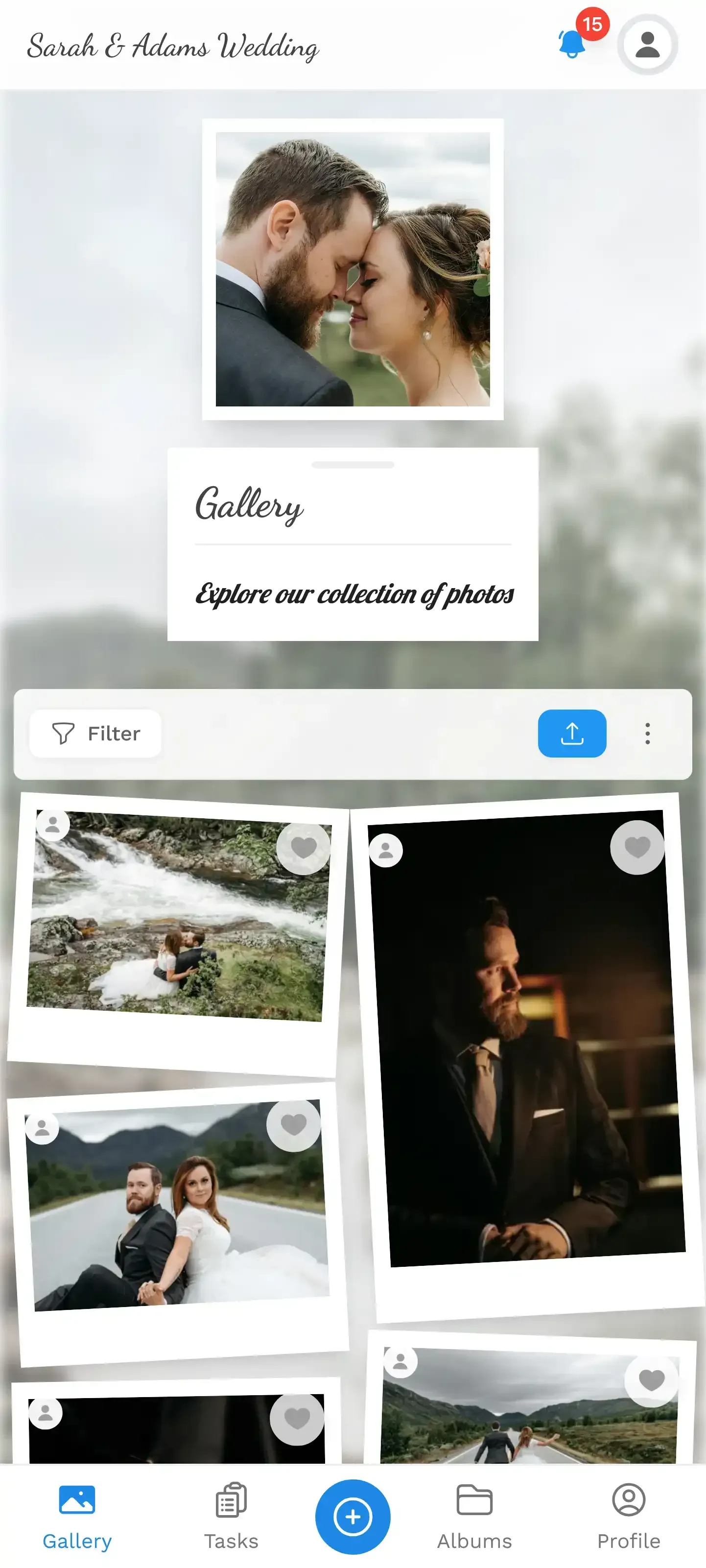
Set up a branded gallery with the event name, date, and a cover image. Generate a QR code. This takes about two minutes.
Place QR codes at the venue
Print QR codes on table cards, signs, or napkins. Guests scan with their phone camera and land in the gallery instantly. No app, no account needed.
Upload your edited photos after the event
Once your edits are done, upload the full-resolution files to the same gallery. The client and guests see everything in one place.
Share the gallery link
Send the client a single link. They browse, download individual photos or the entire set as a ZIP. Forward it to family with one tap.
The key insight from maiimg's event photography guide is relevant here: clients need fast access without app installs, login walls, or chat spam. One link, one QR code, full access.
1.Guests scan, tap, upload. No app needed.
See it in action
Every guest photo in one album – no app.
Why This Works Better for Event Photographers
Studio photographers deliver a curated set of 30-50 portraits. Event photographers deliver hundreds of photos from a chaotic, multi-hour shoot. The workflows are fundamentally different.
For events, the QR code gallery approach solves problems that file-transfer tools can't:
Guest photos and pro photos, same gallery. The wedding couple doesn't want two separate collections. They want the photographer's polished shots alongside their friend's hilarious dance floor candids. One gallery, one link.
Real-time access during the event. Guests can browse photos as they're being taken. Connect the gallery to a TV screen, and you have a live photo wall running during the reception. FilterPixel's workflow guide emphasizes that smart discipline during the shoot reduces post-processing. Showing photos live gives the photographer immediate feedback on what's working.
No expiring links. The gallery stays active for months. No panicked re-sends. The bride's mother can access it in August. The corporate client can pull photos for their annual report in December.
One thing to be upfront about: this approach is browser-based, not a native app. For 95% of clients, that's actually preferable (nothing to install). But if a client specifically wants a desktop application with local file management, they'll need a traditional delivery tool instead.
Making the Gallery Feel Professional
A gallery is only as good as its presentation. Dumping 500 unorganized photos into a shared folder with a pretty frame around it isn't much better than Google Drive.
A few things that matter:
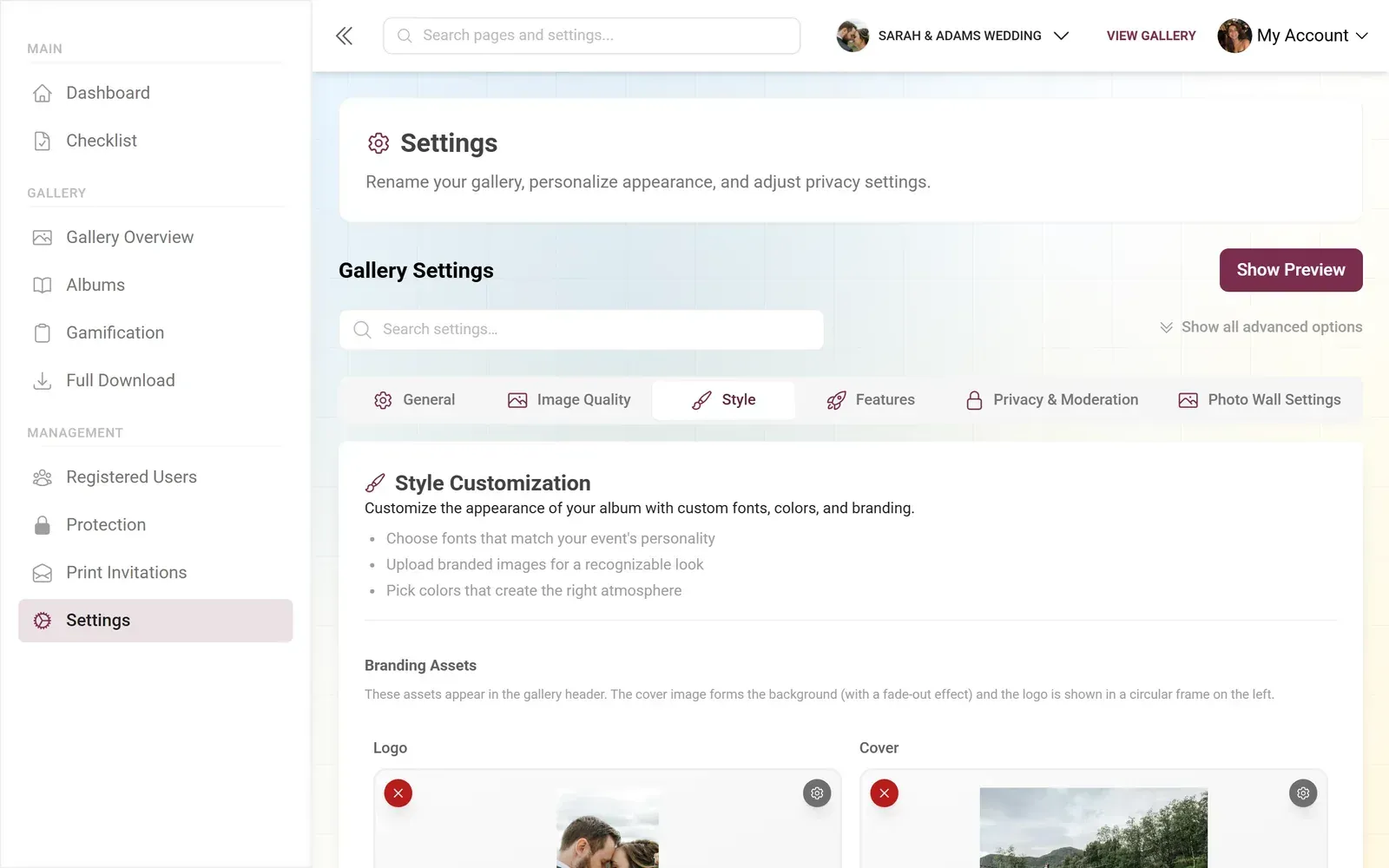
Custom branding. Your logo, your colors, your fonts. The gallery should feel like an extension of your photography business, not a generic third-party tool. This is where purpose-built platforms separate themselves from makeshift solutions.
Albums for structure. Split a wedding into "Ceremony," "Reception," "Portraits," "Dance Floor." A corporate event might be "Keynotes," "Networking," "Team Photos." Clients shouldn't have to scroll through 800 photos to find the one they want.
Download options. Individual photos for social media sharing. Full ZIP for archival. Original quality always preserved, never compressed. Framebird's sizing guide points out that clients use images across social media, self-printing, and professional print. Making full-resolution files available covers all those needs.
Moderation controls. If guests are uploading alongside your professional work, you want a way to review and approve photos before they appear publicly. Nobody wants blurry screenshots or accidental selfies mixed in with the curated shots.
1.Review every upload before it goes live.
The Part Most Photographers Overlook
Here's something that surprised me when researching delivery workflows. The biggest complaint clients have isn't about file quality or speed. It's about not knowing what to do next.
They get a link. They click it. They see photos. Now what? Can they download? Do they need to right-click and "Save As"? Is there a button? Will it be full resolution or a compressed preview?
The best delivery experiences make the next step obvious. A clear download button. A bulk download option that doesn't require a computer science degree. A share button that generates a link they can text to their mother-in-law.
For event photographers who want to go further, features like photo challenges and leaderboards can actually motivate guests to upload more during the event. A challenge like "Best candid reaction shot" or "Funniest dance move" with example preview photos turns passive guests into active contributors. More photos in the gallery means a richer collection for the client.
That's not a gimmick. It's a genuine value-add you can offer as part of your event photography package.
Picking the Right Tool for Your Workflow
Not every photographer needs the same solution. If you shoot studio portraits and deliver 40 retouched files, a simple Dropbox folder genuinely works fine. Don't overcomplicate it.
But if you shoot events where multiple people are taking photos, where clients want immediate access, where the gallery needs to look professional and stay accessible for months, then a purpose-built gallery with QR sharing saves real time and creates a better client experience.
The difference between a photographer who sends a Google Drive link and one who sends a branded, browsable gallery with one-tap downloads? That's the difference between "thanks for the photos" and "can I book you for our next event too?"
All of this comes with your own event.
Setting it up takes five minutes. You can build and view everything before you decide.
Starting from €39 one-timeOne-time payment — No subscription
- No App Required
- Setup in 5 Minutes
- 30-Day Money Back
“We were really thrilled, and everything went so much more smoothly, from the seating plan all the way to the photo games! Simply great! Highly recommended!”
Written by

I believe event photos should be more than static galleries. They should be live, playful, and unforgettable.
Categories
Related Posts

Bridal Shower Photo Sharing: Collect Every Sweet Moment in One Gallery
Bridal shower photos end up scattered across 15 phones. Here's how to get them all into one gallery before the mimosas wear off.

Maternity Photo Sharing: How to Keep Every Announcement, Bump Shot, and Memory in One Place
Pregnancy announcements land on 4 different apps. Maternity photos get lost in group chats. Here's how to keep every photo in one shared gallery your whole family can access.

Sales Kickoff Photo Sharing: How to Turn a Mandatory Meeting Into a Team Memory
Sales kickoffs are expensive. The photos from them usually disappear into 14 different camera rolls. Here's how to fix that.