Best Photo App for Wedding Season 2026: How to Choose Before the Big Day


Picture a Saturday in June. The ceremony just ended, confetti still settling on the church steps. Your cousin pulls out her phone and snaps a photo of your parents hugging. Your college roommate catches the flower girl mid-twirl. The best man films your reaction when the doors open. All of these moments live on separate phones, in separate camera rolls, and by Monday morning most of them will be buried under screenshots and grocery lists.
That's the real problem with wedding photos in 2026. Not the professional shots (your photographer has those covered). The guest photos. The candid, imperfect, emotionally honest ones that 54% of Gen Z couples actually prefer over posed coverage. The ones nobody organizes because nobody planned for it.
This article is about fixing that specific gap. Not a generic "top 10 apps" listicle, but a framework for choosing the right tool before wedding season hits. Because once the reception starts, it's too late to figure out logistics.
Why Generic Cloud Sharing Falls Apart at Weddings
The instinct most couples follow: create a shared iCloud album or Google Photos folder, drop the link in the wedding WhatsApp group, hope for the best. It sounds reasonable. It almost never works well.
The friction is subtle but real. Half your guests don't have iCloud accounts. Android users can't contribute to Apple shared albums natively. Google Photos requires a Google login, which your 68-year-old great-aunt isn't going to set up between cocktail hour and dinner. Even when people do add photos, they trickle in over weeks with no context or organization. A PicStack analysis makes the distinction clearly: wedding photo sharing isn't file sharing. You need two separate workflows (professional gallery and guest candids) plus browsing context that generic cloud storage strips away.
WhatsApp groups are even worse. Compressed images, a 16-photo multi-send limit, and a chat thread that becomes unusable after 30 people post. You end up with a graveyard of tiny thumbnails nobody will ever scroll through again.
So what actually works? A dedicated wedding photo app. But the market in 2026 has at least a dozen options, and they're not all built the same. If you're weighing your choices, here's a guide on how to collect guest photos automatically without the WhatsApp chaos.
The Three Questions That Actually Matter
Forget feature checklists for a moment. Before comparing apps, answer three questions honestly. They'll eliminate 80% of options immediately.
1. Will your oldest guest actually use it?
This is the filter most couples skip. Your tech-savvy friends will use anything. The real test is your partner's grandmother, your dad's golf buddy, the family friend who still prints MapQuest directions. If the app requires a download from the App Store, you've already lost a third of your guest list.
The lowest-friction approach in 2026: a QR code that opens directly in the browser. Guests scan, enter a name, upload. No account creation, no app install, no password. If you're curious how to work QR codes into your actual invitations, there's a full walkthrough for adding photo gallery QR codes to wedding stationery. You can even design custom QR codes with Photogala's free QR code generator. A recent WhiteClover comparison of wedding photo apps put low guest friction at the top of their ranking criteria for exactly this reason.
QR Code Generator
Create custom QR codes for your event — link guests directly to your photo gallery.
Some apps (GuestPix, Everlense, KnotPix) also offer QR-to-browser uploads. Others still require native app downloads. Check before you commit.
2. Do you care about what happens during the reception, or only the photos afterward?
Most apps treat photo collection as a post-event archive. Upload, download later, done. That's fine if all you want is a shared folder with better UX.
But some couples want the photos to be part of the event itself. A live photo wall on a screen near the bar. Photo challenges that give guests creative prompts ("Recreate this movie poster" or "Find the oldest guest on the dance floor"). A leaderboard that turns uploading into a friendly competition.
If you're in the second camp, your options narrow significantly. Most apps don't offer live display or gamification. Photogala, FridaySnap, and a handful of others do, but the depth varies wildly.
3. How much are you willing to spend (and what's actually included)?
Pricing in the wedding photo app market is all over the place. Some apps offer free tiers with tight photo limits. Others charge €70+ for a single flat package. A few use subscription models that keep billing after the wedding is over.
The honest question isn't "which is cheapest" but "what do I actually get for the price?" A free plan with a 50-photo cap won't cover a 150-guest wedding. A €100 plan that includes features you'll never use (geo mapping for a one-venue event, for instance) is wasted money. Our free vs. paid event photo app breakdown digs into the real trade-offs.
See it in action
Every guest photo in one album – no app.
What the 2026 Market Actually Looks Like
Here's how the most talked-about wedding photo apps stack up as of June 2026. Not every feature matters for every couple, but this table gives you the full picture.
Wedding Photo App Comparison (June 2026)
| Feature | Photogala | GuestPix | Everlense | FridaySnap | AirPhoto |
|---|---|---|---|---|---|
| QR Code Upload (no app) | |||||
| Unlimited Photos | all paid plans | tiered limits | 50 to 10,000 | tiered limits | |
| Unlimited Videos | all paid plans | limited | limited | ||
| Photo Wall / Live Display | basic | ||||
| Photo Challenges | unlimited | basic | basic | ||
| Leaderboard & Points | |||||
| Achievements & Rewards | |||||
| AI Face Recognition | |||||
| Content Moderation | advanced dashboard | ||||
| Multiple Gallery Layouts | 4+ layouts | 1 layout | |||
| Social Features | comments, likes, mentions | ||||
| Custom Branding | logo, colors, fonts | logo only | |||
| Starting Price | €0 (free demo) | €33 | €0 (limited) | €70 | €25 |
| Paid Plans From | €39 one-time | €33 one-time | €39 one-time | €70 one-time | €25 one-time |
A few things jump out. Every app now supports QR-code-to-browser uploads. That was a differentiator two years ago; in 2026 it's table stakes. The real separation happens in what the app does after photos land in the gallery.
Where Most Apps Stop (and One Doesn't)
The thing about actual feature sets in 2026: most wedding photo apps are upload forms with a pretty wrapper. You get a gallery. You get a QR code. You get a download button. Done.
That covers the "collect" part of the problem. It completely ignores the "engage" part. And engagement is what determines whether you get 40 photos from 8 guests or 400 photos from 60 guests.
Think about it. At a typical 150-guest wedding, maybe 20-30 guests will voluntarily open an app and upload photos without prompting. The rest need a nudge. A reason. Something that makes participating feel fun rather than obligatory.
Photogala is the only platform in the comparison that treats engagement as a core feature rather than an afterthought. Photo challenges with example preview images give guests creative prompts: recreate a meme, mimic a movie scene, find the couple's parents on the dance floor. The leaderboard and points system turns uploading into a friendly competition. Achievements unlock for milestones ("First to upload 10 photos"). And on the Deluxe plan, you can even set up real-world rewards guests can redeem at the event, like a drink voucher or a raffle entry.
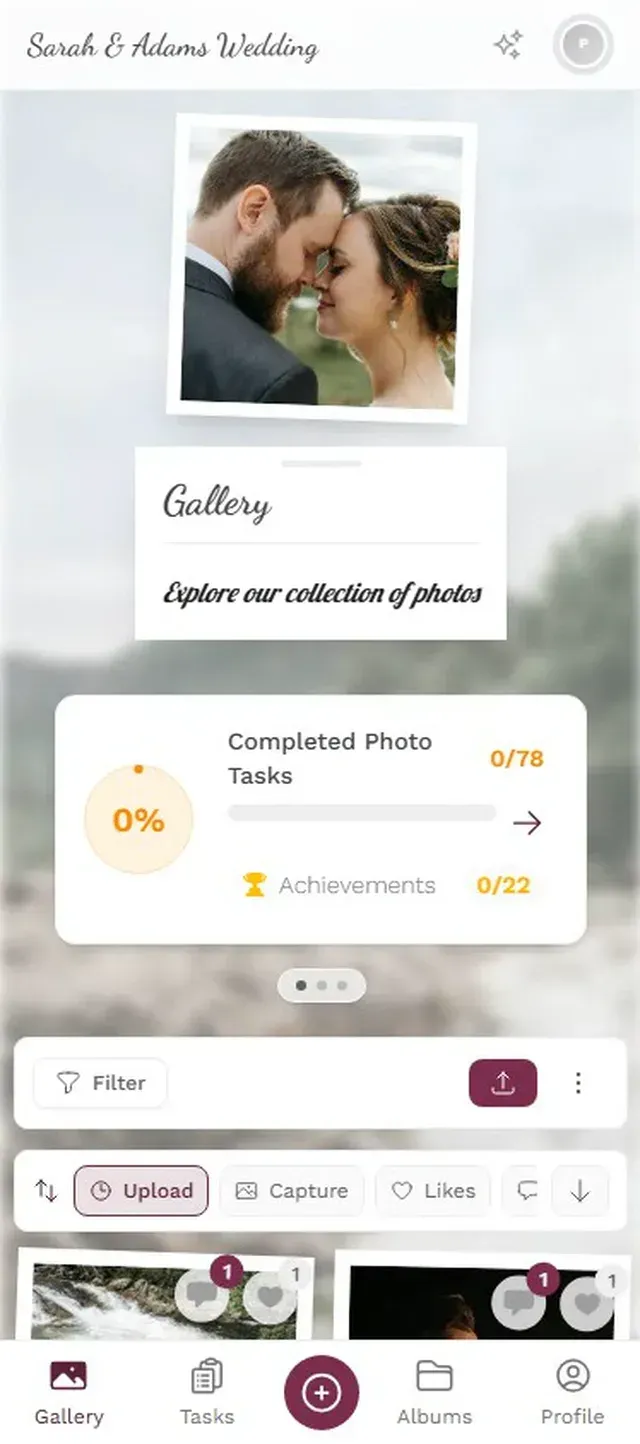

1.Guests browse creative photo challenges right from their phone
That photo wall feature deserves a closer look. Imagine a 55-inch screen near the dessert table cycling through guest photos as they're uploaded. Every few minutes, someone spots themselves and points. It creates a feedback loop: people see the wall, want to be on it, and upload more. If you want to get specific about how to set up a live photo wall for your wedding, the setup takes about ten minutes.
The Honest Trade-Offs
No app is perfect, and I'd be skeptical of any article that claims otherwise. Here's where each option has real weaknesses:
Photogala is browser-based only. There's no native iOS or Android app. For most guests, this is actually an advantage (no download friction), but some people genuinely prefer apps they can find in the App Store. The free demo plan also caps at 50 photos, which won't cover anything beyond a tiny elopement. You'll need at least the Plus plan (€39) for unlimited uploads.
GuestPix has the most brand recognition in the space (they claim 90,000+ events), but their feature set is thin compared to 2026 alternatives. No photo wall, no challenges, no moderation dashboard, one gallery layout. You're paying for a polished upload experience and not much else.
Everlense offers a free tier, which is genuinely useful for budget-conscious couples. The catch: photo limits per tier (50 on free, scaling up to 10,000 on their top plan) can feel restrictive for larger weddings. Their challenges feature exists but lacks depth. No leaderboard, no achievements, no example photos for tasks.
FridaySnap keeps things simple with one flat €70 tier. Unlimited photos and videos, basic challenges, a photo wall. The simplicity is its strength and its limitation. No social features, no AI, no moderation tools. If you want zero decisions, FridaySnap is the "just pick one" option.
AirPhoto is the budget entry at €25, but you get what you pay for: photo limits, no engagement features, and a basic upload-and-download workflow. For a small, casual wedding where you just need basic collection, it works. For anything bigger, you'll hit walls quickly.
Planning tip: Set up your photo app at least a week before the wedding. Test the QR code yourself, assign a tech-savvy friend as moderator, and print QR codes on table cards. Photogala's free invitation card designer can help with the print materials. If you're a wedding planner, here's a deeper guide on photo sharing for wedding planners.
The Feature That Nobody Talks About: Moderation
Here's a scenario most couples don't think about until it's too late. Say you set up a live photo wall at your reception. It's connected to the gallery and displays new uploads automatically. Your cousin's college friend, three drinks deep, uploads something inappropriate. It hits the big screen before anyone can react. The couple's parents are watching.
This is why content moderation matters. Photogala lets you set up a pre-approval queue: every photo gets reviewed before it appears on the photo wall or in the public gallery. You assign a moderator (a bridesmaid, a wedding planner, a trusted friend) who approves or rejects from their phone. One tap. The Deluxe plan even includes an AI NSFW filter that flags problematic content automatically.
Most competing apps don't offer any moderation at all. That's fine if you're only using a private gallery with no live display. But the moment photos go on a screen in front of grandma, you need a safety net. For couples considering a small-venue wedding with live photo sharing, moderation is the feature that separates "fun idea" from "potential disaster."
After the Wedding: What Happens to Your Photos?
This gets overlooked in the excitement of planning. Six months after the wedding, will you still have access to your gallery? Can you download everything in original quality?
Photogala's paid plans keep your gallery active for 6 months to 24 months (Plus: 6 months, Premium: 12 months, Deluxe: 24 months), and the timer starts after the first 10 photos are uploaded, not from the purchase date. Bulk ZIP downloads preserve original resolution. On the Deluxe plan, AI face recognition lets guests take a selfie to find every photo they appear in, which is genuinely useful when you're sorting through 500+ images weeks later.
Some apps (notably WedPics and Eversnap) have shut down entirely in recent years, taking user data with them. If you're curious about what happens when your photo app disappears, there's a cautionary comparison with Eversnap worth reading. It's a real risk in a market full of small startups.
One more thing worth knowing: if you want both professional photos and guest candids in the same place, you'll want a platform that handles both workflows. Dedicated wedding galleries like those on Photogala's weddings use-case page support multiple albums, customizable layouts, and separate views for different types of content.
How to Actually Decide
Forget the feature matrix for a second. Here's the decision tree that actually works:
Choosing your wedding photo app in 4 steps
Define your must-haves
Do you need a live photo wall? Moderation? Unlimited uploads? Write down 3 non-negotiable features.
Test the guest experience
Create a free account on your top 2 picks. Send the QR code to your least tech-savvy relative. If they can upload a photo in under 60 seconds, it passes.
Check the math
Count your guest list. Multiply by 3-5 (average uploads per engaged guest). Make sure the plan you're considering doesn't cap out.
Set it up a week early
Print QR codes, assign a moderator, test the photo wall. Don't leave this for wedding morning.
The couples who end up with the best guest photo collections aren't the ones who picked the "best" app. They're the ones who picked early, tested it, and made it dead simple for guests to participate. A visible QR code on every table, a quick announcement during dinner ("Scan the code, upload your photos, try to beat Uncle Steve on the leaderboard"), and someone keeping an eye on moderation.
If you're still choosing between a few options, the best wedding photo apps 2026 roundup goes deeper into individual comparisons. And for couples also weighing platforms like Joy or Minted that bundle photo features into broader wedding websites, there's a specific comparison here.
Wedding season moves fast. The couples who end up scrolling through hundreds of candid guest photos the morning after their reception, laughing at moments they never even saw, are the ones who spent 15 minutes choosing an app and 10 minutes setting it up. Not the ones who agonized over the decision and ran out of time.
Start free, test the QR code on someone who still uses a flip case, and go from there.
All of this comes with your own event.
Setting it up takes five minutes. You can build and view everything before you decide.
Starting from €39 one-timeOne-time payment — No subscription
- No App Required
- Setup in 5 Minutes
- 30-Day Money Back
“We used the software at my mum's birthday party. It went down really well 😊”
Written by

I believe event photos should be more than static galleries. They should be live, playful, and unforgettable.
Categories
Related Posts

Bridal Shower Photo Sharing: Collect Every Sweet Moment in One Gallery
Bridal shower photos end up scattered across 15 phones. Here's how to get them all into one gallery before the mimosas wear off.

Free vs Paid Event Photo Apps: What You Actually Give Up
Free event photo sharing sounds perfect until you see compressed images, upload limits, and zero engagement tools. Here's what the price tag really buys.

Why Event Photo Galleries Beat Group Chats for Sharing Memories
Group chats promise easy photo sharing but deliver chaos, compression, and silence after 48 hours. Dedicated photo galleries fix every one of those problems.