🤖AI Face RecognitionPRO

AI Face Recognition

What Is AI Face Recognition for Events?

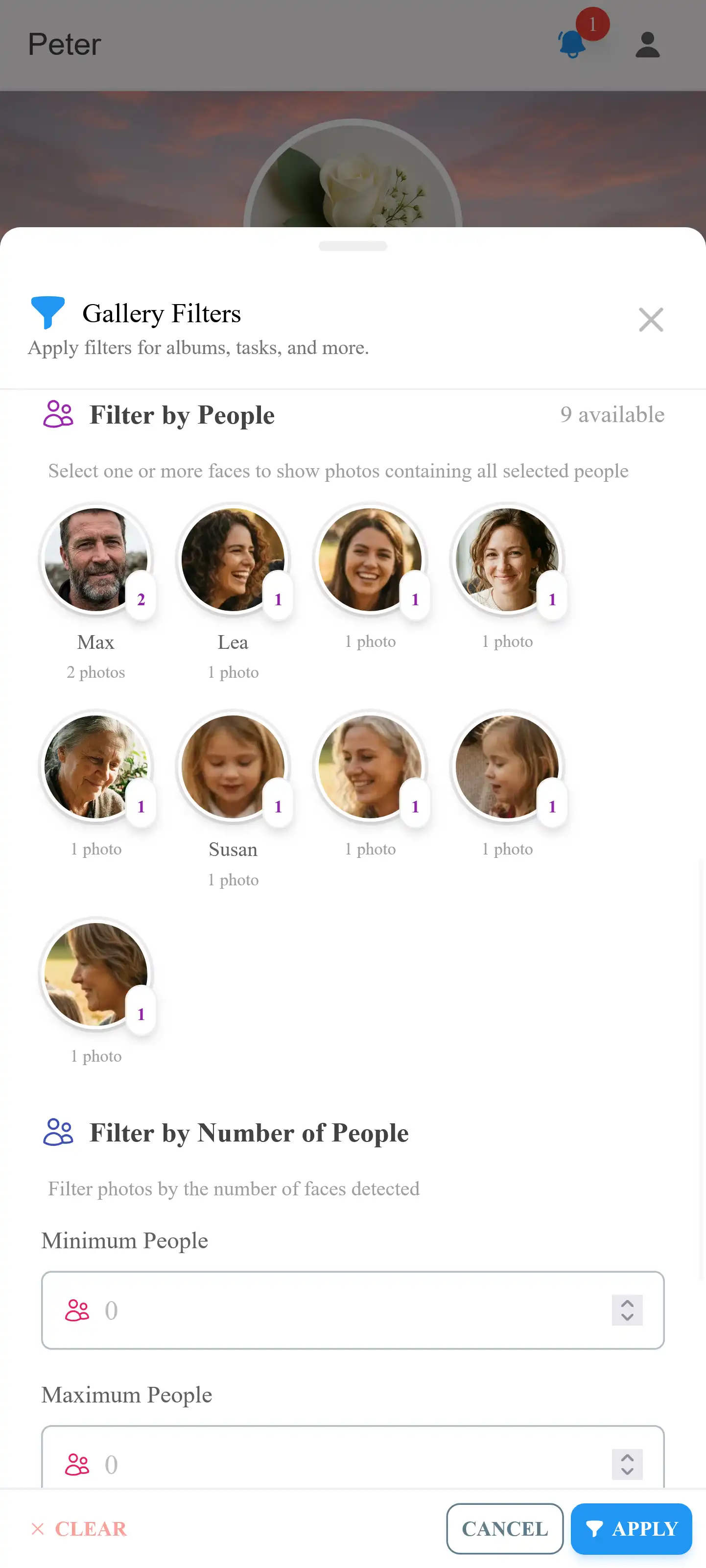
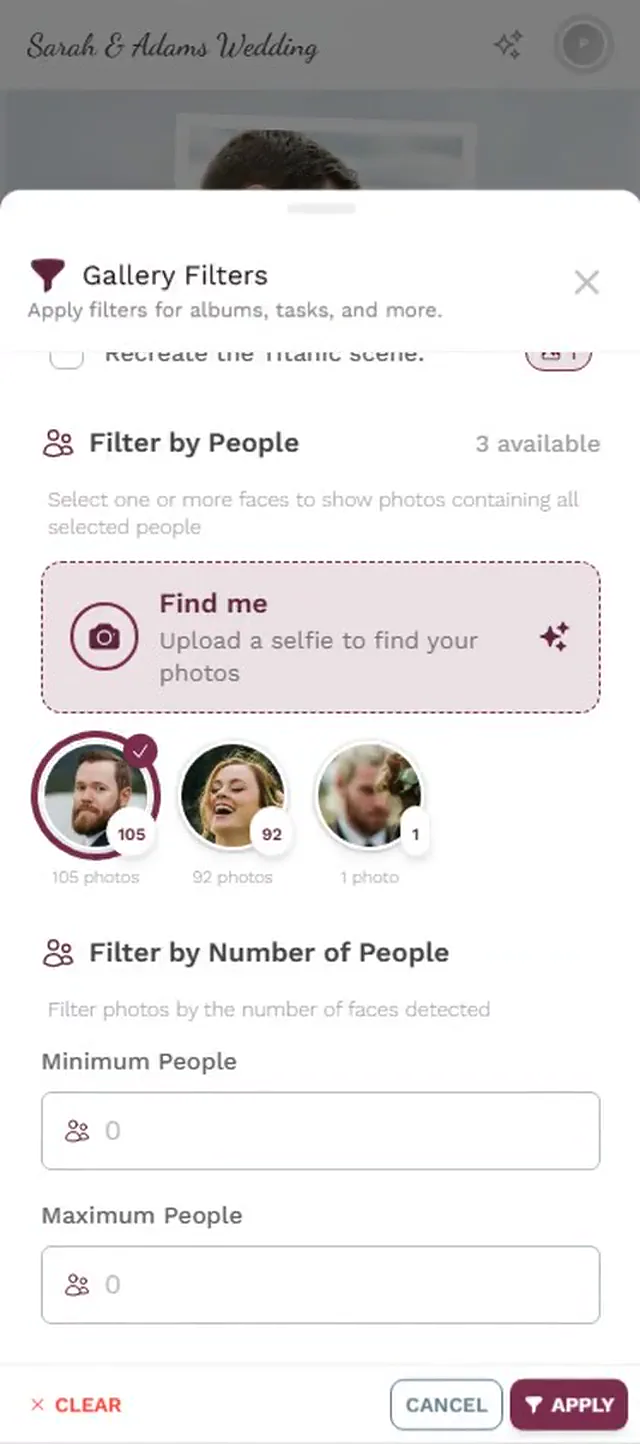
AI face recognition allows event guests to find every photo they appear in across the entire event gallery — by simply taking a selfie. When a guest opens the face search feature, their phone camera captures a selfie, and the AI analyzes the facial features to generate a mathematical representation (a face embedding vector). This vector is compared against all detected faces in the event gallery, and within seconds, the guest sees a personal gallery containing every photo where they appear — whether they're in the foreground, the background, or part of a group shot.

For events with hundreds or thousands of photos — large weddings, corporate conferences, multi-day festivals — manually scrolling through the gallery to find your own photos is impractical. Face recognition solves this problem completely. A guest at a 200-person wedding with 2,000 photos in the gallery can find all 47 photos they appear in within 3 seconds. Without face recognition, that same guest would need to manually review every photo, which could take 30-60 minutes.

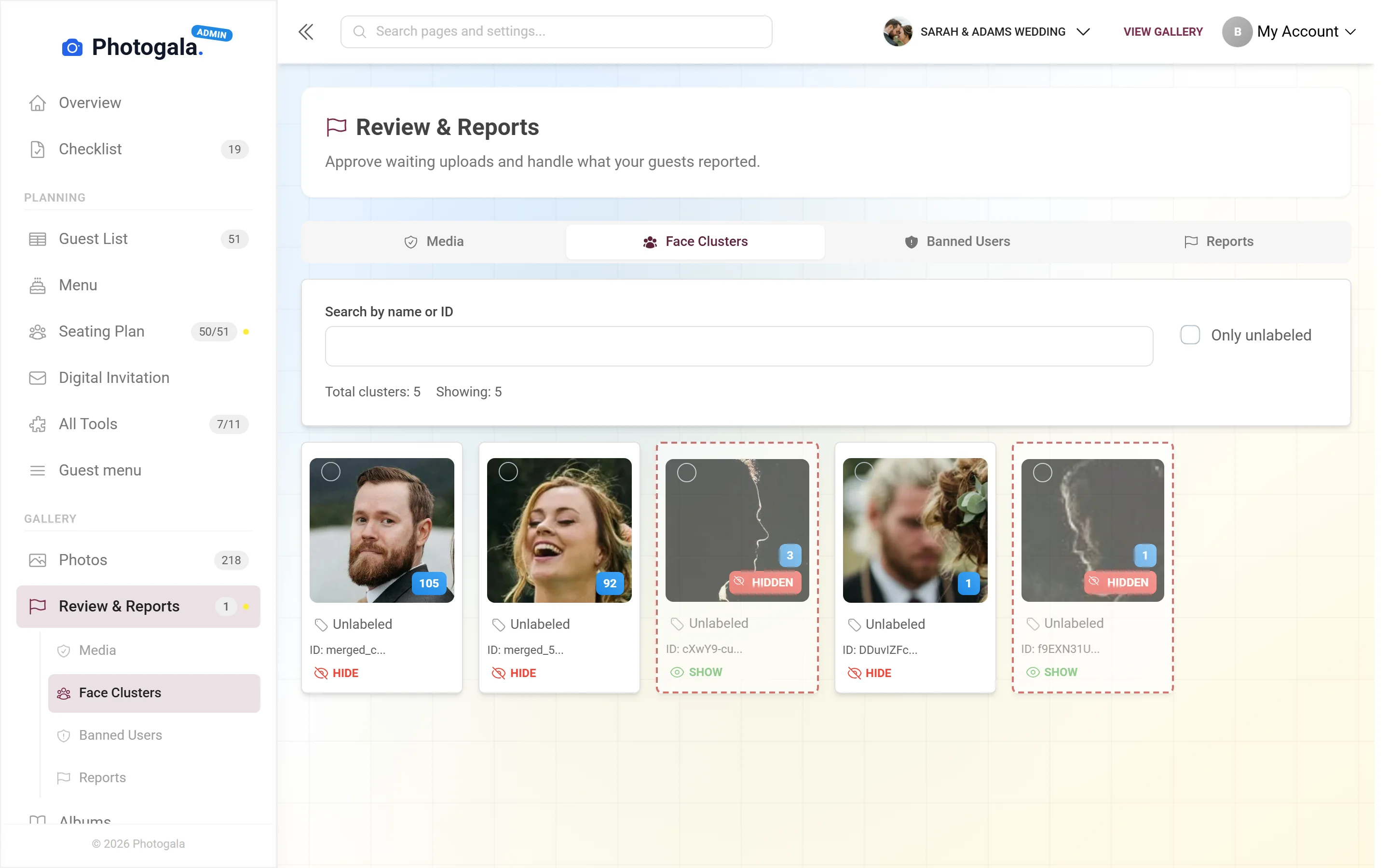
Photogala's face recognition system processes all uploaded photos automatically in the background. When a new photo is uploaded, the AI detects every face in the image, generates embedding vectors, and clusters them with matching faces. This means the face search is instant for guests — the heavy processing happens server-side during upload, not when the guest takes their selfie. The system also provides admin tools for managing face clusters: merging duplicates, labeling people by name, hiding clusters, and making manual corrections.

How Does Face Recognition Work?

1

Take a Selfie

The guest opens the face search feature in the event gallery and takes a selfie using their phone's front camera. The selfie is captured in the browser — no app needed. For best results, the guest should face the camera directly in good lighting. The selfie is used only for matching and is not stored permanently.

2

AI Analyzes Facial Features

The AI processes the selfie to extract a face embedding — a 128-dimensional mathematical vector that represents the unique geometry of the guest's face. This vector captures the distances between eyes, nose width, jawline shape, and dozens of other facial landmarks. The vector is a number sequence, not a visual image — it cannot be reverse-engineered back into a face.

3

Matching Across All Event Photos

The guest's face vector is compared against all pre-computed face vectors from every photo in the event gallery. The system calculates the similarity distance between vectors and identifies matches above a confidence threshold. This comparison happens in milliseconds, even across galleries with thousands of photos and tens of thousands of detected faces.

4

Personal Gallery with All Your Photos

The guest instantly sees a personal gallery containing every photo where they appear. Photos are displayed in chronological order, and the guest can like, download, or share any of them. Group photos where the guest appears alongside others are included as well. The guest's face is highlighted or indicated in group shots so they can quickly verify the match.

Face Filter

Admin Tools for Face Management

Admin Tools for Face Management

Merge Face Clusters

The AI automatically groups detected faces into clusters — all appearances of the same person across the event gallery. Occasionally, lighting changes, angles, or accessories (sunglasses, hats) can cause the system to create two separate clusters for the same person. The merge tool lets admins combine these clusters with a single action, ensuring the person's complete photo set is unified. Merge suggestions are often provided automatically when the system detects high-similarity clusters.

Label and Name People

Admins can assign names to face clusters. Once a cluster is labeled with a person's name (e.g., "Sarah Miller" or "Uncle Hans"), that name appears when browsing the face gallery. This makes it easy to find specific people and adds a personal touch to the gallery. Named clusters also improve the usefulness of the download feature — guests can search for people by name and download all photos containing them.

Hide Face Clusters

Some face clusters may represent staff, waiters, performers, or other people who don't need to appear in the guest-facing face gallery. Admins can hide specific clusters to keep the face search results clean and focused on event guests. Hidden clusters are not deleted — they can be unhidden at any time. This is particularly useful for corporate events where catering staff or AV technicians appear in many photos but are not relevant to attendees searching for their colleagues.

Manual Adjustments

For edge cases where the AI's automatic clustering needs correction, admins can manually move a face detection from one cluster to another, remove incorrect face detections (e.g., a face detected in a painting or poster), or split a cluster that incorrectly merged two different people. These manual controls give admins complete authority over the face recognition results, ensuring accuracy even in challenging scenarios like identical twins or heavily made-up performers.

Who Benefits Most from Face Recognition?

💒

Large Weddings (100+ Guests)

At a wedding with 150-300 guests and a professional photographer producing 1,000-3,000 photos, face recognition is transformative. Instead of manually scrolling through thousands of images, each guest takes a selfie and instantly sees every photo they're in — getting ready shots, ceremony moments, reception candids, and dance floor action. It's the fastest way to deliver a personalized photo experience to every guest.

🏢

Corporate Conferences (500+ Attendees)

Large conferences generate thousands of photos across keynotes, breakout sessions, networking areas, and social events. Attendees want to find photos of themselves with specific speakers, at specific sessions, or networking with colleagues. Face recognition makes this possible in seconds rather than hours. It's also valuable for internal communications teams who need to quickly locate photos of specific executives or team members.

🎪

Festivals & Public Events

At music festivals, food festivals, community events, and public gatherings, official photographers capture thousands of candid shots across multiple stages and areas. Attendees typically have no way to find themselves in these massive galleries. Face recognition gives every attendee a personal gallery — they scan a QR code, take a selfie, and instantly see every moment they were captured in. It turns a generic event gallery into a personalized memory collection.

📅

Multi-Day Events & Retreats

Events spanning multiple days — corporate retreats, destination weddings, sports tournaments, training programs — accumulate enormous photo galleries. Face recognition helps participants cut through the volume to find their personal highlights across all days. A retreat participant who wants their team-building photos from day 1 and their presentation photos from day 3 can find both in seconds through a single selfie search.

Privacy & GDPR Compliance

Face recognition involves biometric data, which requires the highest level of data protection. Here is exactly what Photogala stores, how long, and what controls exist:

1

Vectors Stored, Not Face Images

Photogala stores face embedding vectors — 128-dimensional numerical arrays — not cropped face images. A face vector is a sequence of numbers like [0.023, -0.147, 0.089, ...] that represents facial geometry mathematically. This vector cannot be reverse-engineered into a visual image of the person's face. It is useful only for comparing similarity between faces, not for reconstructing or identifying a person visually.

2

Data Retention Policy

Face vectors are stored for the duration of the event plus a configurable retention period. After this period, all face data — vectors, cluster associations, and labels — is automatically deleted. Event admins can also manually delete all face data at any time from the admin dashboard. The retention period defaults to the same duration as the event gallery itself.

3

Individual Deletion on Request

Any person can request the deletion of their face data at any time, in accordance with GDPR Article 17 (Right to Erasure). Event admins can delete individual face clusters from the admin dashboard, which removes all associated vectors and cluster data. Alternatively, guests can contact Photogala support directly for data deletion requests.

4

Opt-In Process for Guests

Face recognition is an opt-in feature for guests. Guests must actively choose to take a selfie for face search — the system does not identify guests passively or without their action. The selfie taken by a guest for searching is processed and compared against existing face clusters but is not permanently stored. Guest selfies are used only for the immediate search query.

5

GDPR Compliance

Photogala's face recognition is designed with GDPR compliance from the ground up. Face vectors are classified as biometric data under GDPR Article 9 and are processed under legitimate interest (the event organizer's interest in providing a useful service to guests) with appropriate safeguards. Data processing agreements (DPAs) are available for enterprise customers. All face data is stored on EU-based servers with encryption at rest and in transit.

6

No Third-Party Data Sharing

Face data is never shared with third parties. No advertising companies, no social media platforms, no data brokers, no government agencies have access to face vectors or recognition results. The AI model runs on Photogala's own infrastructure, not through external API services like AWS Rekognition or Google Vision. This means face data never leaves Photogala's servers during processing.

Face Recognition Compared: Photogala vs. Alternatives

How does Photogala's face recognition compare to other solutions you might consider?

Face search for event guests

Photogala

Selfie-based instant search across entire gallery

Alternatives

Google Photos: private only. Most event apps: not available.

Works across all guest photos

Photogala

Yes — all uploads from all guests in one gallery

Alternatives

Google Photos: only your own library. Others: N/A

Admin face management tools

Photogala

Merge, label, hide, manual adjust

Alternatives

Rarely available in event context

GDPR compliance

Photogala

EU servers, vectors only, deletion rights, DPA available

Alternatives

Varies — often US-based processing

No app required

Photogala

Browser-based selfie capture and results

Alternatives

Usually requires app download

Processing location

Photogala

Own infrastructure, no third-party AI APIs

Alternatives

Often AWS Rekognition or Google Vision (data leaves your control)

Choose Your Plan

Higher tiers unlock more powerful features and greater flexibility

Buy now, use anytime. The event duration starts after the first 10 photos are uploaded, not from the purchase date.

Deluxe

AI organization, stronger controls, and premium event branding.

€139/event
Unlimited
Guests
500
Uploader
1 year
Duration
Unlimited
Media
  • High Quality Uploads
  • Photo Wall (with Logo)NEW
  • Social Features (Share, Comment, Like)
  • Photo Challenges (Full Suite)
  • Points & Leaderboard
  • Achievements & Real RewardsNEW
  • AI Tools (Filter & Face Recognition)NEW
  • Downloads (Single & Bulk)
  • Moderation & Team Roles
  • Full Branding (Gallery & QR)
  • +12 more features
Choose Plan

Premium

Videos, comments, points and a leaderboard for guest fun.

€79/event
Unlimited
Guests
250
Uploader
1 year
Duration
Unlimited
Media
  • High Quality Uploads
  • Photo Wall
  • Social Features (Share, Comment, Like)NEW
  • Photo Challenges (Full Suite)NEW
  • Points & LeaderboardNEW
  • Achievements & ImportNEW
  • Downloads (Single & Bulk)
  • Moderation & Team RolesNEW
  • Full Branding (Gallery & QR)NEW
  • Multilanguage SupportNEW
  • +9 more features
Choose Plan

Starter

The simple event gallery for collecting photos fast.

€49/event
Unlimited
Guests
30
Uploader
6 months
Duration
Unlimited
Media
  • High Quality Uploads
  • Photo Wall
  • Photo SharingNEW
  • Photo Challenges & ImportNEW
  • Downloads (Single & Bulk)
  • Multiple ColorsNEW
  • Dark ModeNEW
  • Photo LikingNEW
  • Custom QR CodesNEW
  • QR Template DownloadsNEW
  • +2 more features
Choose Plan
30-day money-back guarantee
No app required

Uploader Definition: All guests who upload at least one photo or video count as uploaders. Unlimited guests can still view the gallery.

Fair Use Storage: Storage is sized for normal event usage. Reach out if you need unusually large galleries.

Frequently Asked Questions

How accurate is the face matching?
Photogala's face recognition achieves over 97% accuracy in typical event conditions. The system works well with varying lighting (indoor, outdoor, flash photography), different angles (front-facing, three-quarter profile), and across age ranges. Accuracy may be slightly lower for very young children (under 5), heavily made-up performers, or photos where faces are partially obscured. The confidence threshold is tuned to minimize false matches — it's better to miss an edge case than to show someone a photo they're not in.
Can guests search for their own face?
Yes — that is the primary use case. Guests open the face search feature, take a selfie with their phone's front camera, and instantly see all photos in the event gallery where they appear. The selfie is processed in real-time, matched against pre-computed face clusters, and results are displayed within 2-5 seconds. The selfie is used only for the search query and is not permanently stored.
What data is stored for face recognition?
Photogala stores face embedding vectors — 128-dimensional numerical arrays that represent facial geometry. These are mathematical representations, not images of faces. A face vector cannot be reverse-engineered into a photograph or visual likeness of a person. The vectors are associated with cluster IDs and, optionally, admin-assigned names. Guest selfies taken for searching are processed in memory and not stored.
Is it GDPR compliant?
Yes. Photogala's face recognition is designed for GDPR compliance: face vectors are classified as biometric data and processed with appropriate safeguards. All data is stored on EU-based servers with encryption at rest and in transit. Individuals can request deletion of their face data at any time (Right to Erasure). Data processing agreements (DPAs) are available for enterprise customers. Face data is never shared with third parties, and the AI processes data on Photogala's own infrastructure — not through external services.
Can I disable face recognition for my event?
Yes. Face recognition is an optional feature that event admins can enable or disable at any time from the admin dashboard. When disabled, no face detection processing occurs on uploaded photos, and the face search feature is hidden from guests. If you disable face recognition after it has been active, you can also delete all existing face data (vectors and clusters) with a single action.
How many faces can it handle?
The system is designed to handle events of any scale. On the Pro plan, the limit is 5,000 detected faces per event, which covers most large weddings and conferences. On the Premium plan, there is no limit. A typical 200-guest wedding with 2,000 photos contains approximately 5,000-8,000 face detections (including group shots). A large conference with 500 attendees and 5,000 photos may have 15,000-25,000 face detections — comfortably within the Premium plan's capabilities.
Does it work with group photos?
Yes. The AI detects and processes every visible face in a photo, regardless of how many people are in the frame. A group photo with 20 people generates 20 separate face detections, each matched to the appropriate cluster. When a guest searches for their face, group photos where they appear are included in the results. The system can handle photos with up to 50+ faces, though very small faces in the background of large crowd shots may fall below the detection threshold.
What happens to face data after the event?
Face data (vectors, clusters, and labels) follows the same retention policy as the event gallery. When the gallery retention period expires and data is deleted, all associated face data is deleted as well. Event admins can also manually delete all face data at any time from the admin dashboard, independently of the gallery itself. After deletion, face vectors are permanently removed from all servers and backups within the standard data purge cycle.

Ready to Get Started?

Create your event in minutes. No credit card required.