Free vs Paid Event Photo Apps: What You Actually Give Up

Picture this: a friend is getting married next month. You volunteer to handle the photo situation. "We don't need a paid app," you say. "Google Photos has shared albums. It's free. Done." Three weeks after the wedding, you've got 47 photos from 6 of the 140 guests. Half of them are screenshots of screenshots someone sent via WhatsApp. The bride's aunt uploaded three photos of the dessert table, all blurry. The first dance? Nobody got it.
That scenario plays out constantly. And the frustrating part isn't that free tools are bad. They're not. The frustrating part is that "free" quietly strips away the things that actually make event photo sharing work.
This article breaks down exactly what you lose when you choose a free option over an affordable paid one. Not theoretical losses. Concrete, specific things: image quality, guest participation rates, engagement features, and the difference between collecting 47 photos and collecting 400.
The Free Options (and What They Actually Do)
Before getting into trade-offs, it helps to be honest about what free tools deliver. There are roughly three categories of free event photo sharing.
Shared cloud albums (Google Photos, iCloud) are the default. They work. Guests who already use the platform can add photos with minimal friction. The problems start when half your guests don't have Google accounts or when the album owner hits their 15 GB storage cap mid-event. As one comparison guide from FindMe.photo points out, most people conflate two very different jobs: delivering polished galleries to clients vs. getting guests to actually share their own photos. Free cloud albums technically do neither job particularly well.
WhatsApp and Messenger groups are what people actually use when they don't plan ahead. Quick to set up. Also quick to become unusable. Photos get compressed to roughly 1,600 pixels wide. Videos lose most of their detail. And good luck finding anything two weeks later in a chat with 200 unread messages. We've written about why dedicated galleries beat group chats in detail before.
Free tiers of dedicated photo apps sit somewhere in between. Most event photo sharing platforms offer a free plan with strict limits: 50 photos, 10 uploaders, no video, no downloads, watermarked images. The free tier exists to get you hooked, not to run a real event. It's a demo dressed up as a product.
Photogala's Free Demo plan gives you 50 photos, a QR code gallery, and even a photo wall at no cost. No credit card required. It's genuinely useful for testing the platform with a small gathering before committing to a paid plan.
What Free Costs You (Literally)
1. Image quality disappears
This is the one people notice last but regret most. WhatsApp compresses every photo before sending. Google Photos compresses images unless you pay for storage. Most free-tier apps cap file sizes at 5-10 MB, which means your guests' 48-megapixel smartphone photos get downscaled before they even reach the gallery.
At a 120-guest wedding, that means 120 phones capturing moments in stunning detail, and a shared album full of mushy, detail-free versions of those moments. You'll notice it the second you try to print anything larger than a postcard. Paid platforms like Photogala store originals at full resolution. Every paid plan, starting at €39, keeps the original quality untouched.
2. Participation drops off a cliff
Free tools ask guests to do something (open the right app, find the right album, maybe create an account) without giving them any reason to bother. Anecdotally, participation on shared cloud albums at events tends to land around 10-15% of attendees. Most guests mean to upload photos later, and then never do.
QR Code Generator
Create custom QR codes for your event — link guests directly to your photo gallery.
This is the gap that QR code galleries fill. Guests scan a code on the table, open a browser (no app, no account), and upload. The friction drops to nearly zero. You can even generate codes with Photogala's free QR code generator to test the flow before committing. Add photo challenges on top and participation shifts from passive to active. Instead of hoping guests remember to share photos, you're giving them creative prompts: "Capture the weirdest dance move," "Find the oldest guest and get a selfie." That's a paid feature, and it changes the entire dynamic.
See it in action
Every guest photo in one album – no app.
3. No engagement, no energy
Free tools are passive buckets. Photos go in. Nothing comes back out. No likes, no comments, no leaderboard showing who uploaded the most. No live photo wall cycling through the latest uploads on a screen behind the DJ.
Imagine a corporate team-building day where 40 people have phones in their pockets. With a free shared album, maybe 8 of them upload something. With a gamified gallery that tracks points, shows a leaderboard, and unlocks achievements ("First to upload 10 photos!"), you turn passive bystanders into active contributors. Research from Fliplet on event technology trends confirms the broader shift: events in 2026 are measured by engagement and shareable experiences, not just attendance. Free tools don't even attempt to address that.
For corporate events specifically, check out our breakdown of free planning tools that complement a paid photo app.
4. You're the moderator (or nobody is)
At a company event with 200 people, someone will upload something inappropriate. It's not a question of if. With free tools, there's no moderation dashboard. No approval queue. No AI content filter catching NSFW uploads before they hit the big screen. You either accept everything or manually scroll through every photo yourself.
Photogala's moderation system lets you set up pre-approval on uploads. Assign a colleague as a moderator. One tap to approve, one tap to reject. The AI NSFW filter catches obvious problems automatically. If you've ever had to moderate photos at a public event, you know this isn't a nice-to-have. It's essential.

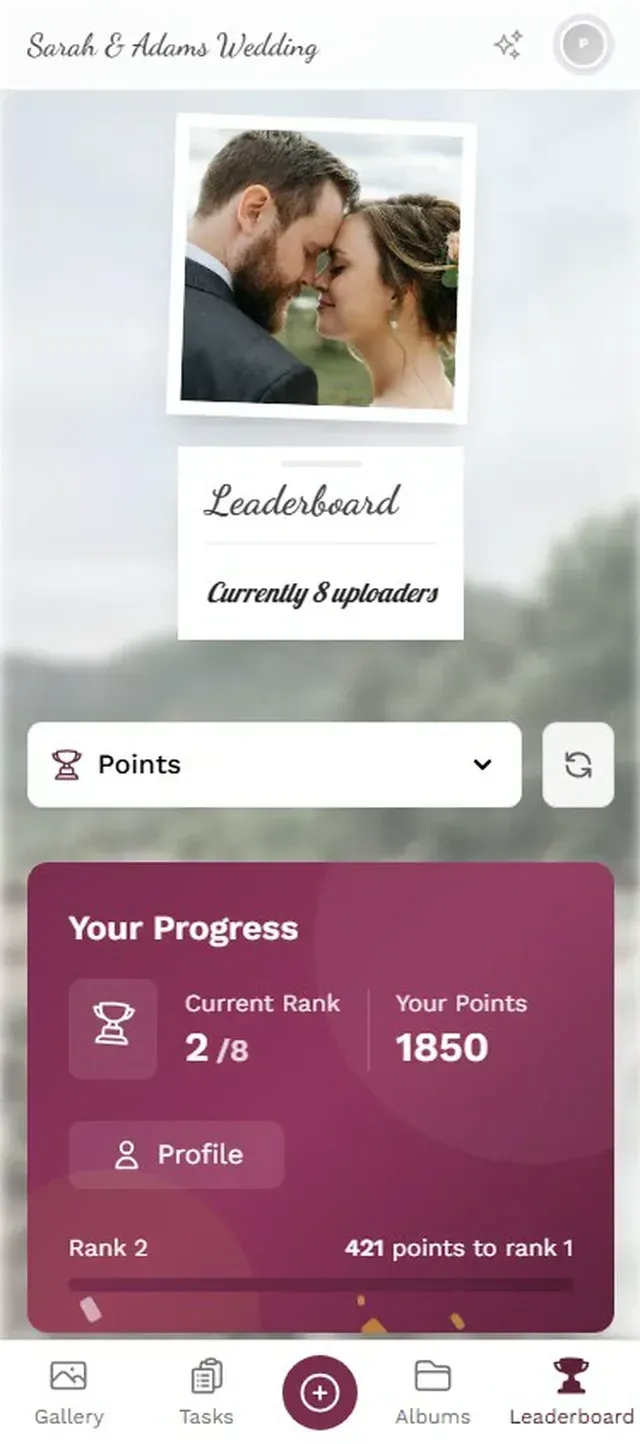
1.No app needed. Guests scan and upload in seconds.
The Comparison Nobody Wants to Make
Here's the uncomfortable math. A free shared album at a 150-guest wedding saves you €39-79. That same wedding's photographer costs €2,000-4,000. The venue costs ten times that. The flowers cost more than the photo app. You're optimizing the cheapest line item on the budget while leaving hundreds of guest photos on the table.
The real comparison isn't "free vs. paid." It's "47 compressed photos vs. 350+ originals with a live photo wall and photo challenges." When you frame it that way, the cost of event photo sharing becomes almost trivially small.
Free vs. Paid: Feature-by-Feature
| Feature | Free Tools (Cloud/Chat) | Photogala (from €39) |
|---|---|---|
| Photo quality | Compressed | Original quality |
| Video support | varies by platform | Unlimited on paid plans |
| Guest upload friction | Account often required | QR code, no app/account |
| Photo challenges | Unlimited challenges | |
| Leaderboard & points | Full gamification | |
| Live photo wall | Included from Starter | |
| Content moderation | Dashboard + AI filter | |
| Likes & comments | Platform dependent | Full social features |
| Face recognition | Selfie-to-search (Deluxe) | |
| Downloads (ZIP) | Manual one-by-one | Bulk ZIP download |
| Custom branding | Logo, colors, fonts | |
| Gallery layouts | 4+ layouts, 6 headers | |
| Upload limit | 15 GB cap or compression | Unlimited photos & videos |
The Middle Ground Most People Miss
The framing of "free vs. paid" creates a false binary. There's a middle ground: start free, upgrade when it matters. Photogala's Free Demo plan lets you create a real gallery, test the QR upload flow, and see the photo wall in action. No credit card. If you're hosting a casual dinner for 15 people, the free plan might be all you need.
But for events where photos actually matter, the Plus plan at €39 (one-time, not monthly) unlocks unlimited photos, up to 25 videos and the full photo challenge system. That's less than the cost of two cocktails at most wedding venues. The Premium plan at €69 adds social features, achievements, a leaderboard, and content moderation. For weddings and corporate events, that's the sweet spot.
And unlike subscription-based platforms, you pay once. The active period starts when the first 10 photos are uploaded, not when you buy. Plan ahead, purchase early, use it when you're ready.
Why the Photo Wall Matters More Than You'd Think
The feature that changes behavior most isn't the gallery itself. It's the photo wall. Say you're running a company holiday party and you connect a 55-inch TV near the bar to display uploads in real time. Within 20 minutes, guests notice their photos appearing on screen. They start uploading more, angling for the best shot. The photo wall turns uploading from a chore into entertainment.
Free tools can't do this. There's no live display mode in Google Photos. No way to cycle through a WhatsApp group's photos on a screen. The photo wall is a paid feature, and it's the single biggest driver of participation at events. We've covered how cloud albums compare to QR code galleries before, and the photo wall is consistently the differentiator.
One honest trade-off worth mentioning: Photogala is browser-based, not a native app. For 95% of use cases, that's actually an advantage (no download friction). But it does mean you won't get push notifications reminding guests to upload later. The real-time upload flow handles most of that, but it's a limitation worth knowing about.
When Free Is Actually Fine
Not every event needs a paid photo app. If you're hosting a casual barbecue with 10 friends and everyone already uses iCloud, a shared album works fine. If the photos don't matter that much and you just want a quick way to swap snapshots, WhatsApp does the job.
Free breaks down when three things are true: you have more than 30 guests, you care about photo quality, and you want more than a passive upload bucket. If your event checks those boxes, the cost comparison tips heavily toward a paid option. Not because free tools are terrible, but because the gap between a handful of blurry shots and hundreds of full-resolution originals is the gap between memories you have and memories you lost.
If you're still deciding, our comparison of Photogala vs. Snapchat for events shows exactly how ephemeral platforms handle (or mishandle) event photos. And if long-term storage matters, the guide on archiving and backing up event photos is worth a read.
The 47-photo gallery from a free shared album and the 350-photo gallery from a QR code app with challenges both capture the same event. Only one of them captures the event you'll actually want to remember.
All of this comes with your own event.
Setting it up takes five minutes. You can build and view everything before you decide.
Starting from €39 one-timeOne-time payment — No subscription
- No App Required
- Setup in 5 Minutes
- 30-Day Money Back
“We were really thrilled, and everything went so much more smoothly, from the seating plan all the way to the photo games! Simply great! Highly recommended!”
Written by

I believe event photos should be more than static galleries. They should be live, playful, and unforgettable.
Categories
Related Posts

Bridal Shower Photo Sharing: Collect Every Sweet Moment in One Gallery
Bridal shower photos end up scattered across 15 phones. Here's how to get them all into one gallery before the mimosas wear off.

Maternity Photo Sharing: How to Keep Every Announcement, Bump Shot, and Memory in One Place
Pregnancy announcements land on 4 different apps. Maternity photos get lost in group chats. Here's how to keep every photo in one shared gallery your whole family can access.

Sales Kickoff Photo Sharing: How to Turn a Mandatory Meeting Into a Team Memory
Sales kickoffs are expensive. The photos from them usually disappear into 14 different camera rolls. Here's how to fix that.