Free Event Planning Tools Every Organizer Should Bookmark

Event coordinators rank among the most stressful jobs in the world, right after police officers, airline pilots, and firefighters. That's according to CareerCast via Asana's research. And honestly? The stress doesn't come from the big decisions. It comes from the 200 small ones: how many drinks to order, where to seat the uncle who doesn't get along with anyone, whether the timeline leaves enough room between the ceremony and dinner.
The instinct is to reach for a big all-in-one platform. Something that promises to handle everything from invitations to post-event analytics. But here's the thing: most of those platforms cost $50-300 per month, lock your data behind paywalls, and you end up using maybe 15% of the features.
A smarter approach? Build a toolkit from free, specialized tools. Each one does one thing well. No subscriptions, no bloated dashboards. You bookmark them, use them when you need them, and move on.
That's what this article is: a curated set of free tools that cover every stage of event planning. Some are well-known, some you've probably never heard of. All of them are free to use right now.
The Problem with All-in-One Event Software
Picture this: you sign up for an event management platform because you need a seating chart. Forty-five minutes later, you're still filling out onboarding forms about ticketing tiers and CRM integrations you don't need. The seating chart is buried three menus deep. The right tool can save you hours, but the wrong one creates more work than it eliminates.
The alternative: a stack of focused, free tools. One for your budget. One for your guest list. One for your timeline. One for collecting photos from guests automatically. Each tool loads fast, does its job, and doesn't require a training manual.
Budget: Know Your Numbers Before Anything Else
Every event starts with money. Or more accurately, every event starts with not enough money and a list of things that cost more than you expected.
A dedicated event budget calculator lets you plug in your expected costs, track spending by category, and see immediately where you're over or under. Photogala offers one for free, no account needed. You open it, enter your numbers, and get a clear picture of where your money is going.
The value isn't the math (you could do that in a spreadsheet). The value is the structure. Pre-built categories for venue, catering, entertainment, decorations, and photography mean you don't forget the line items that sneak up on you. If you're trying to build a realistic event budget without overspending, having the categories laid out in advance makes a real difference.
Quick rule of thumb: Allocate 40-50% of your budget to venue and catering. Entertainment and decorations split the next 30%. Keep 10-15% as a buffer. You will need that buffer.
Guest Lists: Track RSVPs Without a Spreadsheet Disaster
Spreadsheets work until they don't. The moment you need to track dietary restrictions, plus-ones, table assignments, and RSVP status for 150 people, a Google Sheet turns into a nightmare of conditional formatting and accidental deletions.
A proper guest list manager handles this cleanly. You add guests, mark their RSVP status, note meal preferences, assign groups. It's the kind of tool that sounds simple until you realize how much time it saves compared to manually scanning rows in a spreadsheet. If you've ever struggled with managing RSVPs, meals, and groups, you know exactly what I mean.
Guest list for your event
Groups, meal choices, plus-ones and replies in one place — guests can add themselves.
For larger events like conferences or corporate events, a guest list tool becomes even more critical. You're not just tracking who's coming. You're tracking teams, departments, dietary needs, accessibility requirements, and whether someone already registered through a different channel.
Timelines: The Backbone Nobody Sees
A great event feels effortless. Behind that feeling is a timeline that accounts for every transition, every setup window, every buffer between activities.
Photogala's free event timeline builder works for any event type, not just weddings. You drag blocks into a visual schedule, set durations, and immediately see if your 30-minute cocktail hour actually leaves enough time for the caterer to flip the room. For weddings specifically, our guide on building a timeline that runs on schedule walks through the details.
The biggest timeline mistake I see? Not accounting for transitions. Guests don't teleport between rooms. The band needs 20 minutes to set up, not 5. Build in 10-15 minute buffers between every major block. Your future self will thank you.
See it in action
A day timeline every guest can follow live.
Seating and Venue: The Spatial Puzzle
How many people can your venue actually hold? Not the number on the brochure. The real number, accounting for the DJ booth, the buffet tables, the dance floor, and the coat rack that somehow takes up the space of a small car.
A venue capacity calculator gives you that honest number. And once you know how many guests the space supports, a seating planner helps you figure out who goes where. If you're wondering how many guests your space can really hold, running the numbers before booking saves painful conversations later.
Seating charts are where family politics meet geometry. The good news: a visual planner makes it less painful. You drag tables, assign names, and immediately see which groups are too close to each other.
Invitations and QR Codes: First Impressions Matter
Physical invitations still matter for formal events. But even a paper invite benefits from a digital component: a QR code that links to your RSVP page, your photo gallery, or your event details.
An invitation card designer lets you create something that looks designed, not cobbled together in Word. And a QR code generator creates scannable codes for anything: your event page, a shared photo album, a feedback form. If you're looking for creative ways to use QR codes, our guide on designing event invitations for free covers practical approaches.
QR codes have gone from novelty to expectation. Eventbrite's 2025 research found that innovative marketing is the number one trend event professionals point to for improving attendee experiences. A scannable code on a table card or invitation is one of the lowest-effort, highest-impact ways to act on that trend.
Photo Sharing: The Part Most Planners Forget
Here's what usually happens with event photos: guests take hundreds of pictures on their phones. Someone creates a WhatsApp group. Twelve people upload photos. The other 80 forget. Three weeks later, the only photos you have are the professional photographer's set and a handful from your cousin's Instagram story.
A QR code photo gallery fixes that. Guests scan a code, the gallery opens in their browser (no app install), and they upload directly. You can try it free with Photogala's Free Demo plan, which lets you test the full experience with up to 50 photos. For bigger events, paid plans start at €39 one-time and include unlimited photos, up to 25 videos, and a live photo wall that displays uploads in real time on a screen at the venue.
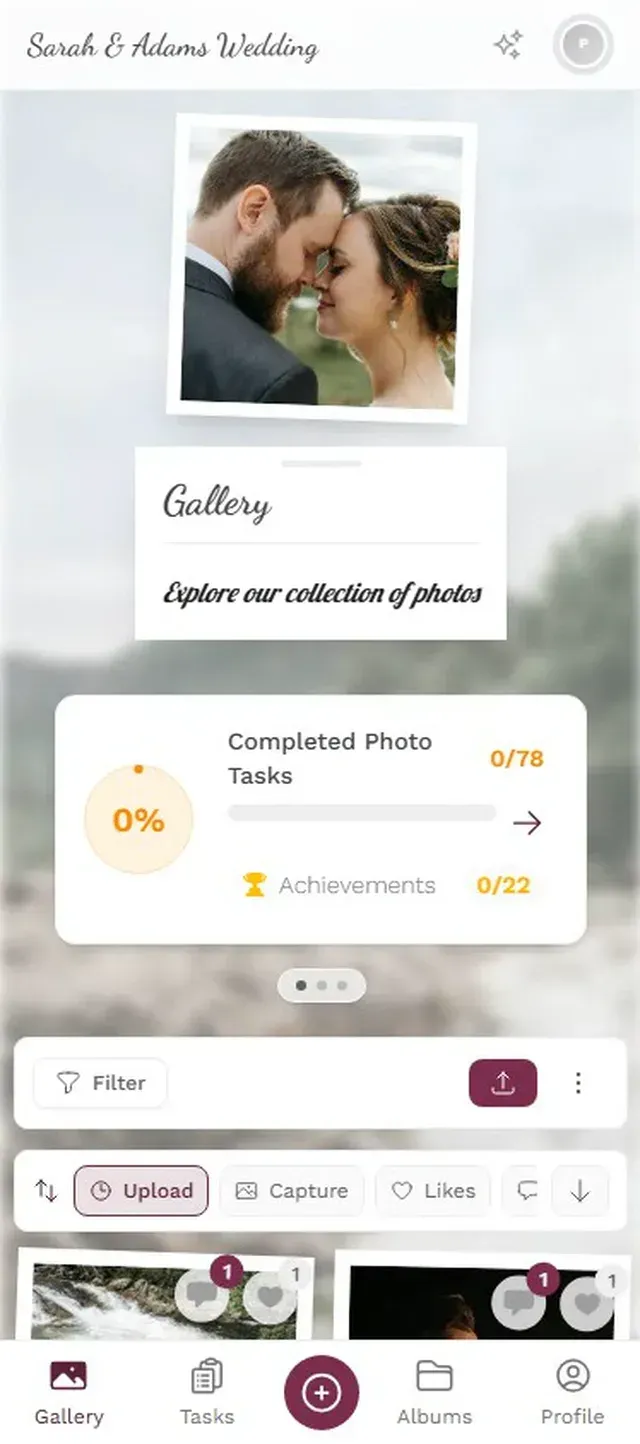
1.Guests scan and upload from their browser. No app needed.
What makes this more than a shared folder is the gamification layer. You can set up photo challenges with example photos that guests try to recreate. Imagine a challenge card that shows a funny meme pose. Guests get points for completing it, rankings show up on a leaderboard, and suddenly people who would never upload a single photo are competing to be the top contributor. It's the piece that turns passive attendees into active participants.
If you want the full picture on sharing event photos with guests without requiring an app, we've written a detailed walkthrough.
Drinks and Catering: Do the Math
The most common planning mistake for social events? Ordering too little alcohol. The second most common? Ordering too much of the wrong kind. (I once helped plan a summer barbecue where we bought twice as much red wine as white. In July. In 30-degree heat. Guess which bottles came home unopened.)
A drinks calculator takes the guesswork out. Enter your guest count, event duration, and the mix of beer/wine/spirits drinkers, and get actual quantities. We wrote a whole guide on how much alcohol and drinks to buy for your event if you want the detailed breakdown.
For weddings, the ratio shifts dramatically between cocktail hour and the reception. For corporate events, you're thinking about coffee breaks and non-alcoholic options. The calculator adapts to both.
The Free Toolkit, All in One Place
Here's what your complete free event planning stack looks like:
Your Free Event Planning Toolkit
Plan the money
Budget calculator to track every category of spending before you commit.
Organize the people
Guest list manager for RSVPs, meals, groups, and plus-ones.
Map the time
Timeline builder to schedule every block with realistic buffers.
Design the space
Venue capacity calculator and seating planner for layout logistics.
Create the invites
Invitation designer and QR code generator for polished, scannable cards.
Capture the moments
QR photo gallery so every guest's photos end up in one place automatically.
None of these tools require an account or a subscription. You bookmark them, use them when you need them, and move on to the next planning task. That's the whole point: free tools that work without locking you into a platform you'll abandon after one event.
One Honest Trade-Off
Free tools have limits. You won't get CRM integrations, automated email sequences, or white-label branding. If you're running a 5,000-person conference with sponsorship tiers and multi-track scheduling, you probably do need a paid platform. But for the other 95% of events (weddings, birthdays, corporate team days, reunions, holiday parties), free tools cover the essentials without the overhead.
The trick is knowing which tools to combine. A budget calculator plus a guest list manager plus a photo sharing setup gets you 80% of the way there with zero cost. Add a timeline builder and you're at 95%.
The best event toolkit isn't the most expensive one. It's the one you'll actually use. Bookmark these, pull them out when planning starts, and spend your energy on the parts of the event that can't be solved by software: the music, the food, the people who make it worth remembering.
All of this comes with your own event.
Setting it up takes five minutes. You can build and view everything before you decide.
Starting from €39 one-timeOne-time payment — No subscription
- No App Required
- Setup in 5 Minutes
- 30-Day Money Back
“We used the software at my mum's birthday party. It went down really well 😊”
Written by

I believe event photos should be more than static galleries. They should be live, playful, and unforgettable.
Categories
Related Posts

How to Make a Photo Book From Your Event Photo Gallery
Your event gallery has hundreds of photos. Here's how to turn them into a photo book people actually flip through.

Game-Day Watch Party Photo Sharing: How to Capture 4 Hours of Chaos in One Gallery
Game-day watch parties generate wild, unforgettable moments. Here's how to make sure every photo actually ends up in one place instead of 14 different camera rolls.

Military Homecoming Photo Sharing: How to Collect Every Reunion Moment From Every Phone
Military homecomings and farewell parties produce hundreds of irreplaceable photos scattered across dozens of phones. Here's how to collect them all in one place before everyone disperses.