💬Social EngagementSTARTER

Turn Your Gallery Into a Social Experience

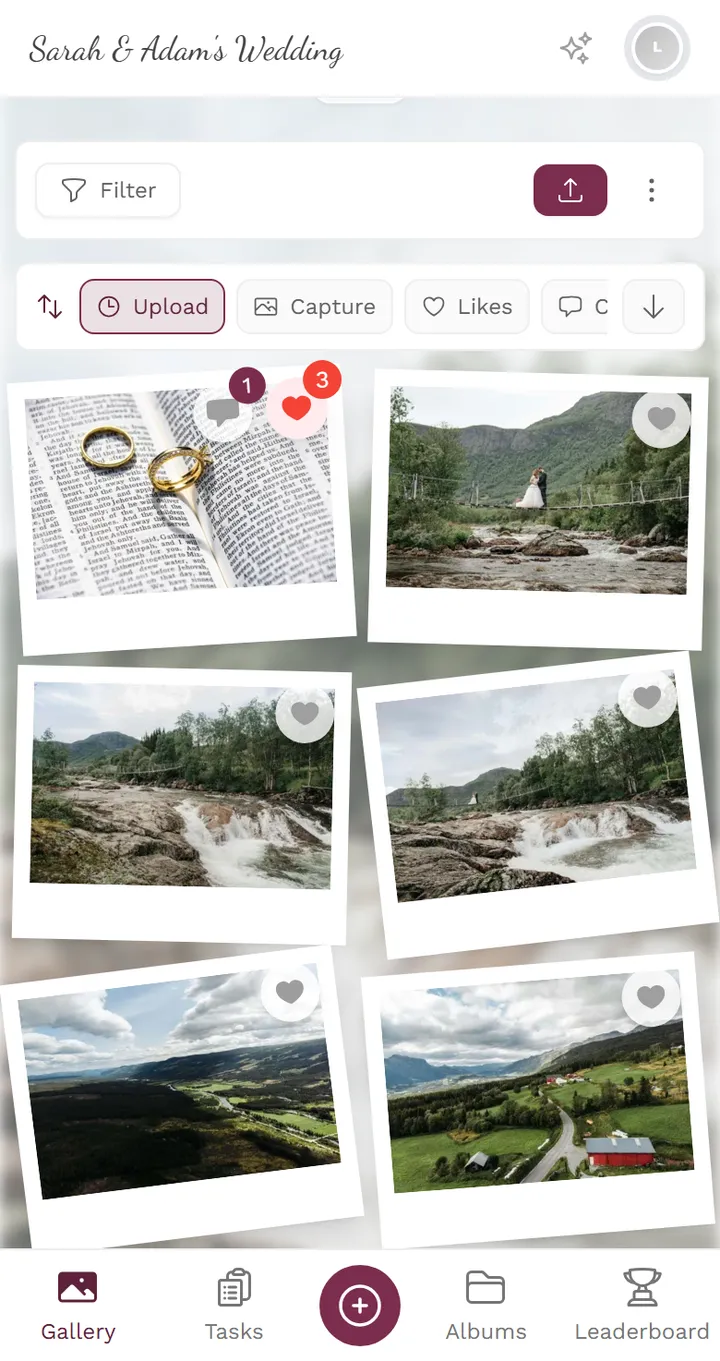
Likes, comments, threaded replies, and @mentions transform a static photo collection into a living, breathing social feed for your event.

What Are Social Features?

Social features transform your event gallery from a passive photo dump into an interactive social feed. Instead of guests uploading photos and leaving, they stay to react, comment, tag each other, and share standout moments.

Think of it as Instagram-style engagement built right into your event gallery. Guests can like their favorite shots, leave comments with context about who's in the photo or what was happening, and @mention other guests to draw their attention to specific photos.

The result? Guests spend 3-5x more time in the gallery. They come back after the event to relive memories. And the gallery becomes a shared social experience rather than a one-way upload destination.

Core Social Features

Six social tools that keep guests engaged with every photo in the gallery.

❤️

Likes & Reactions

One-tap likes on any photo or video. See which shots are the crowd favorites with like counts visible to all guests.

💖

Bulk Liking

Quickly like multiple photos at once by swiping through the gallery. Perfect for catching up on new uploads without tapping each one individually.

💬

Comments

Leave context, jokes, or memories on any photo. Comments appear below the photo and are visible to all guests in the gallery.

🗨️

Threaded Replies

Reply directly to comments to start conversations. Threaded replies keep discussions organized without cluttering the main comment feed.

📣

@Mentions

Tag other guests in comments using @name. The mentioned person gets a notification so they don't miss photos they're in or moments they'll love.

🔗

Easy Sharing

Share standout photos directly from the gallery via WhatsApp, Instagram Stories, email, or any messaging app. The gallery stays the single source of truth.

How Social Engagement Works

📸
1

fp.socialEngagement.howItWorks.browse.title

fp.socialEngagement.howItWorks.browse.description

❤️
2

fp.socialEngagement.howItWorks.interact.title

fp.socialEngagement.howItWorks.interact.description

💬
3

fp.socialEngagement.howItWorks.discuss.title

fp.socialEngagement.howItWorks.discuss.description

🔗
4

Best Moments Get Shared

The most-liked photos surface naturally. Guests share their favorites to WhatsApp groups, Instagram, or save them to their phone.

How Social Engagement Works

Who Benefits Most

💒

fp.socialEngagement.audiences.wedding.title

fp.socialEngagement.audiences.wedding.description

🏢

Corporate Event Planners

Team events get more engagement when colleagues can react to each other's photos. The leaderboard and likes create friendly competition.

🎂

Birthday & Celebration Hosts

Birthday guests leave funny comments, tag friends in embarrassing photos, and the gallery becomes a living guestbook for the party.

✈️

Vacation Groups

Travel groups share and react to photos throughout the trip. Mentions help everyone find the photos they're in across hundreds of uploads.

How Photogala Compares

Most event photo platforms treat the gallery as a static upload destination. Photogala adds the social layer that keeps guests coming back.

Likes & Reactions

Photogala

yes

Alternatives

partial

Comments on Photos

Photogala

yes

Alternatives

no

Threaded Replies

Photogala

yes

Alternatives

no

@Mentions & Notifications

Photogala

yes

Alternatives

no

Easy Sharing to Social Apps

Photogala

yes

Alternatives

partial

Choose Your Plan

Higher tiers unlock more powerful features and greater flexibility

Buy now, use anytime. The event duration starts after the first 10 photos are uploaded, not from the purchase date.

Deluxe

AI organization, stronger controls, and premium event branding.

€139/event
Unlimited
Guests
500
Uploader
1 year
Duration
Unlimited
Media
  • High Quality Uploads
  • Photo Wall (with Logo)NEW
  • Social Features (Share, Comment, Like)
  • Photo Challenges (Full Suite)
  • Points & Leaderboard
  • Achievements & Real RewardsNEW
  • AI Tools (Filter & Face Recognition)NEW
  • Downloads (Single & Bulk)
  • Moderation & Team Roles
  • Full Branding (Gallery & QR)
  • +12 more features
Choose Plan

Premium

Videos, comments, points and a leaderboard for guest fun.

€79/event
Unlimited
Guests
250
Uploader
1 year
Duration
Unlimited
Media
  • High Quality Uploads
  • Photo Wall
  • Social Features (Share, Comment, Like)NEW
  • Photo Challenges (Full Suite)NEW
  • Points & LeaderboardNEW
  • Achievements & ImportNEW
  • Downloads (Single & Bulk)
  • Moderation & Team RolesNEW
  • Full Branding (Gallery & QR)NEW
  • Multilanguage SupportNEW
  • +9 more features
Choose Plan

Starter

The simple event gallery for collecting photos fast.

€49/event
Unlimited
Guests
30
Uploader
6 months
Duration
Unlimited
Media
  • High Quality Uploads
  • Photo Wall
  • Photo SharingNEW
  • Photo Challenges & ImportNEW
  • Downloads (Single & Bulk)
  • Multiple ColorsNEW
  • Dark ModeNEW
  • Photo LikingNEW
  • Custom QR CodesNEW
  • QR Template DownloadsNEW
  • +2 more features
Choose Plan
30-day money-back guarantee
No app required

Uploader Definition: All guests who upload at least one photo or video count as uploaders. Unlimited guests can still view the gallery.

Fair Use Storage: Storage is sized for normal event usage. Reach out if you need unusually large galleries.

Social Engagement FAQ

Can I disable social features for my event?
Yes. You can enable or disable likes, comments, and sharing independently in your event settings. This gives you full control over the level of interaction.
Do guests need an account to like or comment?
Guests need a free guest account (just a name and optional email) to interact. This prevents anonymous spam and lets @mentions work properly.
Can I moderate comments?
Yes. Event organizers and moderators can delete any comment. You can also enable comment approval mode where comments must be approved before they appear.
Which plans include social features?
Likes and sharing are available on all plans. Comments, threaded replies, and @mentions are available on Premium and Deluxe plans.
Do guests get notifications for likes and mentions?
Yes. Guests receive real-time notifications when someone likes their photo, comments on it, or @mentions them. Notifications appear in the gallery and can also be viewed in a notification history.
Can social features work with the photo wall?
Absolutely. The photo wall can show the most-liked photos, and social activity (new comments, trending photos) can be configured to influence which photos appear on the wall.
Is there a limit to comments per photo?
No. There is no limit to comments, replies, or likes per photo. The threaded reply system keeps long comment threads organized and readable.
Can guests share photos outside the gallery?
Yes. The share button generates a direct link or allows sharing to WhatsApp, Instagram Stories, email, and other apps. The original quality photo is always shared.

Ready to Get Started?

Create your event in minutes. No credit card required.