Guest List & Import

You already have the list. It's just in the wrong file.

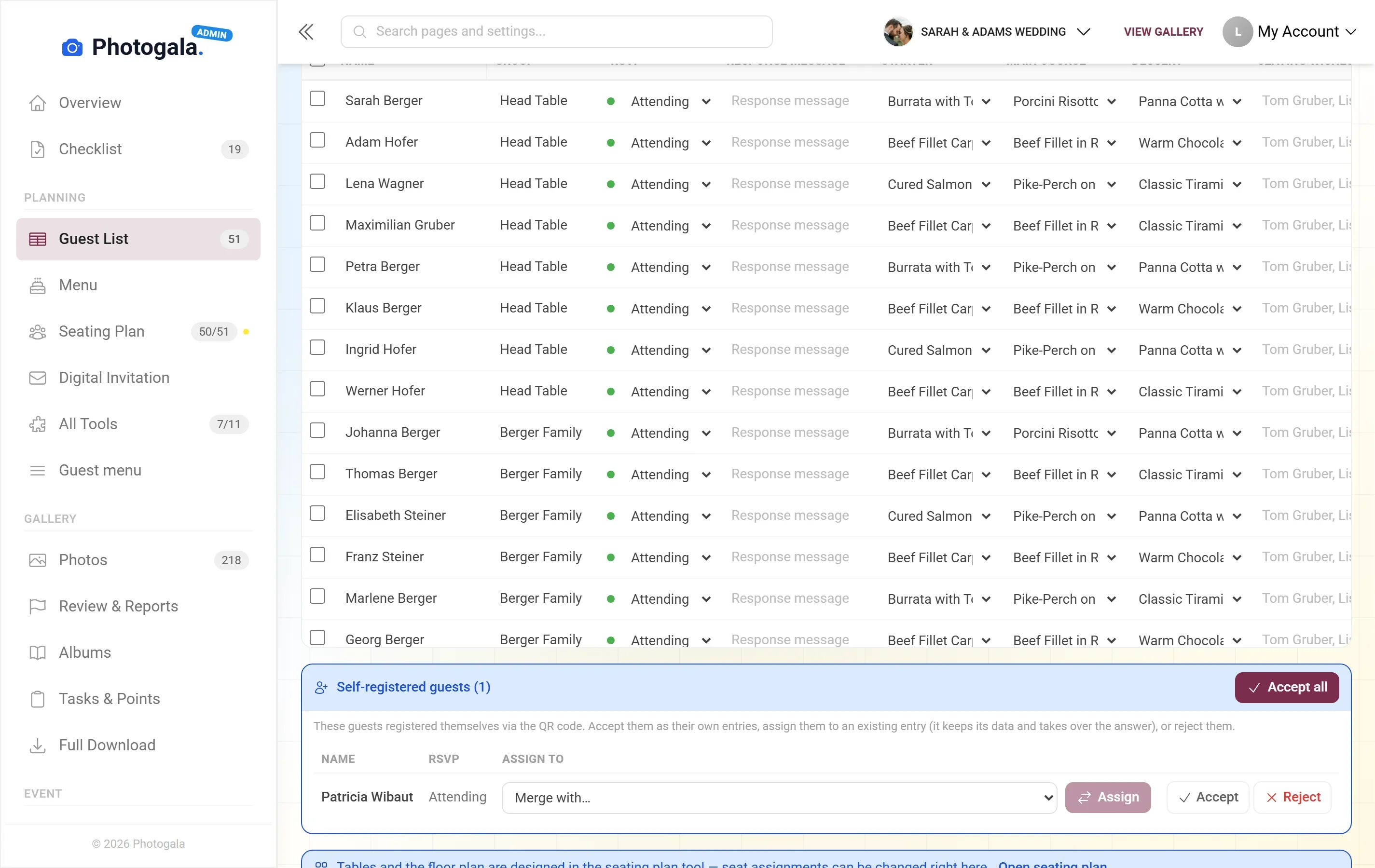
Names, groups, plus-ones, "hotel booked?", "shuttle?" — you import your existing Excel file instead of retyping it, and define the columns yourself. After that the seating chart, meal choices and place cards all read from that same list. Adding, importing and maintaining guests is free on every plan.

Start for free — no credit card required · Paid plans from 39 €

No App Required
Setup in 5 Minutes
30-Day Money Back

Photogala or the Excel template?

Both are a table with columns. The difference only shows up when other tools are supposed to work from that same list.

Your own columns
Photogala: Text, number, select, checkbox or date — up to 30 custom values per guest, with translatable labels and select options. Renaming a column or changing its type doesn't lose the values already entered.
Excel template: A new column is typed in two seconds, with no rules and no waiting. But it stays text in a cell — no other tool can do anything with it.
Bringing in an existing file
Photogala: Import from .xlsx, .xlsm, .xls, .csv, .tsv and .txt: delimiters and column headers are detected, first and last name merged, unknown columns ignored. A review step shows what will land before it does.
Excel template: Not needed — the file is the list, and it opens anywhere. In exchange, every further use starts with copy and paste again.
Plus-ones
Photogala: Every companion is a record of its own beneath the main guest — with its own name, meal choice, dietary note, seat and place card. Up to 10 per guest.
Excel template: Usually a number in the "+1" column. For a seat and a card, exactly the thing you need is missing: the name.
When guests write in themselves
Photogala: When a guest registers via link or QR, the answer lands in their row. If that record has already answered, a duplicate candidate is created instead, which you merge in the admin area — an answer already given is never overwritten.
Excel template: You type in every reply yourself: from chats, phone calls and voice messages. Whether a name sits in the list twice, the spreadsheet won't notice.
Seating chart
Photogala: The same record, no second sheet. Auto-seating fills the tables straight from the list, skips declines and respects "seat together" and "do not seat together" rules.
Excel template: Second file, second version. Anyone who cancels has to be deleted in two places.
Meal choice and dietary notes
Photogala: The choice sits on the guest per course, the dietary note right next to it. Your catering headcounts end up in the same row as the seat.
Excel template: One column per course, counted by hand — and recounted after every change.
Place cards and export
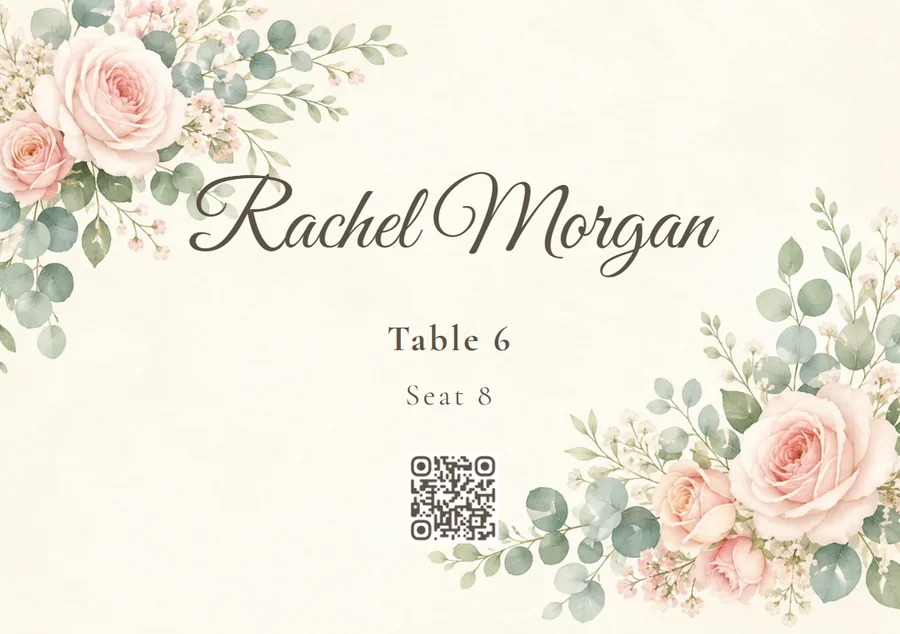
Photogala: Name, table, seat number, group, meal choice and dietary note fill the template automatically, one record per guest; you open the template from the seating chart. The printing happens at your print shop — Photogala only hands you the file. Seating export and guest list export both hang on the guest limit, and the list export as Excel, CSV or PDF additionally needs Plus or higher.
Excel template: Mail merge in a word processor, or retyping. In exchange the file stays in your hands with no account, no limit and no plan — on price, the spreadsheet wins this row.

Where the spreadsheet wins

If all you really need is a list of names, the spreadsheet wins. No account, no internet connection, a new column in two seconds, and the file sits on your own computer — nobody can switch it off or change it on you. Three uncomfortable points belong on our side of this. First: exporting the list as Excel, CSV or PDF is only included from Plus upwards — on the free plan you can keep the list online, but you can't get it back out as a file. Second: there is no import from Google, Outlook or phone contacts and no two-way sync; the starting point is always a file or typing. Third: nothing can be sent out from the list itself (see the questions below). Photogala only starts to pay off the moment a seating chart, a meal choice and place cards are supposed to come out of that same list.

Six recordings, one list

Six recordings from a real demo wedding. Watch how often the same rows turn up again — typed once, reused five times.

The table every other tool reads from

The recording moves through the guest list in the admin area: first down through the guests and their groups, then sideways through the columns — RSVP status, meal choice per course, seating wishes, contact details, dietary note and remarks. One row per guest, no second sheet. Everything else in this series only shows who reads from that one row.

The guest fills in their own row

On the phone: the guest types first and last name, confirms they're coming, and picks a starter and a main course in the next step. Everything they enter lands in their row of the guest list — including when you had already added them. If that record has already answered, a duplicate candidate is created instead, ready to merge; nothing is ever overwritten.

The same rows, now at tables

The seating chart stores no name list of its own — it reads the same rows. In the recording only two couples are seated at first, the ones carrying a "seat together" and a "do not seat together" rule; one click on "Auto-seat", and the tables fill in a single go, straight from the guest list. Declines are skipped. How the plan itself is drawn and printed is a topic of its own — what counts here is that nothing gets retyped for it.

Where the "meal choice" column comes from

On the phone the guest taps the "Menu" tile on the event home screen and scrolls through starter, main course and dessert — each dish with a photo and freely typed notes such as "vegan" or "gluten-free". These are the same dishes offered when they RSVP, and their choice then sits as a column per course on the guest, right next to their dietary note.

From the row to the place card

In the seating tool the recording opens the export dialog and launches the template editor via "Place cards". The card is already filled when it opens: name, table and seat number are on it because they come from that guest's row — one record per guest, no mail merge by hand. What falls out of the editor is a file; the printing is your print shop's job.

The same guests, after the party

Finally, a calm scroll through the shared gallery on the phone. You don't need the list for this at all — guests upload photos via link or QR. Why you can still sit down with the list months earlier is answered in the questions below.

All of this comes with your own event.

Setting it up takes five minutes. You can build and view everything before you decide.

View Live Demo

One-time payment — No subscription

Starting from 39 € / one-time

All memories from your event — one price, no hidden fees.

See Pricing

Questions about the guest list

Can we bring in our existing Excel list?
Yes. The import accepts .xlsx, .xlsm, .xls, .csv, .tsv and .txt. Delimiters and column headers are detected automatically, across languages; first and last name can be merged, and even a file with no header row works. Columns Photogala doesn't recognise are ignored. Before anything is taken over, a review step shows you what will actually be created. What isn't possible is the address-book route: there is no import from Google, Outlook or phone contacts.
What do custom columns give us that a spreadsheet doesn't?
The difference is the type. A custom column is text, number, select, checkbox or date — "hotel", "shuttle?", "gift received" — and up to 30 values fit on one guest. Labels and select options are translatable, and if you later rename a column or change its type, the values already entered stay.
What is free, and what costs money?
Keeping the list costs nothing: adding guests, importing them, building columns, evaluating answers, drawing the seating chart and building the invitation are free on every plan. Money starts at delivery. Five actions hang on the guest limit — the public seat search for guests, seating exports and printing, personal RSVP links, the full digital invitation and the guest list export. Free covers those up to 20 guests, then Plus (39 €) up to 75, Premium (69 €) up to 250 and Deluxe (119 €) with no guest limit. Exporting the list as Excel, CSV or PDF is a separate right on top of that, included from Plus upwards.
How many guests fit in the list?
Up to 1000 records — a technical ceiling that is the same on every plan. Companions are records of their own and count in full. Alongside that: 30 custom column values per guest, up to 20 meal choices and up to 3 seating wishes. Don't confuse this with your plan's guest limit: that one only decides when you may deliver, not how many names the list may hold.
Does Photogala send invitations or reminders to our guests?
No, and there's no point in glossing over it: there is no sending channel towards the guest list — no guest email, no SMS, no WhatsApp and no automatic reminder to everyone who hasn't replied yet. You hand out the link and the QR code yourself, by messenger, on the printed card or on the table. The personal RSVP links can be exported as a name-and-link list, which you then send out yourself — that export is one of the five delivery actions, though, so from guest 21 onwards it needs a paid plan.
How are companions handled?
A companion is a full record, linked to the main guest. It has its own name, its own meal choice, its own dietary note, its own seat and its own place card. You can allow up to 10 companions per guest; they count towards the limits like everyone else.
Can our guests see the guest list?
No. The list is for admins only and is never delivered through the guest-facing pages. There is deliberately no public "who's coming" link and no name picker to click. When a guest registers via QR, they never learn whether their name matched an existing record. The only place names are found is the seat search on the event day — and it shows the searcher the table and seat for their own name rather than listing anyone.
Can we start a year before the wedding?
Yes, and it costs you no storage time. Your event's storage period doesn't start when you register, but with the first photo in the gallery (on the paid plans, with the tenth). So you can build the list, import it, place the tables and set up the menu months in advance without any clock running. It only starts once the first pictures are uploaded.

Ready to Get Started?

Create your event in minutes. No credit card required.

See Pricing
No App Required
Setup in 5 Minutes
30-Day Money Back