Guest List

One list everything else grows from

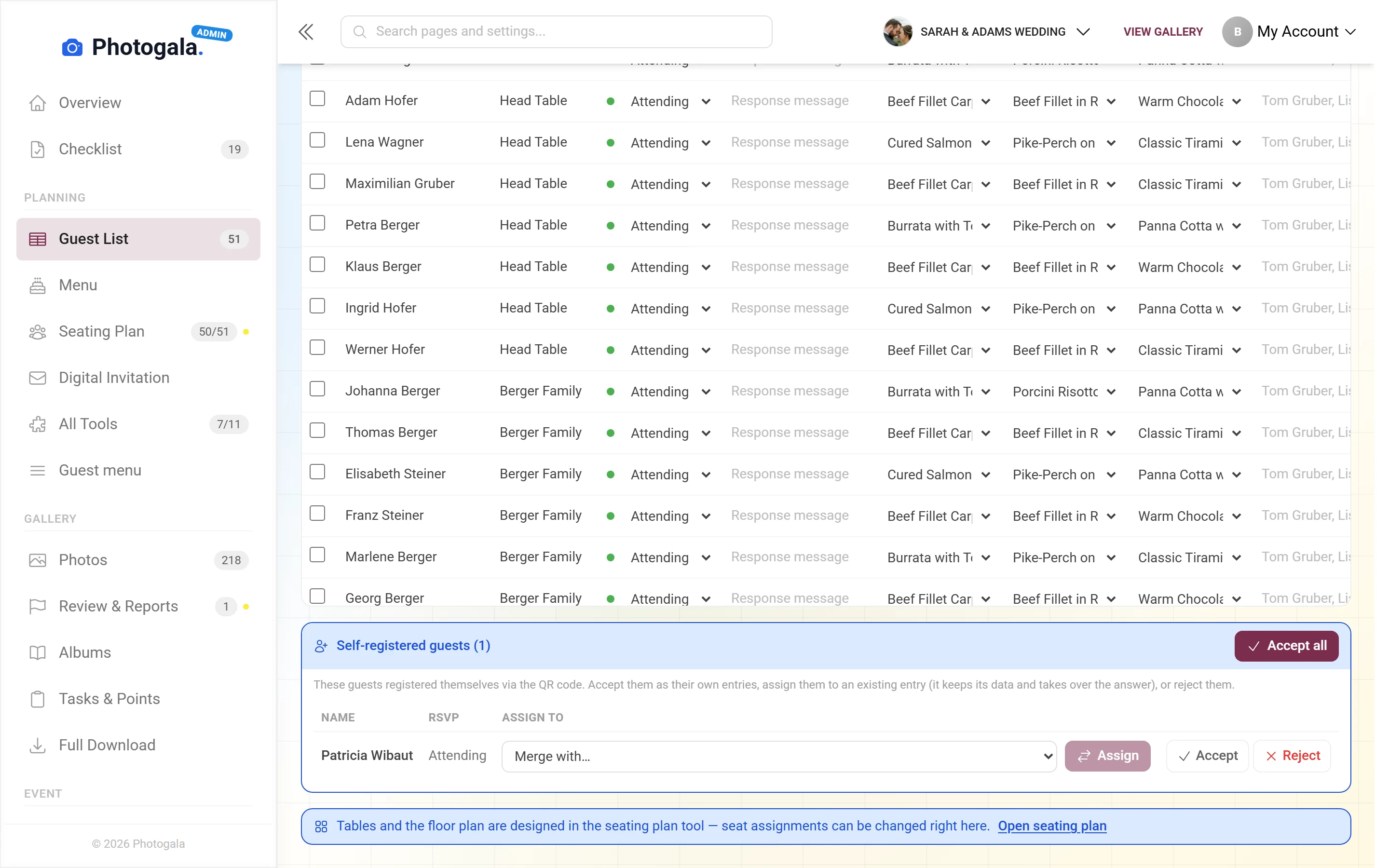
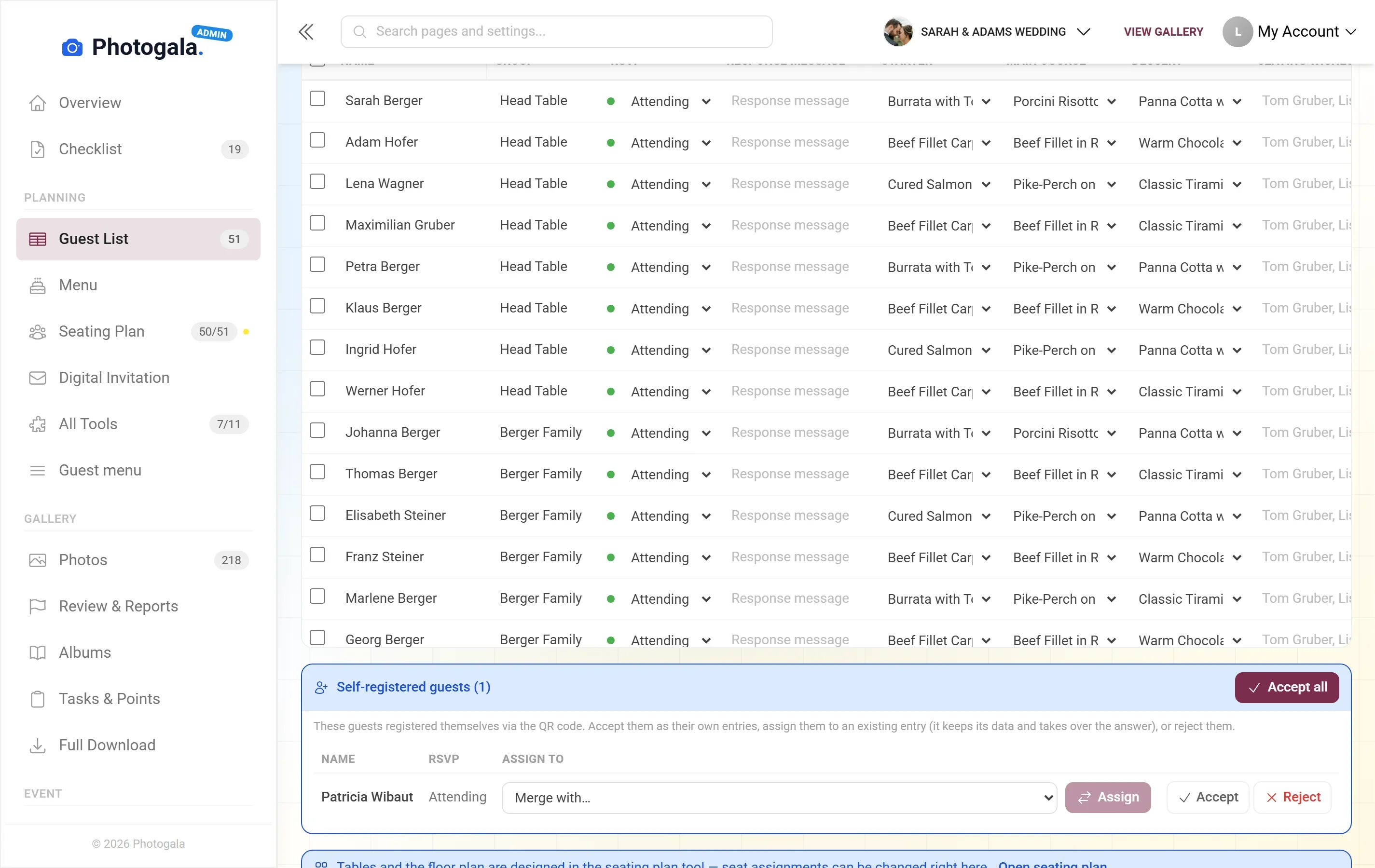
Names, plus-ones, replies, allergies, table wishes — kept in one place. Seating plan, menu, place cards and reminder emails all read the same list.

Free · no credit card · ready in 2 minutes

Guest List — Admin view
460+
Events created
2,600+
Guests & hosts
10,000+
Photos shared
  • No app — guests scan the code and upload
  • Guests need no account
  • Photos in original quality, not compressed

Why the guest list is the foundation

At most events the guest list exists three times: once in a spreadsheet, once in someone's head, once in a chat thread. Every change has to reach all three, and eventually none of them is right.

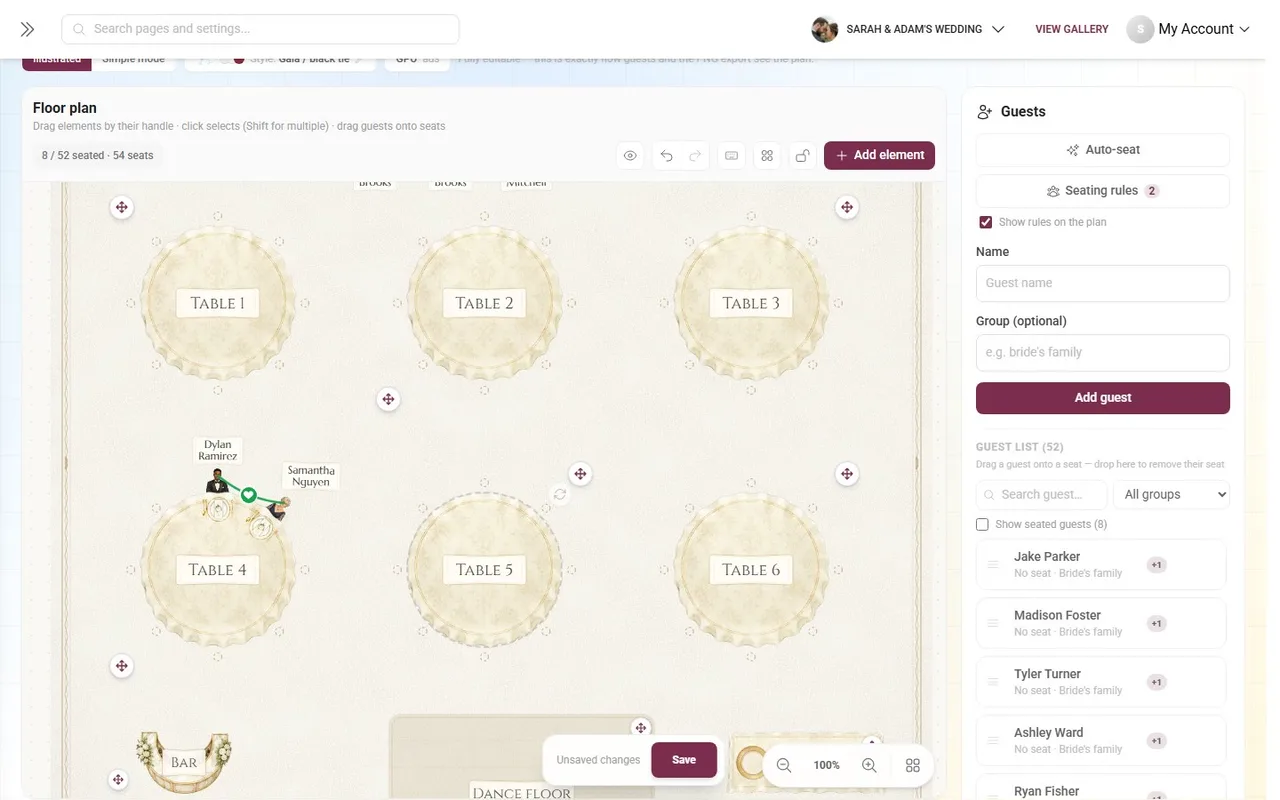
On Photogala it exists once. The seating plan pulls names from it, the menu choice hangs off the same people, the printed place cards are filled from the same rows. Mark someone as declined and the seat at the table and the card in the print job both disappear.

What the list contains is up to you. Beyond names and reply status you add your own columns — allergies, travel, accommodation, children, table wishes, whatever your event needs.

What the guest list does

A table that knows what it is for, instead of a table that has to be everything.

One source for everything

Seating, RSVP, menu, print templates and reminders read the same rows. One change lands everywhere.

Custom columns

Add what your event needs: allergies, travel, childcare, table wishes. Each column has a type so you can filter by it later.

Import from CSV

Upload the list you already keep in Excel or Google Sheets, map the columns, done. You never start from zero.


Export as Excel, CSV or PDF

For the caterer, the venue or ticking people off at the door — the list comes with you as a file.

Households and groups

Families and couples belong together. One invitation, one reply, one table — instead of five separate rows that happen to share a surname.

Guest data stays private

Guests see their own entries, never anybody else's. Who sits where is visible; who has which allergy is not.

Guest List — Admin view
Admin view

From the first row to the finished evening

1

Create or import

Type names in or upload the spreadsheet you already have. Either takes minutes.

2

Add your columns

Allergies, plus-ones, travel — exactly the fields your event needs.

3

Connect the tools

RSVP writes replies in, the seating plan reads names out. No copy and paste.

4

Print and take it with you

Place cards, table lists and the catering overview all come straight from the list.

Guest List — Admin view
Admin view

Who needs a real guest list

Weddings

80 to 150 guests, half as many households, changes right up to two days before. Exactly where spreadsheets fall apart.

Corporate events

Sign-ups trickle in over weeks, departments sit together, and catering wants a number they can rely on.

Birthdays

Even at 30 people a list pays off the moment somebody asks who is vegetarian.

Event planners

Several events at once, a list for each, the same routine. Exporting for the venue is part of the standard process.

Guest list, spreadsheet and paper

What happens when two cancellations and one allergy arrive three days before the party.

Recording a cancellation

Photogala

Seat at the table and place card disappear automatically

Alternatives

Edit the sheet, edit the seating, edit the print file

Collecting replies

Photogala

RSVP writes straight into the list

Alternatives

Copy answers from chat and email by hand

Custom fields

Photogala

Any number of typed columns you can filter by

Alternatives

Free-text columns nobody fills in consistently

Privacy

Photogala

Guests only ever see their own entries

Alternatives

A shared sheet shows everything to everyone

Handover to catering

Photogala

Export as Excel, CSV or PDF in one click

Alternatives

Gather the numbers and retype them

How many versions of your list exist?

Enter each name once and the seating plan, menu choices and place cards all read the same rows. The guest list is included in every Photogala event.

Add your guests — free

Start free, no credit card

Get started with Photogala

Collect every photo and video from your event — pick the package that fits.

Buy now, use it whenever. Your storage period only starts with the 10th uploaded photo — not on the purchase date — and then runs continuously, so guests can add photos during every part of your event.

Guest List is included in every plan — the free one too.

Plus

Collect every guest photo in one beautiful gallery.

75
Uploader
Unlimited
Photos
25
Videos
6 months
Storage period
  • High Quality Uploads
  • Seating plan for 75 guests
  • Photo WallNEW
  • Event Planning Tools (RSVP & Guest Replies, Guest List Manager, Digital Invitation …)
  • Unlimited Albums
  • Downloads (Single & Bulk)NEW
  • Dark Mode
  • Photo Liking
  • Custom QR Codes
  • QR Template DownloadsNEW
  • +3 more features
Available in higher tiers
  • Live Upload (FTP / WebDAV)(from Premium)
  • Smart Albums(from Premium)
  • Sharing & Comments(from Premium)
  • Photo Challenges (Full Suite)(from Premium)
  • +10 more in higher tiers
39 €/one-time
Buy now
Best Value

Premium

The full experience — guests engage, you get the best photos.

250
Uploader
Unlimited
Photos
Unlimited
Videos
1 year
Storage period
  • High Quality Uploads
  • Live Upload (FTP / WebDAV)NEW
  • Seating plan for 250 guests
  • Photo Wall
  • Event Planning Tools (RSVP & Guest Replies, Guest List Manager, Digital Invitation …)
  • Social Features (Share, Comment, Like)NEW
  • Unlimited Albums & Smart AlbumsNEW
  • Photo Challenges (Full Suite)NEW
  • Points & LeaderboardNEW
  • Achievements & ImportNEW
  • +18 more features
Available in higher tiers
  • AI Tools (Filter & Face Recognition)(from Deluxe)
  • GPS Map View(from Deluxe)
  • Real Rewards(from Deluxe)
  • Photo Wall Logo(from Deluxe)
69 €/one-time
Buy now

Deluxe

AI-powered, fully branded, completely hands-free.

500
Uploader
Unlimited
Photos
Unlimited
Videos
2 years
Storage period
  • High Quality Uploads
  • Live Upload (FTP / WebDAV)
  • Seating plan for any number of guests
  • Photo Wall (with Logo)NEW
  • Event Planning Tools (RSVP & Guest Replies, Guest List Manager, Digital Invitation …)
  • Social Features (Share, Comment, Like)
  • Unlimited Albums & Smart Albums
  • Photo Challenges (Full Suite)
  • Points & Leaderboard
  • Achievements & Real RewardsNEW
  • +22 more features
119 €/one-time
Buy now

Starter (free of charge)

Your moments, your stage, create your first digital photo gallery completely free of charge.

15
Uploader
50
Photos
None
Videos
3 months
Storage period
  • High Quality Uploads
  • Seating plan for 20 guests
  • Event Planning Tools (RSVP & Guest Replies, Guest List Manager, Digital Invitation …)
  • Unlimited Albums
  • Dark Mode
  • Photo Liking
  • Custom QR Codes
Available in higher tiers
  • Photo Wall(from Plus)
  • Downloads (Single & Bulk)(from Plus)
  • QR Template Downloads(from Plus)
  • Invitation QR Downloads(from Plus)
  • +2 more in higher tiers
Free
Create gallery
30-day money-back guarantee
No app required

Uploader Definition: All guests who upload at least one photo or video count as uploaders. Unlimited guests can still view the gallery.

Fair Use Storage: Storage is sized for normal event usage. Reach out if you need unusually large galleries.

After expiry: After the storage period the gallery is closed to guests; as the organizer you keep 30 days of ZIP-download access, then it is deleted.

Guest list questions

Can I bring my existing Excel list?
Yes. Upload it as CSV and map the columns — names, emails and everything else land in the new list.
How many guests can the list hold?
There is no cap on the list itself. What your plan limits is photo storage, not how many names you keep.
Can guests see the list?
No. Guests see their own entries and, if you share the seating plan, which table they are at. The list itself stays with you.
Can I add my own columns?
Yes, as many as you like. Each column has a type such as text, yes/no or choice, so you can filter and count by it later.
What about families and couples?
Group them into a household. They get one invitation, give one reply and sit together at the table.
Can somebody help me maintain it?
Yes. Give other people access to the event and several of you keep the same list, without versions drifting apart.
Can I get the data back out?
Any time, as Excel, CSV or a print-ready PDF. The list belongs to you, not to the platform.
What happens to the data after the event?
It stays with your event for as long as you keep it. Delete the event and the guest list goes with it.

Ready to Get Started?

Create your event in minutes. No credit card required.