How to Collect RSVPs Online Without Building a Wedding Website

The Question Nobody Warns You About
A few months before the wedding, you hit a wall that has nothing to do with flowers. The caterer wants a final headcount. The venue asks about allergies. And a good part of your guest list still hasn't answered the invitation you sent weeks ago.
The standard advice is to build a wedding website: pick a template, write your love story, upload engagement photos, add a registry link, and somewhere in there bolt on an RSVP form. It works, but it takes an evening or three. If you already love your printed invitations, or simply don't want a public page about your relationship, it feels like building a house to install a doorbell.
The real question is smaller: how do you collect replies online without all of that? With a standalone RSVP page. No template, no domain, no coding. A link or a QR code that guests open, answer and close.
Why the Usual RSVP Methods Break Down
Paper reply cards still work, technically. They arrive in dribs and drabs over weeks, cost postage, and someone has to type every answer into a spreadsheet. That spreadsheet quickly becomes the most important and most error-prone document of the whole wedding.
Group chats are worse. Picture a WhatsApp thread with 40 people. Someone asks "Who's coming?" and the replies get buried between memes, congratulations and unrelated questions. Three days later you're scrolling back through the thread trying to work out whether Uncle Thomas said yes or just sent a thumbs-up.
Then there's the form-plus-spreadsheet route. You send a generic online form, answers trickle into a sheet, and you cross-check them by hand against your actual guest list. It costs nothing, but every change means more manual work.
The real cost of messy RSVP tracking isn't the time. It's ordering extra dinners "just in case", or running short on chairs because several guests brought a plus-one nobody counted.
What a Standalone RSVP Page Actually Is
Exactly what it sounds like: one page with your event details and a reply form, nothing else. No homepage, no "Our Story", no menu of subpages. Guests open the link, see the event name and date, say whether they're coming, add a plus-one or a dietary note, and send it off. Every answer lands in one list on your side.
Sharing is the easy part. Print the link or a QR code on your paper invitations, text it, email it. Guests don't install anything, don't create an account and don't need a password.
One rule of thumb holds for every RSVP form: each extra question costs you replies. Ask what you genuinely need for planning (attendance, plus-ones, meals, allergies) and leave the rest out.
See it in action
RSVPs, meal choices, plus-ones – one list.
How the RSVP Tool in Photogala Works
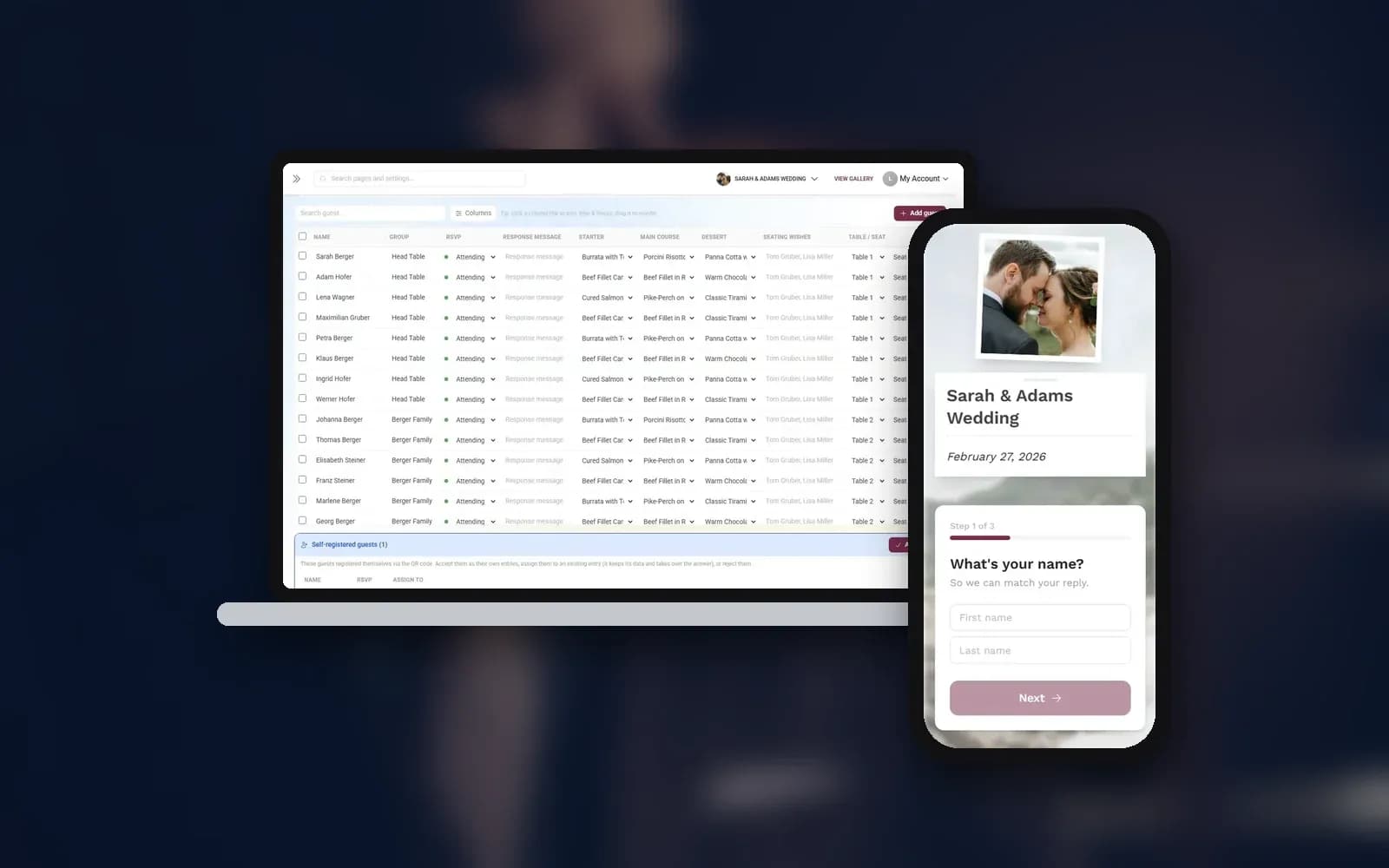
Photogala has an RSVP tool built into every event gallery, on every plan, the free one included. It isn't a separate product with a separate login. The reply page lives inside your event and writes straight into your guest list, which also feeds the seating plan and the menu.
Setup is a few switches in the admin area. You decide whether guests may bring companions (and how many, with exceptions per guest), whether you ask for a meal choice and dietary needs, whether email or phone number is off, optional or required, and whether guests go through the form step by step or see everything on one page. On top of that you can add your own questions: single choice, multiple choice or free text, optionally with an "other" field.
Guests open the page on their phone, no app, no account. They answer, pick their meal if you ask for one, note allergies, add a message for you and send it. The answer appears in your guest list right away.
A guest confirms, adds a companion and picks a meal, right in the browser
Collect RSVPs online
One link and your guests reply themselves — with meal choice, allergies and plus-ones.
Two Ways to Invite (Pick the One That Fits)
One QR code for everyone. The same code goes on every invitation. Guests type their first and last name, and Photogala matches it to your list. Your guest list itself is never shown, so nobody browses who else is invited. If a name isn't on the list, you decide: either the guest is added automatically (handy for casual parties) or the reply is turned away. If someone answers under a name that has already replied, the entry is kept as a possible duplicate, which you can merge with the original in your guest list.
A personal link per guest. Each guest gets their own link or QR code. When they open it, the page already knows who they are and fills in their details. This suits formal weddings where you want to see exactly which household answered and keep plus-ones under control. Personal links count as delivery, so they follow your plan's guest allowance (more on that below).
Both modes feed the same list. And in both, guests can change their answer later: the phone remembers the reply, and on the next visit they see a summary with an option to change it. A "not you?" link covers shared phones.
Need a cut-off date? The RSVP tool has a visibility window like every other tool. Once it closes, the form closes with it, so the caterer gets a final number on the day you promised.
The Part Nobody Mentions: What Happens After the Reply
Collecting replies is step one. Step two is turning them into logistics, and that's where a connected list pays off.
Say most of your guests have confirmed. Now you need a seating chart. With a standalone form tool you would export a file, open a separate seating app and import the names again. Here the names are already in the seating plan: drag tables onto the floor plan, place your key guests, and let auto-seating fill the remaining chairs. If you switch on the optional question "Who would you like to sit next to?", those wishes can be taken over as seating rules. On the day, guests look up their seat on their phone.
The same goes for food. Meal choices from the RSVP show up per guest and per course, and the digital menu shows guests what's being served. Nothing is typed twice.
1.Every reply lands in one list with status, group and meal choice
And because Photogala is a photo-sharing platform at heart, the gallery guests used to reply is the same one where they upload their photos on the day. One link, one QR code.
What About the Invitation Itself?
Some couples want more than a bare reply page: a countdown, venue details, the day's schedule, maybe music. That's what the digital invitation is for. You can design, preview and save it on any plan. Publishing the full invitation to guests is a paid feature, while the Save-the-Date version stays free for everyone. If a clean RSVP page is all you need, you never have to touch the invitation editor.
For couples who already have printed stationery, this split works nicely. The paper invitation carries the design and the feeling. The RSVP link or QR code handles the logistics.
Honest Limitations
The RSVP tool sits inside an event gallery platform. That's its strength (everything connects) and its limit. There is no ticketing or payment processing. And it's not a wedding website with your own domain and SEO.
Planning is never capped: you can build the full guest list, set up the form and test everything before paying anything. What's capped is delivery to guests, meaning personal RSVP links, the seat lookup and exports. The free plan covers a short guest list, the paid plans scale up, and Deluxe has no cap. Check the pricing page against the size of your guest list before you send the invitations.
Language is less of an issue than you might think. The guest-facing interface is available in nine languages, including English, German, Spanish, French, Italian, Dutch, Polish, Hungarian and Turkish, so international guests see the form in their own language. If you also want your own texts in several languages, have a look at multi-language galleries.
Collect RSVPs in 4 Steps
Create a gallery
Sign up, name your event and pick a cover image. The free plan is enough to set everything up.
Switch on RSVP
Choose companions, meal and dietary questions, contact fields and your own questions.
Share the link or QR code
Print one QR code for everyone, or hand out personal links per guest.
Work from one list
Replies land in your guest list and flow into the seating plan and menu.
Who This Works Best For
If you already have printed invitations and only need the digital reply layer, this is a natural fit. Add a QR code to the card and you're done.
If you're planning a smaller wedding and don't want the overhead of a full website with registry, blog and photo pages, a standalone RSVP page gives you what you need and nothing more.
And if you'd rather run planning and photos from one place than juggle half a dozen apps, the connection between RSVP, guest list, seating plan, menu and gallery saves you a lot of copying. Our guide to guest list management goes deeper into tracking replies, meals and groups.
Picture the week before the wedding. You open one list: replies in, meal choices counted, seating plan done, and the gallery already waiting for the first photos. No spreadsheet in sight.
All of this comes with your own event.
Setting it up takes five minutes. You can build and view everything before you decide.
Starting from €39 one-timeOne-time payment — No subscription
- No App Required
- Setup in 5 Minutes
- 30-Day Money Back
“I use PhotoGala Deluxe and I'm absolutely thrilled. It was the perfect solution for documenting a sports event. Uploading and downloading via the link is a breeze for every participant. What won me over most were the photo wall and the slideshow – both are quick to set up and look really professional. Big praise also to Peter from the PhotoGala team: he's very easy to reach by email, replies quickly and even took my suggestions on board and added new features that made my slideshow even better. You rarely get support this dedicated. A clear 5-star recommendation!”
Written by

I believe event photos should be more than static galleries. They should be live, playful, and unforgettable.
Categories
Related Posts
Three Hundred Phones, One Gallery: The Graduation Ball Photo Setup That Actually Works
One QR code, one gallery, one photo wall. How to set up photo sharing for your graduation ball so the best shots don't stay trapped on random phones.

Best Photo Wall Apps for Events 2027: What Actually Gets Guests Off Their Phones
Photo walls went from party gimmick to must-have. Here's what separates the apps that work from the ones guests ignore.
The End of USB Sticks and CDs: Why Digital Photo Delivery Is the New Standard
USB sticks end up in drawers, CD drives have disappeared, transfer links expire. What good digital photo delivery looks like for event photographers and their clients, and where prints still belong.