Best Photo Wall Apps for Events 2027: What Actually Gets Guests Off Their Phones


Picture a 180-guest wedding reception. The DJ is between sets, dessert is being cleared, and a 55-inch TV near the bar starts cycling through photos guests uploaded minutes ago. A blurry selfie of three bridesmaids. A wide shot of the first dance from an angle the photographer missed. A toddler asleep under a table, still clutching a napkin. Every few seconds, someone points at the screen and laughs.
That's a photo wall doing its job. Not as decoration, not as a tech demo, but as a thing that pulls people into the same moment together.
The problem is, most photo wall apps in 2027 still treat the screen as an afterthought. They focus on collecting uploads and tack on a slideshow as a bonus feature. The result: a screen nobody looks at after the first ten minutes. The apps that actually work understand something different. The wall isn't just a display. It's the engine that drives guests to participate.
Why Photo Walls Went Mainstream
LED walls have crossed from premium upgrade to expected standard for events, according to event production analysts at CueQuote. What used to require renting a projector and praying the venue had a blank wall now runs on a browser tab connected to any smart TV. The hardware barrier disappeared. The software barrier is what remains.
And the software landscape is crowded. MemWall, EventWall, SelfieShow, HeyGrats, and others all promise instant photo walls. Most deliver some version of the same thing: QR code, upload, slideshow. The differences live in the details, and those details determine whether your wall is a centerpiece or a screensaver.
If you've been comparing event photo sharing apps for summer events, you already know the basics. This article goes deeper on the wall itself: what display modes exist, what keeps guests engaged beyond the first upload, and which apps give you real control over what shows up on screen.
What Separates a Good Photo Wall From a Slideshow
Every app on the market can cycle through uploaded photos. That's table stakes. The features that actually matter are the ones you don't think about until you're standing in a venue at 7 PM realizing something is missing.
Moderation. Imagine a corporate event with 200 employees. Someone uploads something inappropriate. Without moderation, it hits the big screen before anyone can react. A good photo wall app lets you set up pre-approval so a designated moderator reviews every photo before it goes live. Photogala's smart moderation system includes a manual approval queue on the Premium plan and above. On the Deluxe plan, an AI-powered NSFW filter catches obvious problems automatically before they even reach the queue.
Display modes. A simple slideshow gets boring after twenty minutes. The apps that hold attention offer variety: collage layouts, featured photo highlights, live overlays showing likes and achievements. If you're deciding between slideshow and collage formats, it usually comes down to the event type. Slideshows work well for intimate gatherings. Collages shine at larger events where volume matters.
Guest participation mechanics. This is where most apps fall flat. They give guests a way to upload, and that's it. No reason to upload a second photo. No feedback loop. No game. The wall sits there passively, and participation drops off a cliff after the first hour.
The best indicator of a photo wall app's quality isn't its feature list. It's whether guests are still uploading photos two hours into the event. If participation dies after 30 minutes, the app failed.
Feature Comparison: Photo Wall Apps in 2026
I compared five photo wall apps currently active in the market. Here's how they stack up on the features that affect the guest experience and the host's control. Note: I'm comparing publicly available feature sets as of June 2026. Things change fast, so check each provider's site for the latest.
Photo Wall App Comparison 2026
| Feature | Photogala | MemWall | EventWall | SelfieShow | HeyGrats |
|---|---|---|---|---|---|
| QR Code Upload (No App) | |||||
| Live Photo Wall | |||||
| Content Moderation | AI + manual | AI filter | pre-approval | ||
| Multiple Display Modes | slideshow + 5 collage styles | ||||
| Live Overlays (likes, achievements) | |||||
| Photo Challenges / Games | unlimited | scavenger hunts | |||
| Leaderboard & Points | |||||
| Face Recognition | |||||
| Gallery Layouts (beyond wall) | 4+ layouts | ||||
| Custom Branding | |||||
| Real-World Rewards | |||||
| Pricing | Free demo / from €39 one-time | From $9 | Free tier available | Free tier available | Free tier available |
A few things stand out. Every app handles the basics: QR upload, live display, no app download. That's the minimum viable product for 2027. The gaps appear in moderation, engagement mechanics, and display customization.
MemWall deserves credit for including an AI content filter on every plan and offering scavenger hunts. HeyGrats focuses on moderation, which makes it popular with schools. EventWall and SelfieShow keep things simple, for better or worse.
Where Photogala pulls ahead is the combination of photo challenges with a points system, leaderboard, and live overlays on the wall itself. That combination creates a feedback loop: guest uploads a photo, sees it on the wall, earns points, checks the leaderboard, uploads another. Most apps only have the first step.
See it in action
Photos land live on the big screen.
The Engagement Problem (And Why Display Modes Matter More Than You Think)
Say you're running a company holiday party for 120 people. You set up a photo wall on the TV behind the buffet. The first 30 minutes are great. People scan the QR code, upload selfies, point at the screen. Then dinner starts. Conversation takes over. The screen fades into the background.
This is normal, and it's not entirely fixable. People come to events to be with people, not to stare at a screen. But the drop-off can be less dramatic if the wall keeps surprising guests.
That's where display variety helps. A uniform collage looks the same after 50 photos as it did after 10. But a collage that highlights popular photos at larger sizes, or shows live overlays when someone unlocks an achievement, keeps changing. It gives people a reason to glance back. Photogala's wall supports five collage styles (uniform, polaroid, vintage, featured, justified) plus a live slideshow, and you can switch between them mid-event without restarting anything.
The live overlay feature is worth calling out specifically. When a guest's photo gets liked, a heart animation pops on the wall. When someone completes a challenge or unlocks an achievement, it shows up on screen. These micro-moments create little bursts of attention that pull eyes back to the display throughout the evening.
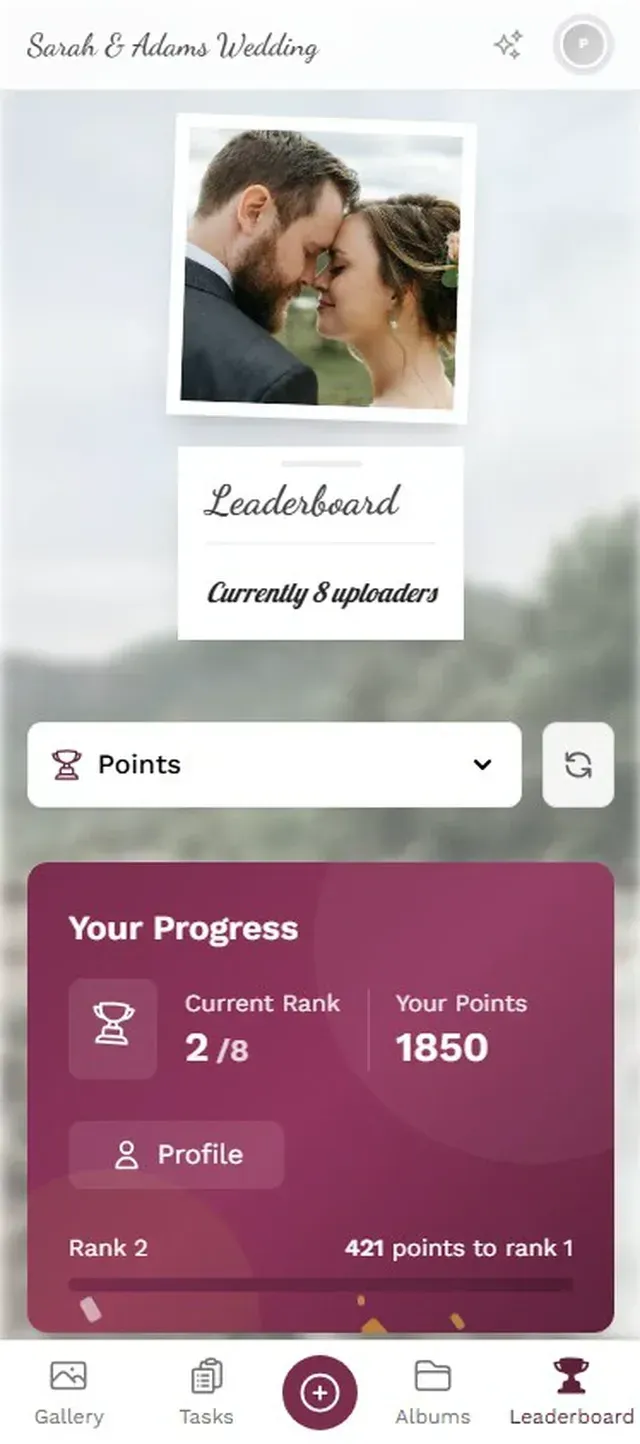
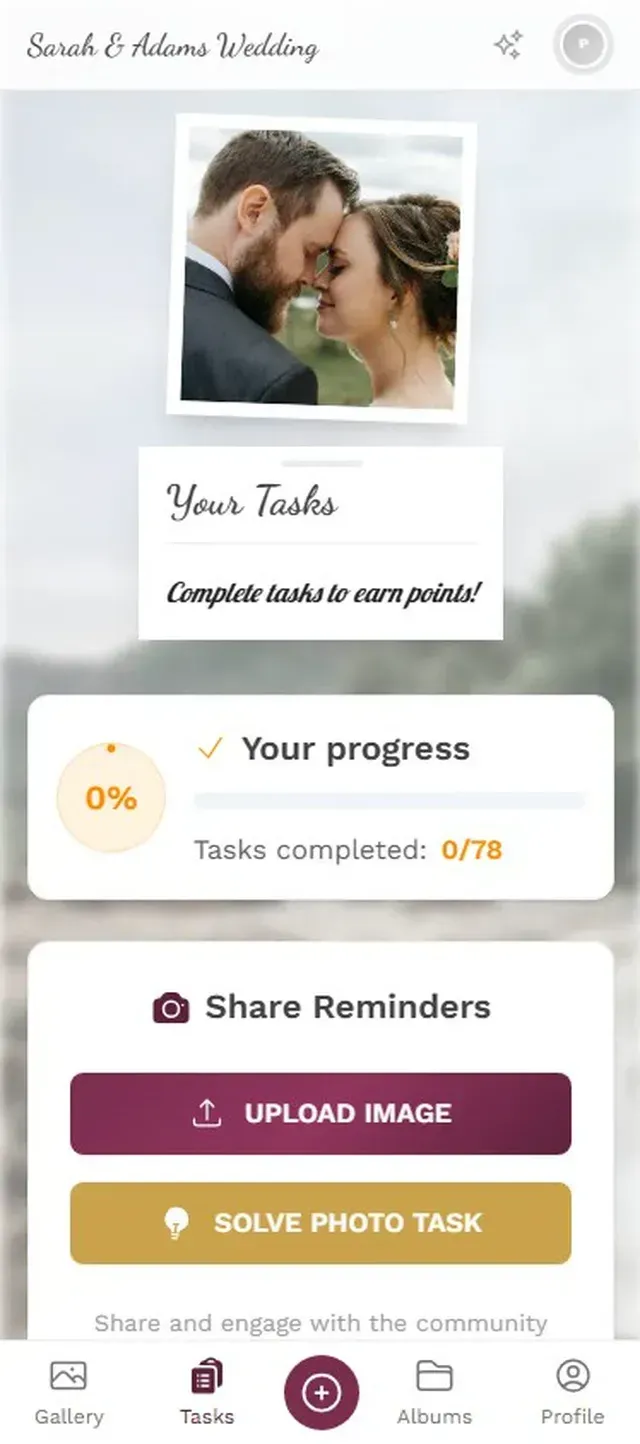
1.The photo wall running on a TV, with a live indicator and real guest uploads
The Photo Challenge Advantage
Most photo wall apps treat uploads as a one-way street. Guest takes photo, uploads it, done. Photo challenges flip this into a game.
Imagine a wedding with eight challenges: "Best dance move," "Find something blue," "Selfie with the flower girl," "Recreate this pose" (with an example photo guests need to mimic). Each completed challenge earns points. Points feed a leaderboard. The leaderboard feeds competitive instincts. Suddenly, the uncle who never takes photos is uploading his fifth attempt at recreating a funny pose because he wants to beat his nephew's score.
Photogala's challenge system supports example preview photos, which opens up creative formats like photo roulette (guests get a random reference photo to recreate), meme recreation, and themed pose contests. Most competing apps either don't offer challenges at all, or limit them to basic text-only prompts.
The thing about challenges is they don't just increase the number of uploads. They increase the quality of what gets uploaded. Instead of 50 nearly identical group shots, you get varied, creative content that's actually fun to watch on the wall. And when those challenge completions trigger live overlays on the big screen, every completion becomes a mini-event that draws attention.
If you want to go further, the full gamification system adds achievements and real-world rewards. At a corporate event, you could offer a gift card to the top contributor. At a wedding, maybe a bottle of champagne. The Deluxe plan includes inventory management for physical rewards, so you can track who claimed what.
What About Customization?
A photo wall at a tech startup's launch party should look different from one at a rustic barn wedding. Most apps give you a logo upload and a color picker. That's about it.
Photogala's customization options go deeper. You get multiple gallery layouts (modern, polaroid, timeline, vintage, and more), six header styles, per-variant styling controls for things like card rounding, shadows, and tilt, plus custom branding with your own colors, logo, and fonts. The photo wall itself can run a custom logo overlay on the Deluxe plan.
Honest caveat: the sheer number of styling options can be overwhelming if you just want something quick. The defaults look good out of the box, but if you're the type who tweaks every detail, budget an extra 20 minutes for setup. The simpler apps win on speed-to-launch, even if they lose on flexibility.
Setting Up a Photo Wall in Practice
Regardless of which app you choose, the setup process is roughly the same. Here's what it looks like with Photogala, which handles both the guest upload flow and the wall display from one platform.
Photo Wall Setup in 4 Steps
Create your gallery
Sign up (free demo available, no credit card), name your event, pick a theme. Takes about 2 minutes.
Configure the wall
Choose slideshow or collage mode, pick a collage style, enable moderation if needed. Turn on live overlays for likes and achievements.
Connect your screen
Open the photo wall URL on any browser-connected TV, projector, or laptop. Full-screen it. Done.
Share the QR code
Print QR codes on table cards, project the code on screen, or share the link. Photogala's free [QR code generator](https://photogala.net/en/tools/qr-code-generator) can help if you need standalone codes. Guests scan and upload from their phone browser.
The one thing people consistently underestimate is screen placement. A photo wall behind the DJ booth looks great in concept but competes with the stage lighting. Near the bar or buffet works better: high foot traffic, guests are standing around anyway, natural conversation starter. If you're working with a wedding venue, scout the wall location during your venue visit.
The Honest Trade-Offs
No photo wall app is perfect. Here's where each category of app makes compromises:
Simple apps (EventWall, SelfieShow): Fast setup, low learning curve, free tiers available. But no moderation, no engagement mechanics, and limited display options. Fine for a casual birthday party with 20 friends. Risky for a 200-person corporate event where you can't control what appears on screen.
Mid-range apps (MemWall, HeyGrats): Better moderation, some interactive features like scavenger hunts. Good for events where content control matters (schools, formal corporate). But limited customization and no deeper engagement tools like leaderboards or achievements.
Full-featured platforms (Photogala): The most display modes, the deepest engagement system, AI moderation on the Deluxe plan. But: it's browser-based (no native app, which some guests find unfamiliar), the paid plans start at €39 (though a free demo with 50 photos exists for testing), and the customization depth means a steeper learning curve if you want to use everything. The archive and download features are solid, but you need Starter or above for bulk ZIP downloads.
Pick based on your event size and what you actually need. A backyard BBQ doesn't need AI face recognition. A 300-guest corporate conference probably does need moderation and branded displays.
For help choosing between plans, the guide on sizing your photo gallery breaks down what each tier includes and which events they fit.
The photo wall went from novelty to standard event feature faster than most people expected. The apps that understand this aren't just building upload tools. They're building participation engines. And the ones that figure out how to keep that participation going past the first hour are the ones worth paying for.
If you want to see what a full-featured photo wall looks like before committing, Photogala's free demo lets you create a gallery and test the wall with up to 50 photos. No credit card, no time limit on setup.
All of this comes with your own event.
Setting it up takes five minutes. You can build and view everything before you decide.
Starting from €39 one-timeOne-time payment — No subscription
- No App Required
- Setup in 5 Minutes
- 30-Day Money Back
“Excellent service and great pictures! Photogala fully met our expectations at the event. The value for money is unbeatable. Absolutely recommended! The seating plan saved us a lot of hassle!”
Written by

I believe event photos should be more than static galleries. They should be live, playful, and unforgettable.
Categories
Related Posts

Best Free Guest Photo Apps for Events 2027 (and What Free Really Costs)
Free event photo apps sound perfect until you hit the upload cap at 11 PM. Here's what free tiers actually include, what they cut, and when paying €35 saves you more than it costs.

Best Corporate Event Photo Apps 2027: What Separates the Good from the Forgettable
Most corporate event photo apps do the same three things. Here's what to look for if you want one that actually gets employees to participate.
Photogala vs Amazon Photos: Why Cloud Storage Falls Flat at Events
Amazon Photos stores your pictures beautifully. But ask 150 wedding guests to use it? Here's why purpose-built event sharing wins.