Company Christmas Party Programme: 10 Ideas That Get the Whole Team Involved (Without the Cringe)

December. The planning channel just pinged. Someone shared a spreadsheet titled "Christmas Party Activities (MANDATORY)" and your stomach dropped. You know this movie: forced icebreakers, a quiz where the boss reads every question at half speed, and a karaoke machine nobody wanted.
Your company Christmas party needs structure, not a script. The difference matters. A script tells people what to do minute by minute. Structure gives them a few anchors and lets the evening breathe between them.
These 10 programme ideas work for small teams and whole companies alike. Most of them run themselves once set up. None require anyone to stand up and perform solo in front of colleagues. If you're looking specifically at how to collect team photos without the HR headache, we have a separate deep-dive on that. This article is about the full evening programme.
The One Rule Before You Plan Anything
Leave gaps. The single biggest mistake at corporate holiday events is over-programming. Too many games back to back start to feel like a work assignment. Keep most of the evening unstructured and scatter the programme items below across it like seasoning, not stacked like a conference agenda.
People came to see each other. The programme exists to create the conditions for that, not to replace it.
10 Programme Ideas (In Rough Order of the Evening)
1. A Photo Wall That Fills Itself
Mount a screen near the entrance or the bar. Connect it to a live photo wall that shows guest uploads in real time. People arrive, notice the screen, and start snapping. No announcement needed.
Place a printed QR code on every table and at the entrance. Guests scan it with their phone camera, pick a name, and upload. No app, no account. Soon you'll have a screen full of arrival selfies, group shots, and someone's close-up of the appetiser table. The photo wall becomes the room's conversation starter before the first speech even happens.
2. A Year-in-Review Quiz
Put the questions on the big screen (or the same photo wall screen), and let people answer on their phones. "How many new hires joined this year?" "Which team won the summer football tournament?" "What was the most-used emoji in the company Slack?"
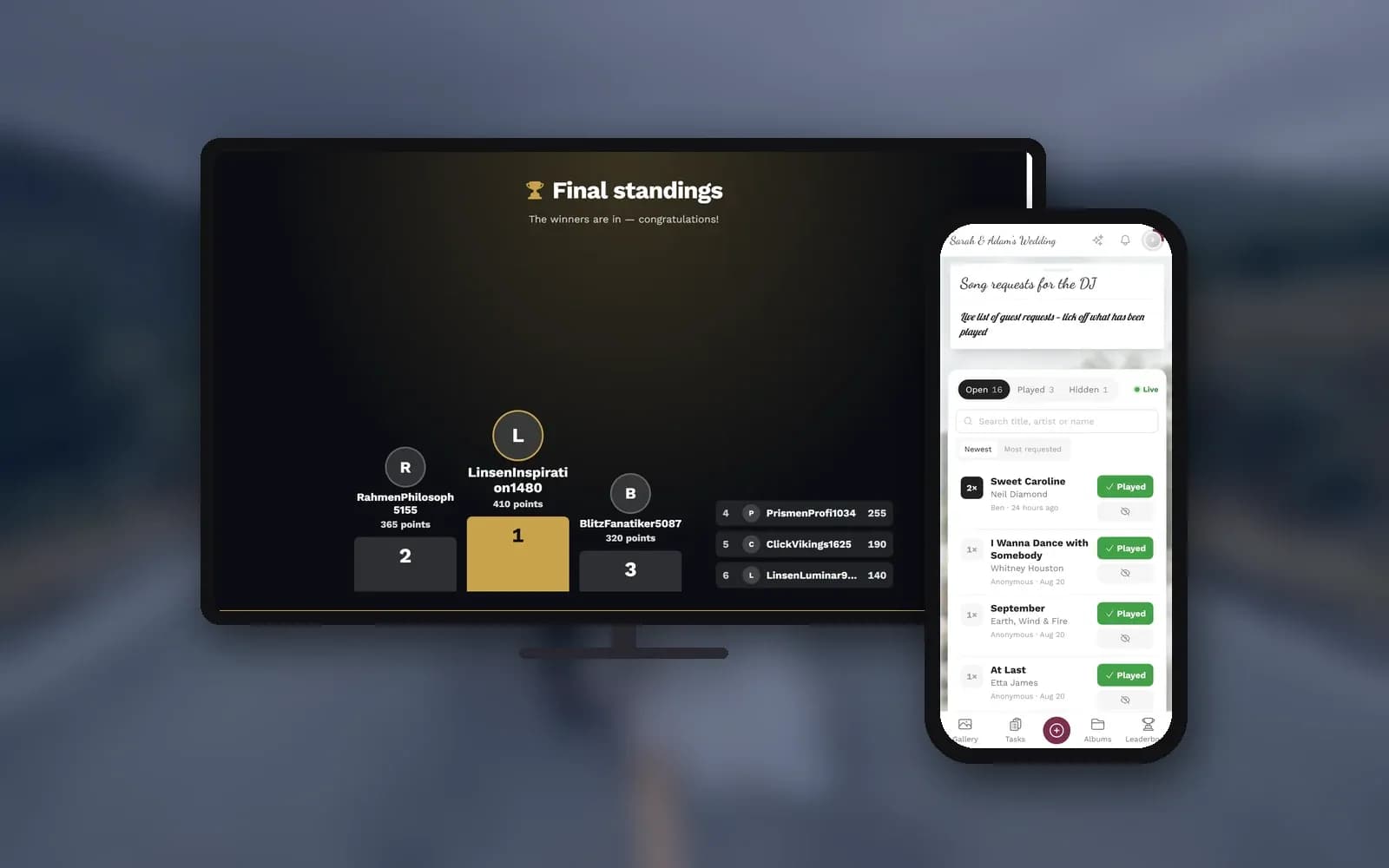
Photogala's live quiz does exactly this: question appears on the TV, answers land on every phone. Guests join via the same QR code they already scanned for photos. Faster answers earn more points, and a streak bonus rewards consistency. Keep it to 8-12 questions; more than that and attention wanders. For 25 ready-to-use question ideas, check our year-in-review quiz guide. It's written for New Year's, but the format works just as well at a Christmas party.
3. Photo Challenges Across Departments
Hand out printed photo challenge cards on each table or let people discover them via the QR code: "Best ugly Christmas sweater," "Most creative team pose," "Catch someone from another department laughing." Photo challenges give people a reason to walk up to colleagues they don't usually talk to.
The challenges feed into a leaderboard that tracks uploads, solved challenges, and likes. Friendly competition between departments can carry the energy of the entire evening. One thing to note: the leaderboard and photo challenges sit on the Premium plan. More on what's included at each tier in a moment.
4. Secret Santa Reveal on Screen
This one barely needs technology. But the photo wall helps. Ask everyone to photograph the moment they unwrap their gift. The reactions show up on the photo wall moments later (or once approved, if you review photos first), a room full of simultaneous unwrapping all captured and projected live. It's low effort, high reward.
5. Song Requests From Every Phone
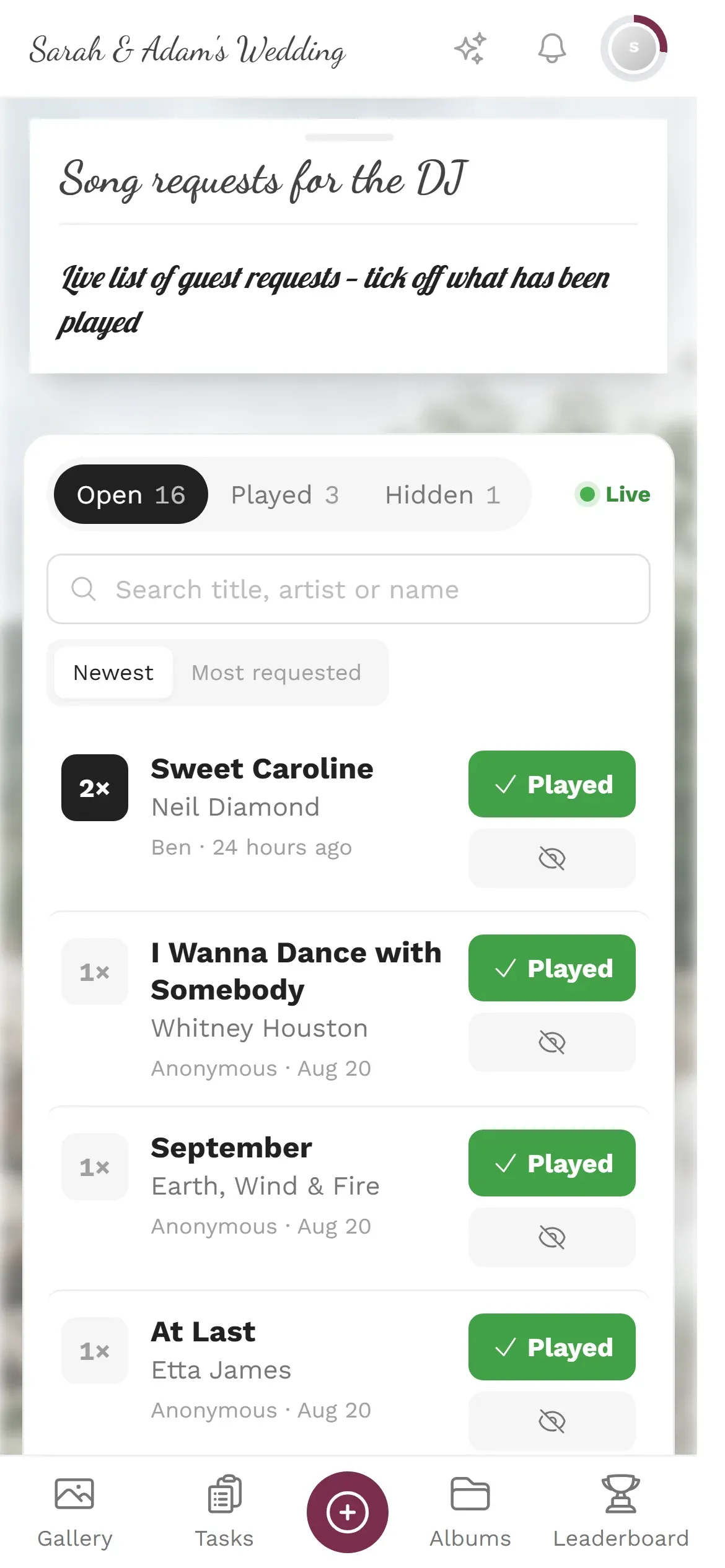
Instead of a pre-made playlist nobody chose, let people request songs from their phone. Whoever runs the music sees requests come in live in the DJ view. On Premium and up you can add the DJ as a moderator so they open it on their own device; on any plan you can open it on your own phone or tablet and hand it over. Guests type a song title and artist, optionally add a note ("Please play this during dessert"), and submit. The DJ view groups identical requests, so if eight people ask for "Last Christmas," it shows up once with a counter. No voting, no app, just a text field.
What's included where: The live quiz and song requests work on every plan, including the free one; how many people can play one quiz round depends on the plan's guest allowance. Photo challenges, the leaderboard, and content moderation start at the Premium plan. The photo wall needs at least Plus. Check pricing for the full breakdown.
See it in action
Every guest photo in one album – no app.
6. The Non-Programme Slot
Schedule this explicitly. Write it on the timeline. "No programme. Eat, drink, talk." The best conversations at company events happen when people aren't being herded to the next activity. If you share the event timeline with guests through the same QR code, they'll know what's coming and won't feel lost during the break.
7. A Two-Minute Thank-You From Management
Short. Genuine. Specific. "This year, the product team shipped the feature that changed how we onboard clients." "We hired 14 people and none of them regret it yet." Two minutes. The photo wall can show a curated selection of team highlights behind the speaker.
If you want more than guest photos on screen now and then, photo wall slides play your own images, videos, text cards or QR codes between the guest photos, on a timer you set. Available on the Deluxe plan.
8. The Department Showdown
Pick one photo challenge and turn it into a live event. "Best group pose, one photo per department, 3 minutes." Show the results on the photo wall. Let the room cheer. This works because it's voluntary, team-based (nobody stands alone), and finishes in under five minutes.
9. The All-Hands Team Photo
Old-school, and it works every time. Gather everyone, take the shot, upload it to the gallery. It becomes the cover photo of the event. If a photographer or photo booth is already at the venue, their shots go straight into the same gallery via live upload (Premium and up). No separate folder, no "I'll send you the link on Monday."
10. Year-in-Photos Slideshow
As the evening winds down, switch the photo wall to a slideshow of the evening's best uploads. Or, if you've collected photos from team events throughout the year (offsites, launches, casual Fridays), mix them in. The slideshow (Plus and up) cycles through automatically. People cluster around it, point at photos, laugh at things they'd forgotten. It's a quiet, warm ending that feels deliberate.

1.Photos appear on screen as guests upload them. No manual curation needed.
What to Skip
A few things that reliably make people uncomfortable at corporate events:
- Solo performances. Karaoke is fine for volunteers. Forced improv, talent shows, or "tell us something nobody knows about you" rounds are not. Keep competition team-based.
- Rankings by personal traits. "Best dressed," "Most likely to become CEO," or "Funniest colleague" awards put people on the spot and often backfire.
- More than three structured activities. Leave generous free time between programme items. Two or three programme moments per evening is plenty. The rest should be conversation, food, and music.
- A programme that runs from arrival to midnight. The spaces between activities are where the real connections happen. Protect them.
Privacy at a Work Event
Not everyone at a corporate event wants their photo on a shared screen. That's completely fair. A few things that help:
Set up content moderation so every photo gets reviewed before it appears on the photo wall. On Premium and up, give someone from HR or the events team the moderator role so they can take on the job. One tap to approve, one tap to reject. This is also your safety net for anything that shouldn't go on a company screen (think: accidental screenshots, blurry mishaps, or the odd NSFW attempt at a holiday party).
Make participation voluntary. The QR code is an invitation, not a requirement. People who'd rather enjoy the evening without uploading can do exactly that. And mention the gallery in the event invitation beforehand, so nobody is surprised. Under GDPR, employees have the right to know how event photos will be used and to request removal. The moderation tools make both straightforward: unapproved photos never go public, and removing a photo from the gallery takes only a moment.
One honest limitation: Photogala runs entirely in the browser. There's no native app. That's a deliberate trade-off. It means zero friction for colleagues who'd never install an event app, but the upload experience is slightly different from a dedicated camera app.
All of this comes with your own event.
Setting it up takes five minutes. You can build and view everything before you decide.
Starting from €39 one-timeOne-time payment — No subscription
- No App Required
- Setup in 5 Minutes
- 30-Day Money Back
“I use PhotoGala Deluxe and I'm absolutely thrilled. It was the perfect solution for documenting a sports event. Uploading and downloading via the link is a breeze for every participant. What won me over most were the photo wall and the slideshow – both are quick to set up and look really professional. Big praise also to Peter from the PhotoGala team: he's very easy to reach by email, replies quickly and even took my suggestions on board and added new features that made my slideshow even better. You rarely get support this dedicated. A clear 5-star recommendation!”
Written by

I believe event photos should be more than static galleries. They should be live, playful, and unforgettable.
Categories
Related Posts
Photo Sharing for Event Venues: A Built-In Perk That Books More Events
Event venues that offer built-in photo sharing don't just sell a space. They sell a shareable experience that fills calendars.
Email and SMS vs a Shared Gallery: The Best Way to Send Event Photos
That 2.5MB wedding photo becomes a 356KB blur over text message. Here's why shared galleries replaced email and SMS for event photo sharing.
How to Set Upload Reminders and Deadlines for Event Guests
Most event photos die on guests' camera rolls. Here's how upload windows, gentle nudges, and smart deadlines rescue them.