How to Collect Guest Videos at Your Event (Not Just Photos)

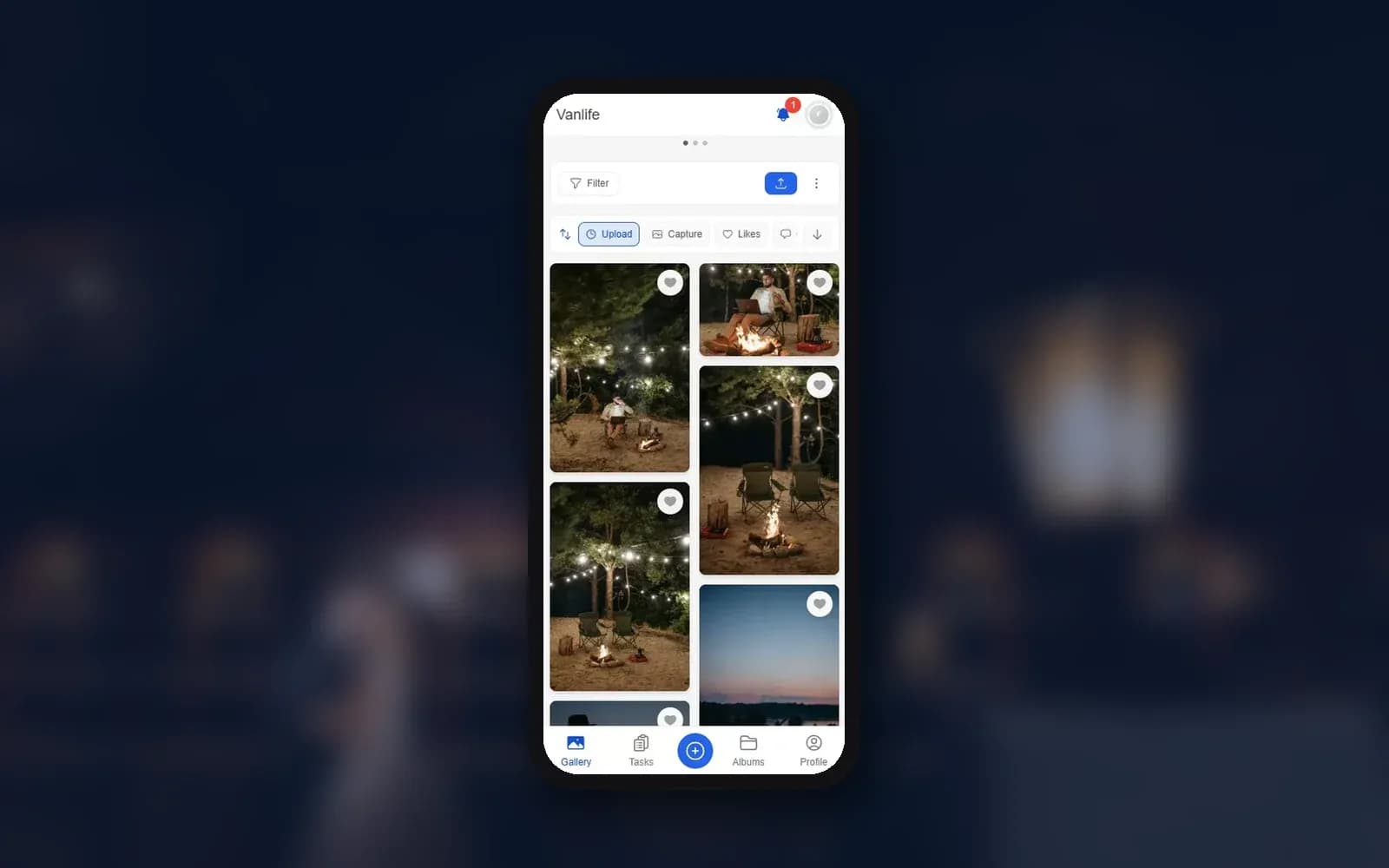
Picture this: a wedding toast. The best man pauses mid-sentence, chokes up, tries again. The room goes quiet, then bursts out laughing when he rescues himself with a joke. Somebody at table four caught it on their phone. As a photo.
A photo of that moment shows a man standing at a microphone. That's it. The video would have had the pause, the wobble in his voice and the laugh that broke the tension. You'd watch it again in five years and feel the same lump in your throat.
Most hosts put their planning energy into photos: QR codes on the tables, a shared album, maybe a screen at the venue. Sensible. But a lot of what people talk about afterwards moves and makes noise. The terrible karaoke. The speech. A three-year-old taking over the dance floor. This guide is about getting those clips off your guests' phones and into one place, including the honest bits about plans, limits and connection speed.
Why Guest Videos Stay on Guests' Phones
Here's the uncomfortable part: your guests are already filming. Short clips, wobbly pans across the room, reaction shots. They just never send them. Not out of selfishness. Sending a video is simply more annoying than sending a photo.
Photos land in a group chat in seconds. Videos are big, messaging apps often squeeze them down, and a long clip may not go through at all on patchy reception. Shared cloud albums want everyone on the same platform with the right account (we went through the trade-offs in cloud albums vs. QR code galleries). And once the party is over, nobody feels like sorting out AirDrop or a download link.
So the clips stay where they are. A month later they're buried under hundreds of new pictures of lunch and the dog. A year later a phone upgrade or a full storage warning takes some of them for good. It's the same story as with photos, which we covered in the best apps to collect wedding photos from guests. With video it just stings more, because a voice you may never hear again can't be re-shot.
The Fix: Treat Videos Like Photos
The easiest way to collect guest videos is to not give them a separate process. Same QR code, same upload button, same gallery. Guests scan, pick whatever they shot (photos and videos mixed, straight from the camera roll) and upload. No app. No account.
In Photogala that is simply the normal QR code upload in the browser. Guests scan the code, pick a name and choose their files. MP4, MOV and WebM are accepted, and a single clip can be up to 10 GB, so even a long speech filmed on a recent phone fits. After the upload the server does the boring part: it grabs a poster frame as the preview image and creates a web version that plays smoothly in any browser. The original file is kept too, which matters later when you download.
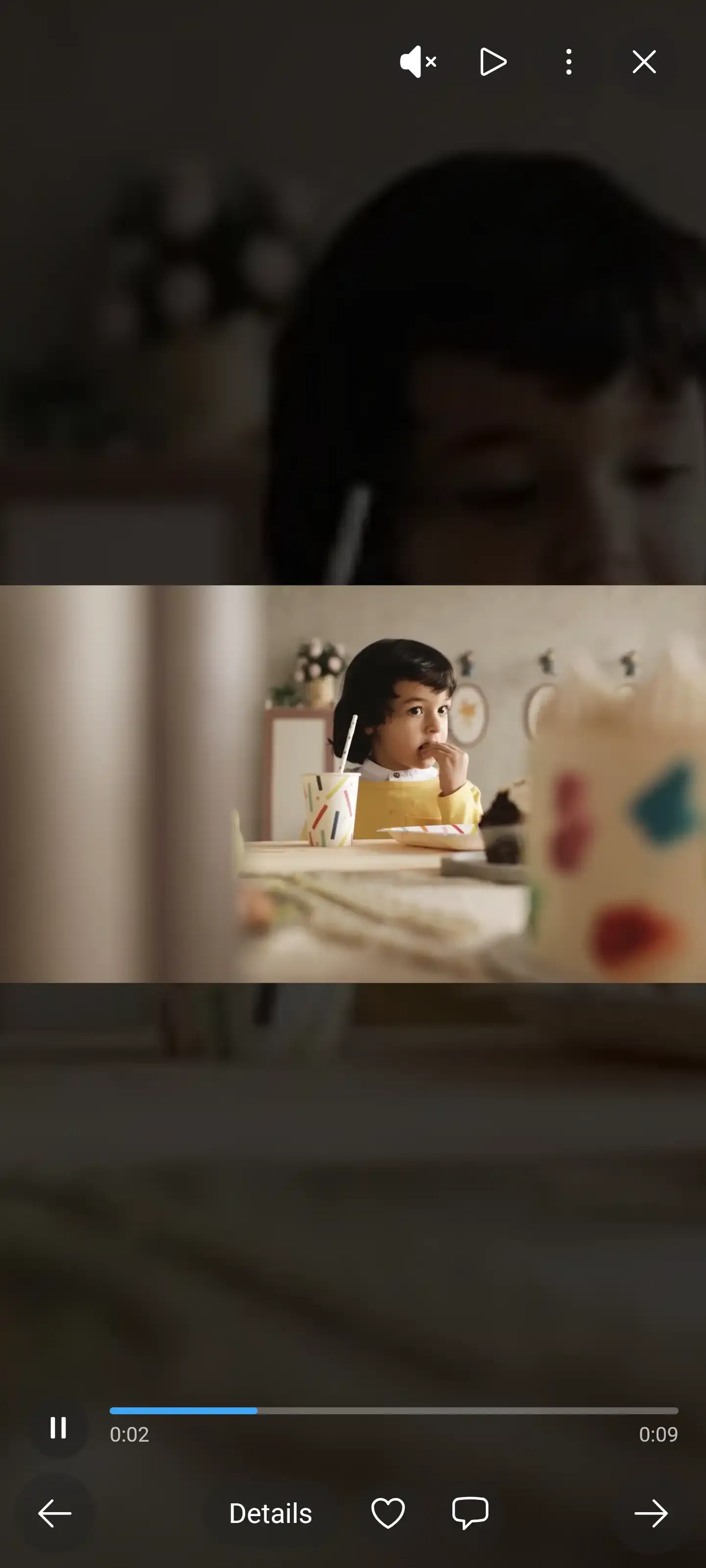
1.Pick a video, upload, and the clip shows up as a tile with a play button.
Funny enough, the biggest hurdle often isn't technical at all. Many guests simply don't know videos are welcome. One line on the QR sign ("Photos and videos welcome, short clips upload fastest") fixes that.
Now the honest part. Video is not included in the free plan, it starts with the paid plans. The entry plan Plus covers up to 25 videos per event, and from Premium upward videos are unlimited. At a 30-person birthday that cap rarely matters. At a wedding where the dance floor runs until 2 AM, it can. The video feature page has the details and the pricing page shows the current plans.
Put QR codes where the emotional moments happen, not just on the tables: next to the speech microphone, at the edge of the dance floor, by the dessert table. People film in those spots, and a code within reach catches the impulse before it fades. Our guide to upload reminders and deadlines covers what to do for the guests who forget anyway.
What Makes People Actually Hit Record
Getting guests to upload clips they've already shot is one thing. Getting them to film in the first place takes a nudge.
That nudge is what photo challenges are for. Most people think of them as a photo thing: "Selfie with the bride", "Catch the best dance move". But a challenge can just as well be answered with a short clip, as long as video uploads are switched on for the event. Imagine "Record a 15-second message for the couple" or "Film someone attempting the limbo". Prompts like these give guests permission to film. That matters more than you'd think, because plenty of people feel awkward holding up a phone at someone else's party. A challenge turns it from intrusive into joining in.
Challenges can also carry an example photo. Photo roulette, where guests get a random example to recreate, is a good fit: when the example is a ridiculous pose or a movie scene, a lot of people film the attempt, failed tries and the laughter around them included. Our 50 photo challenge ideas are easy to adapt for video, and this guide to challenges guests actually finish helps with the setup. One catch: creating challenges needs Premium or higher, the same plan that unlocks the other gamification features like points and the leaderboard.
See it in action
Every guest photo in one album – no app.
Videos on the Big Screen
This is where collecting video pays off while the party is still going. A live photo wall cycling through guest uploads already pulls people in. Add clips and the room reacts differently: a shaky ten-second clip of grandma owning the dance floor gets a cheer that a still rarely does. Whoever filmed it is the hero for a minute, and the next few guests start filming too.
1.Guest uploads run on the big screen while the party is still going.
A few things are good to know before the night. Videos play on the wall in slideshow mode, while the collage mode shows photos only (more on that choice in slideshow vs. collage). You decide how many seconds a clip runs, whether shorter clips loop until then, and whether they play with sound. Sound is off by default, which is usually right during dinner and speeches. Some browsers only allow audio after someone has clicked or tapped the page, and the M key toggles the wall's sound. The photo wall comes with every paid plan from Plus and needs nothing more than a browser on a laptop or smart TV connected to a screen.
Planning a company event? Whether clips can run on the wall is one of the questions worth asking any provider, and it's part of our comparison of event photo apps for corporate events.
Short Clips Win
Not all guest videos are equal. A 15-second clip of the first dance from a decent angle? Gold. A four-minute pan across the whole venue with a thumb in the corner? Less so.
You can't control what guests film, and you shouldn't try. Two things still help:
- Ask for short clips. Instead of "Record a video", write "Record a 10 to 15 second clip of ...". A time frame helps. Short clips get watched again, long ones get skipped.
- Use moderation. With content moderation, uploads go into a queue first and only reach the gallery and the wall once someone approves them. A trusted friend can handle it from their phone, one tap to approve, one to reject. Moderation needs Premium. On Deluxe an AI filter also checks uploads, videos included, for explicit content.
Say you're running a team event with 60 people. Without moderation, someone uploads the entire keynote. With it, the wall keeps showing the good stuff: the team cracking up during a challenge, the CEO losing at karaoke, the group dance nobody planned. Our guide on moderating guest photos at a public event goes deeper.
After the Event: What to Do With All Those Clips
Collecting is step one. The value shows up when you sit down and actually watch them.
In the download area you save single files or everything as a ZIP, in original quality. Downloads come with every paid plan. For video this matters: the web version is fine for watching in the browser, but for editing you want the original with all its detail. Large galleries download in parts, with size and remaining time shown, so a folder full of clips doesn't stall halfway. And keep a copy of your own. The gallery stays online for the storage period of your plan (12 months on Premium, for example), not forever, so archiving your event photos applies to clips just as much.
Plenty of couples turn guest clips into a highlight reel. Our guide on turning event photos and videos into a montage walks through it. Short version: download the originals, pick 20 to 30 of the best clips and hand them to a friend with editing software or to a freelance editor. A three-minute montage of guest footage feels different from a professionally shot film, messier and louder. Both have their place, and if a videographer is booked, the guest clips fill in the angles they couldn't cover.
One honest trade-off: Photogala runs in the browser, so video uploads depend on the venue's connection. On weak Wi-Fi a long clip takes a while. If reception at your venue is patchy, say so on the sign: "Short clips upload fastest". And iPhone Live Photos arrive as still images when uploaded through the browser, so anyone who wants to share movement should record a proper video.
Video at Corporate Events
Weddings get most of the attention, but corporate events get plenty out of guest clips too. Reactions to an announcement, the team-building moment, a quick look behind the scenes: material for the internal newsletter, the recap email or next year's invitation. Before anything goes outside the company, make sure the people in it are fine with that.
The purpose is different, though. At a wedding, clips are keepsakes. At a company event they also show what happened on the day, which helps when someone asks whether it was worth it. If the budget is tight, our comparison of free guest photo apps shows what free tools deliver and where video tends to be missing.
Collect Guest Videos in 4 Steps
Create your gallery
Start free, then switch to a paid plan once you want video: Plus for up to 25 clips, unlimited from Premium.
Check that video uploads are on
Video uploads are switched on by default for new events. The switch sits in the event settings.
Share the QR code everywhere
Table cards, the bar, the dance floor, next to the microphone. Mention on the sign that videos are welcome.
Watch the clips arrive
Uploads appear in the gallery, and with the photo wall in slideshow mode they play on the big screen.
That's the whole setup. No separate video tool, no app, no "please email me your videos" message three days later. One gallery, one QR code, photos and clips together. For weddings that means one less thing to coordinate on the day.
For birthday parties and smaller get-togethers it works the same way, just on a smaller scale. Even eight or ten short clips from a 30-person birthday add something a photo album can't: everyone singing off-key, the real surprise on the birthday person's face, kids running through the frame.
Remember the toast from the beginning? Now imagine having the video. Not a photo of a man at a microphone, but the moment itself: the pause, the crack in his voice, the laugh that saved it. That's the difference between collecting photos and collecting the whole evening.
All of this comes with your own event.
Setting it up takes five minutes. You can build and view everything before you decide.
Starting from €39 one-timeOne-time payment — No subscription
- No App Required
- Setup in 5 Minutes
- 30-Day Money Back
“Excellent service and great pictures! Photogala fully met our expectations at the event. The value for money is unbeatable. Absolutely recommended! The seating plan saved us a lot of hassle!”
Written by

I believe event photos should be more than static galleries. They should be live, playful, and unforgettable.
Categories
Related Posts

Kids' Birthday Party Photo Sharing: One Gallery Every Parent Will Love
Stop chasing parents for photos after your kid's party. One QR code, one shared gallery, zero hassle.

Company Retreat Photo Sharing: How to Actually Keep the Memories
Most offsite photos die on individual phones. Here's how to collect, share, and actually use every photo from your next company retreat.

Neighborhood Block Party Photo Sharing: How to Turn 40 Strangers Into One Shared Album
Block parties create great photos — and zero way to share them. Here's how a QR code gallery turns your street into a connected community.