Employee Appreciation Event Photo Ideas That Boost Morale


Picture this: your company just wrapped up its biggest quarter. Leadership wants to do something nice for the team. Someone books a conference room, orders catering platters, and sends a calendar invite titled "Team Appreciation Lunch." Forty people show up, eat lukewarm pasta, make small talk for 22 minutes, and go back to their desks. The only photo evidence is a blurry group shot someone took on their phone and posted to Slack. Nobody comments on it.
That's the standard playbook. And it doesn't work. According to SHRM's 2026 Global Workplace Culture Report, organizational culture directly impacts retention, performance, and long-term success. Gallup's research puts the number at just 23% of employees worldwide feeling genuinely engaged. The gap between "we appreciate you" and employees actually feeling appreciated is enormous.
Photos bridge that gap in ways speeches and gift cards can't. Not corporate headshots or stiff team portraits. Real, candid, sometimes ridiculous photos that capture who your team actually is when they're not performing for a camera. The kind of photos people screenshot and set as their lock screen.
Here's how to build an appreciation event around photos that people will actually remember.
Why Photos Hit Different at Appreciation Events
A thank-you email disappears into an inbox within hours. A gift card gets spent and forgotten. But a photo of your team laughing mid-competition, or a candid shot of someone receiving a surprise award, sticks. It becomes a shared reference point. Inside jokes form around it. People bring it up months later.
The psychology is straightforward: photos create social proof of belonging. When employees see themselves reflected in company moments, it signals "I'm part of this." That signal is more powerful than any CEO speech about company values. As HRSimple's research on appreciation events notes, meaningful experiences that make teams feel valued drive measurable improvements in morale, productivity, and retention.
The trick is making photo-taking effortless. If people have to download an app, create an account, or figure out how to share files, they won't bother. The sweet spot is a system where someone scans a code with their phone camera and starts uploading within seconds. No friction, no excuses.
The QR Code Gallery: Your Event's Backbone
Every idea below works better when there's a central place for photos to land. Not a WhatsApp group that gets muted by Thursday. Not a shared Google Drive folder that three people have access to. A dedicated gallery that everyone can upload to, browse, and relive afterward.
With a QR code photo gallery, you print a code on table cards, tape it near the entrance, or project it on a screen. Guests scan it, type a name, and start uploading. No app install. No login. Takes about 15 seconds total. That matters because corporate events have a narrow window of energy. If the barrier is too high, you lose people.
If you've seen how this works for sharing corporate event photos with staff, you know the logistics are minimal. Set it up in under five minutes, share the QR code, and let the team do the rest. While you're at it, Photogala's free guest list manager can help you plan headcount before the event.
Guest list for your event
Groups, meal choices, plus-ones and replies in one place — guests can add themselves.

1.Guests upload directly from their phone browser. No app needed.
Six Photo Ideas That Actually Boost Morale
1. The Photo Scavenger Hunt
Divide the team into groups of 3-4. Give each group a list of 8-12 photo challenges to complete within 60-90 minutes. Think: "Take a photo recreating your team's Slack profile pictures," "Find something in the office older than the company," "Capture a coworker doing their signature move."
Specificity is what makes or breaks these. Vague challenges ("take a funny photo") produce awkward results. Specific ones ("recreate a famous movie poster using only office supplies") produce genuinely creative shots that people will talk about for weeks. Photogala's photo challenge system lets you set these up with example preview photos, so teams know exactly what you're going for. You can even do a photo roulette format where each team gets a random reference image to mimic.
For tips on configuring challenges people actually complete, keep tasks achievable but creative. The best challenges make people laugh while doing them, not just when reviewing the results.
2. The "Wall of Fame" Live Photo Display
Set up a TV or projector near the main gathering area. Connect it to a live photo wall that cycles through uploaded photos in real time. Every time someone uploads a new photo, it appears on the big screen within seconds.
Imagine a team of 30 at a summer barbecue. Someone uploads a photo of the CEO losing at cornhole. It hits the screen. The whole patio notices. Laughter. Three more people pull out their phones to upload their own angles. By the end of the afternoon, you have 90 photos from 18 different contributors, and the screen became the centerpiece of the event.
Placement matters. Put the screen where people naturally gather (near food, near the bar, in the main room). A screen hidden in a side hallway will get ignored. Our guide on turning guest photos into a live collage covers display modes and collage styles in detail.
Pro tip: Use the collage display mode instead of a simple slideshow. Seeing multiple photos on screen at once creates a mosaic effect that feels more dynamic and encourages people to upload more to "get on the wall."
3. Awards Ceremony With Photo Evidence
Skip the generic "Employee of the Quarter" plaque. Create silly, specific awards: "Most Likely to Reply-All," "Best Desk Plant Parent," "Person Who Actually Reads the Newsletter." Then pair each award with a photo challenge: the winner has to pose with their trophy (a rubber duck, a tiny crown, whatever fits your culture) and upload the photo to the gallery.
You can take this further with Photogala's achievements and badges system. Create custom badges that unlock when someone completes certain photo tasks. For corporate events specifically, you can tie these to real-world rewards, like an extra coffee voucher or first pick of the new office snacks.
See it in action
Every guest photo in one album – no app.
4. The "Then and Now" Photo Booth Corner
Collect old team photos beforehand. First day at the company, old team events, embarrassing holiday party shots (with permission). Print them out and pin them to a board next to a simple backdrop. The challenge: recreate the old photo as closely as possible and upload both versions to the gallery.
This one works especially well for anniversary celebrations or teams that have been together a while. The comparisons are always funnier than you'd expect. And it gives newer team members a window into company history that no onboarding deck can match.
5. Department vs. Department Photo Battle
Turn the appreciation event into a friendly competition. Marketing vs. Engineering. Sales vs. Operations. Each department gets the same set of photo challenges. A leaderboard tracks uploads, completed challenges, and likes in real time.
Say your finance team has 8 people who normally wouldn't pick up their phones at an event. But when they see the engineering team pulling ahead on the leaderboard, suddenly the CFO is posing with a calculator and uploading at double speed. Turns out, nothing motivates like a little rivalry. Photogala's points system lets you customize point values for different actions, so you can weight creativity (task completions) higher than volume (raw upload count).
6. The Candid Photo Gallery That Lives On
This is the simplest approach, and sometimes the most effective. No structure, no challenges, no competition. Just a shared QR code gallery that stays active for the entire event. Tell people once: "Scan this, upload anything you want." Then let it happen organically.
The gallery becomes a living document of the event. After it's over, send the link to the whole company. People who couldn't attend see what they missed. People who attended relive it. The archive and download features let anyone grab individual photos or a bulk ZIP of the entire collection, perfect for the internal newsletter or the company's year-in-review deck. It works just as well if you need to share event photos across the organization.
If you want to upload event photos for clients or leadership to download afterward, the same gallery handles that too. No separate file-sharing setup needed.
Making It Look Professional Without a Photographer
Here's a concern that comes up: "Won't the photos look terrible if random employees take them?" Short answer: some will. That's fine. The blurry, off-center shots of people mid-laugh are often the ones people love most.
But you can nudge quality upward without hiring a professional. Our guide on making corporate photos look professional without a photographer covers the basics: good lighting near photo spots, simple backdrops (a branded banner, a flower wall, even a clean brick wall), and a few props that match your company's personality. If your event has a QR code station at a restaurant or bar venue, the venue itself often provides a great backdrop.
For branding, Photogala lets you customize the gallery with your company logo, colors, and fonts. Small detail, but it makes the difference between "random photo dump" and "official company event gallery."
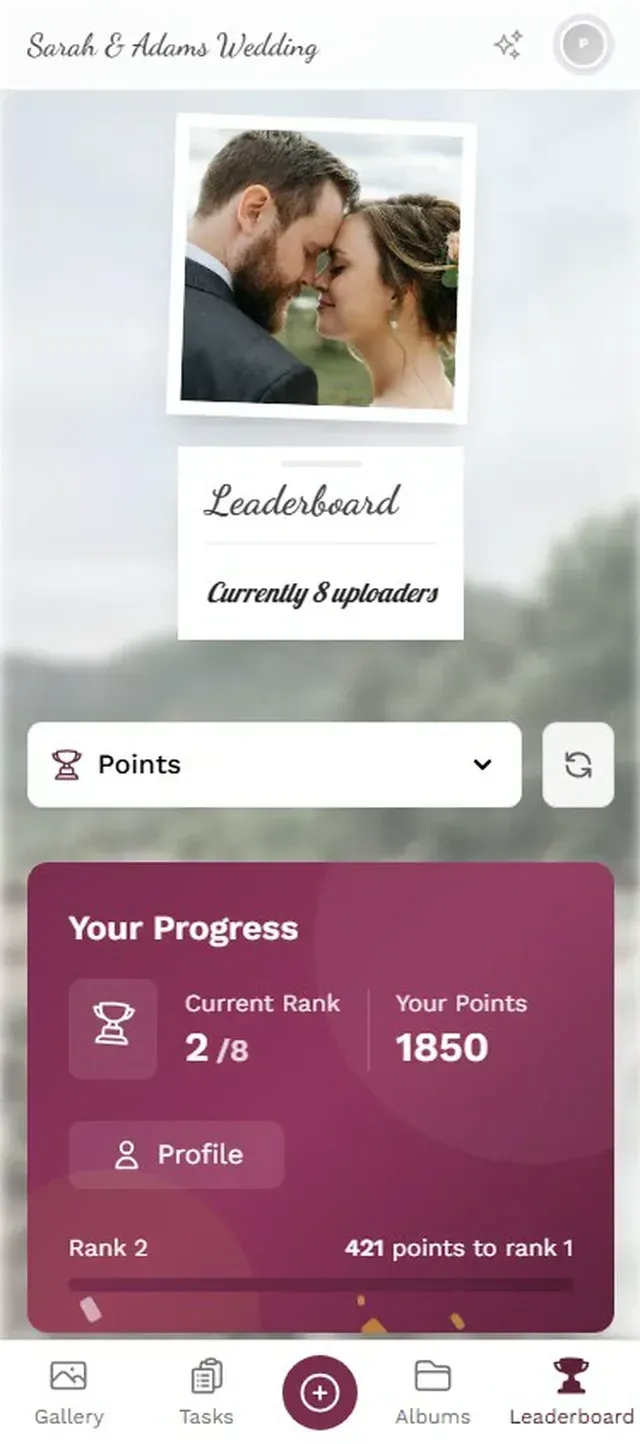
1.Match the gallery to your own branding.
The Part Nobody Plans For: After the Event
Most appreciation events end when the catering gets cleared. The photos sit in a forgotten channel or get buried in someone's camera roll. That's a missed opportunity.
A shared gallery that stays accessible turns a one-day event into a lasting touchpoint. Share the gallery link in your next all-hands. Include the best photos in the quarterly newsletter. Use them in future recruiting materials (with permission). Every time someone sees those photos again, it reinforces the feeling of being part of a team that actually celebrates together.
If you want to take it further, show likes and achievements on a live photo wall during the event itself. Seeing their photos get likes in real time gives people a small dopamine hit that keeps them uploading. You can even create a digital guestbook where team members leave messages alongside their photos.
One Honest Trade-Off
Photogala is browser-based. There's no native app to install, which is the entire point for frictionless event uploads. But it also means the upload experience depends on the venue's Wi-Fi. If you're doing this at an offsite location with spotty connectivity, test the Wi-Fi beforehand. A simple workaround: ask IT to set up a dedicated network for the event, or let people upload on mobile data. The photos are typically 2-5 MB each, so even an average LTE connection handles it fine.
All of this comes with your own event.
Setting it up takes five minutes. You can build and view everything before you decide.
Starting from €39 one-timeOne-time payment — No subscription
- No App Required
- Setup in 5 Minutes
- 30-Day Money Back
“We used the software at my mum's birthday party. It went down really well 😊”
Written by

I believe event photos should be more than static galleries. They should be live, playful, and unforgettable.
Categories
Related Posts

Bridal Shower Photo Sharing: Collect Every Sweet Moment in One Gallery
Bridal shower photos end up scattered across 15 phones. Here's how to get them all into one gallery before the mimosas wear off.

Maternity Photo Sharing: How to Keep Every Announcement, Bump Shot, and Memory in One Place
Pregnancy announcements land on 4 different apps. Maternity photos get lost in group chats. Here's how to keep every photo in one shared gallery your whole family can access.

Sales Kickoff Photo Sharing: How to Turn a Mandatory Meeting Into a Team Memory
Sales kickoffs are expensive. The photos from them usually disappear into 14 different camera rolls. Here's how to fix that.